分支保护
Project -> Settings -> Repository -> Protected Branches
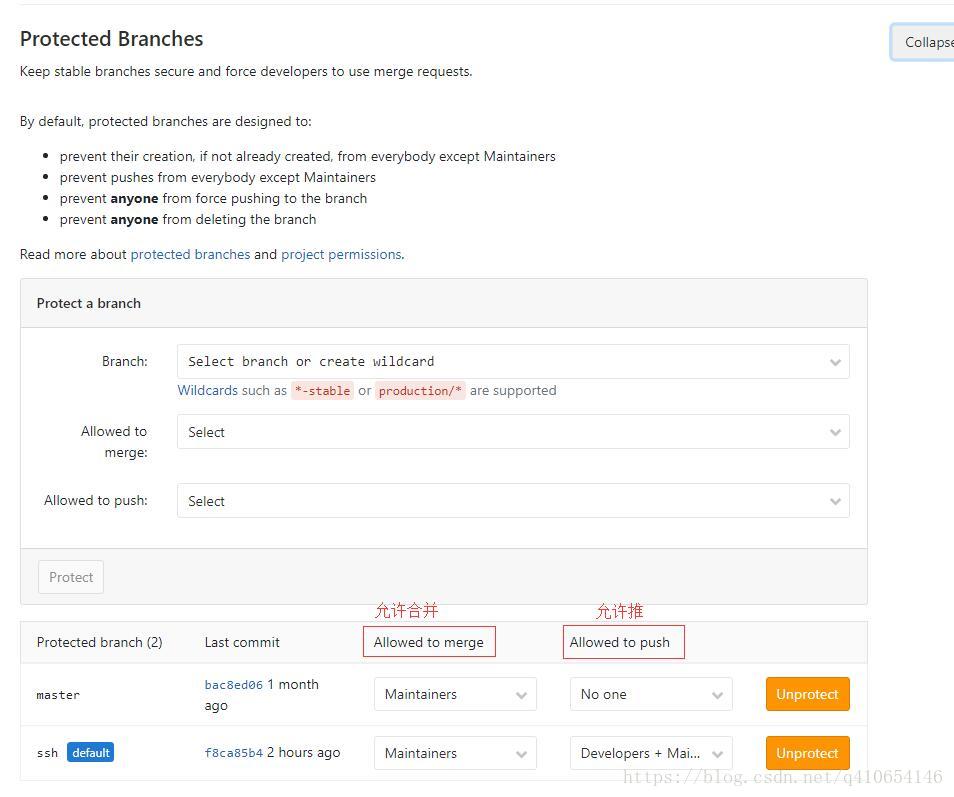
人员角色
Guest (客人)、Reporter(记者)、Developer(开发者)、Maintainers(维护者)、Owner(所有者)
角色权限:https://docs.gitlab.com/ce/user/permissions.html
Project members permissions
The following table depicts the various user permission levels in a project.
| Action | Guest | Reporter | Developer | Maintainer | Owner |
|---|---|---|---|---|---|
| Create new issue | ✓ 1 | ✓ | ✓ | ✓ | ✓ |
| Create confidential issue | ✓ 1 | ✓ | ✓ | ✓ | ✓ |
| View confidential issues | (✓) 2 | ✓ | ✓ | ✓ | ✓ |
| Leave comments | ✓ 1 | ✓ | ✓ | ✓ | ✓ |
| Lock issue discussions | ✓ | ✓ | ✓ | ✓ | |
| Lock merge request discussions | ✓ | ✓ | ✓ | ||
| See a list of jobs | ✓ 3 | ✓ | ✓ | ✓ | ✓ |
| See a job log | ✓ 3 | ✓ | ✓ | ✓ | ✓ |
| Download and browse job artifacts | ✓ 3 | ✓ | ✓ | ✓ | ✓ |
| View wiki pages | ✓ 1 | ✓ | ✓ | ✓ | |
| Pull project code 1 | ✓ | ✓ | ✓ | ✓ | |
| Download project 1 | ✓ | ✓ | ✓ | ✓ | |
| Assign issues | ✓ | ✓ | ✓ | ✓ | |
| Assign merge requests | ✓ | ✓ | ✓ | ||
| Label issues and merge requests | ✓ | ✓ | ✓ | ✓ | |
| Create code snippets | ✓ | ✓ | ✓ | ✓ | |
| Manage issue tracker | ✓ | ✓ | ✓ | ✓ | |
| Manage labels | ✓ | ✓ | ✓ | ✓ | |
| See a commit status | ✓ | ✓ | ✓ | ✓ | |
| See a container registry | ✓ | ✓ | ✓ | ✓ | |
| See environments | ✓ | ✓ | ✓ | ✓ | |
| See a list of merge requests | ✓ | ✓ | ✓ | ✓ | |
| Manage related issues | ✓ | ✓ | ✓ | ✓ | |
| Lock issue discussions | ✓ | ✓ | ✓ | ✓ | |
| Lock merge request discussions | ✓ | ✓ | ✓ | ||
| Create new environments | ✓ | ✓ | ✓ | ||
| Stop environments | ✓ | ✓ | ✓ | ||
| Manage/Accept merge requests | ✓ | ✓ | ✓ | ||
| Create new merge request | ✓ | ✓ | ✓ | ||
| Create new branches | ✓ | ✓ | ✓ | ||
| Push to non-protected branches | ✓ | ✓ | ✓ | ||
| Force push to non-protected branches | ✓ | ✓ | ✓ | ||
| Remove non-protected branches | ✓ | ✓ | ✓ | ||
| Add tags | ✓ | ✓ | ✓ | ||
| Write a wiki | ✓ | ✓ | ✓ | ||
| Cancel and retry jobs | ✓ | ✓ | ✓ | ||
| Create or update commit status | ✓ | ✓ | ✓ | ||
| Update a container registry | ✓ | ✓ | ✓ | ||
| Remove a container registry image | ✓ | ✓ | ✓ | ||
| Create/edit/delete project milestones | ✓ | ✓ | ✓ | ||
| Use environment terminals | ✓ | ✓ | |||
| Add new team members | ✓ | ✓ | |||
| Push to protected branches | ✓ | ✓ | |||
| Enable/disable branch protection | ✓ | ✓ | |||
| Turn on/off protected branch push for devs | ✓ | ✓ | |||
| Enable/disable tag protections | ✓ | ✓ | |||
| Rewrite/remove Git tags | ✓ | ✓ | |||
| Edit project | ✓ | ✓ | |||
| Add deploy keys to project | ✓ | ✓ | |||
| Configure project hooks | ✓ | ✓ | |||
| Manage Runners | ✓ | ✓ | |||
| Manage job triggers | ✓ | ✓ | |||
| Manage variables | ✓ | ✓ | |||
| Manage GitLab Pages | ✓ | ✓ | |||
| Manage GitLab Pages domains and certificates | ✓ | ✓ | |||
| Remove GitLab Pages | ✓ | ||||
| Manage clusters | ✓ | ✓ | |||
| Edit comments (posted by any user) | ✓ | ✓ | |||
| Switch visibility level | ✓ | ||||
| Transfer project to another namespace | ✓ | ||||
| Remove project | ✓ | ||||
| Delete issues | ✓ | ||||
| Remove pages | ✓ | ||||
| Force push to protected branches 4 | |||||
| Remove protected branches 4 | |||||
| View project Audit Events | ✓ | ✓ |
Group members permissions
Any user can remove themselves from a group, unless they are the last Owner of the group. The following table depicts the various user permission levels in a group.
| Action | Guest | Reporter | Developer | Maintainer | Owner |
|---|---|---|---|---|---|
| Browse group | ✓ | ✓ | ✓ | ✓ | ✓ |
| Edit group | ✓ | ||||
| Create subgroup | ✓ | ||||
| Create project in group | ✓ | ✓ | |||
| Manage group members | ✓ | ||||
| Remove group | ✓ | ||||
| Manage group labels | ✓ | ✓ | ✓ | ✓ | |
| Create/edit/delete group milestones | ✓ | ✓ | ✓ | ||
| View private group epic | ✓ | ✓ | ✓ | ✓ | |
| View internal group epic | ✓ | ✓ | ✓ | ✓ | ✓ |
| View public group epic | ✓ | ✓ | ✓ | ✓ | ✓ |
| Create/edit group epic | ✓ | ✓ | ✓ | ✓ | |
| Delete group epic | ✓ | ||||
| View group Audit Events | ✓ |
- 在公共和内部项目中,所有用户都能够执行此操作
- 访客用户只能查看他们自己创建的机密问题
- 如果公共管线在启用项目设置> CI / CD
- 不允许访客,记者,开发者,维护者或所有者
- 只有当作业由用户触发
- 只有当用户不是外部的时候
- 仅当用户是项目的成员
版权声明:本文为q410654146原创文章,遵循CC 4.0 BY-SA版权协议,转载请附上原文出处链接和本声明。