在项目中有时需要点击某个地方的时候让一个文本框获取焦点以弹起键盘~~比如前端经常使用的input.focus(),但是在flutter中没有.focus()这个方法~~不过我们可以通过FocusScope.of(context).requestFocus()来实现这一操作
先看一下实现场景,点击某一条留言然后让文本框获取焦点弹出键盘:
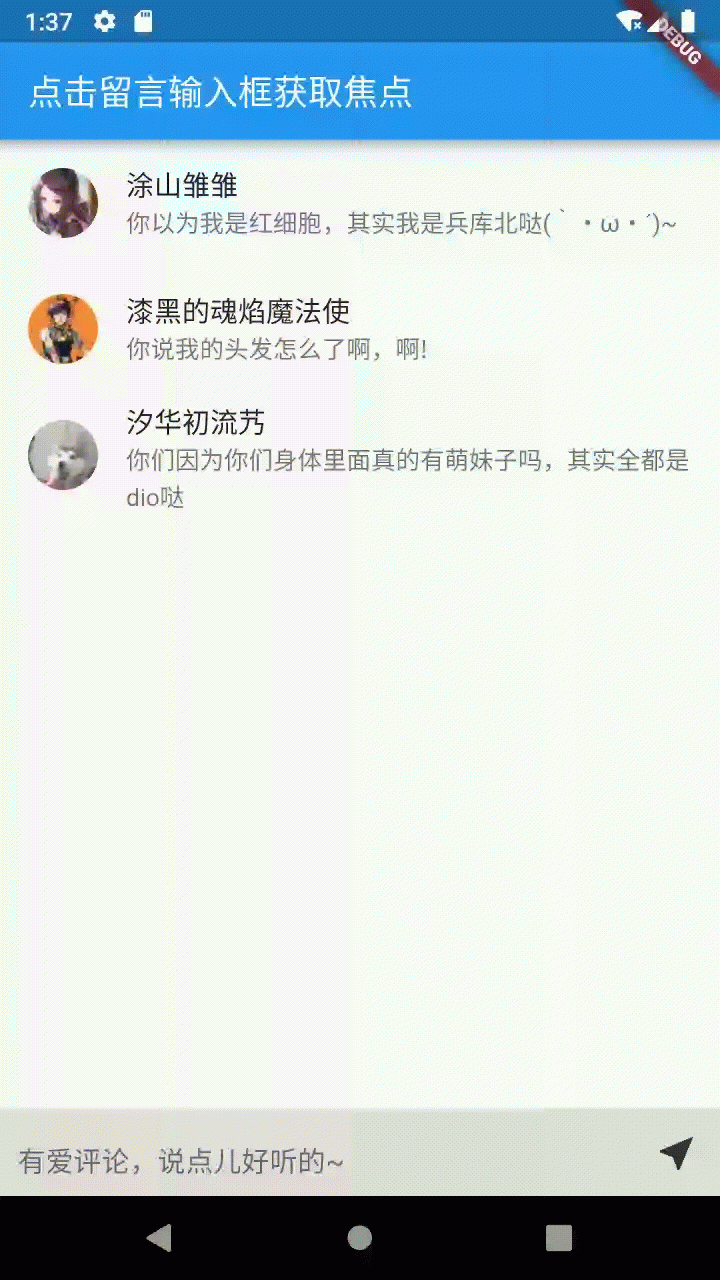
要使用FocusScope.of(context).requestFocus()需要先定义一个FocusNode
FocusNode _commentFocus = FocusNode();
TextField(
focusNode: _commentFocus,
),
获取焦点
当点击时用FocusScope.of(context).requestFocus()获取焦点
FocusScope.of(context).requestFocus(_commentFocus); // 获取焦点
失去焦点
当发送留言之后可以通过unfocus()让其失去焦点
_commentFocus.unfocus(); // 失去焦点
最后附上完整代码
import 'package:flutter/material.dart';
class CommentTest extends StatefulWidget {
@override
_CommentTestState createState() => _CommentTestState();
}
class _CommentTestState extends State {
TextEditingController _textEditingController = TextEditingController();
String _currentTipsText = "有爱评论,说点儿好听的~";
FocusNode _commentFocus = FocusNode();
List _commentList = [
{
'name': '涂山雏雏',
'headerImg': 'http://i2.hdslb.com/bfs/face/cab3e9ec886ff98bc7ac6cb2dca194051895dfba.jpg@52w_52h.webp',
'content': '你以为我是红细胞,其实我是兵库北哒(`・ω・´)~'
},
{
'name': '漆黑的魂焰魔法使',
'headerImg': 'http://i0.hdslb.com/bfs/face/6edd973203eb1ec2b576a3bc61ee555e3757b674.jpg@52w_52h.webp',
'content': '你说我的头发怎么了啊,啊!'
},
{
'name': '汐华初流艿',
'headerImg': 'http://i0.hdslb.com/bfs/face/ecf4c932d4f09ffdcd769b423764210488d03209.jpg@52w_52h.webp',
'content': '你们因为你们身体里面真的有萌妹子吗,其实全都是dio哒'
}
];
@override
Widget build(BuildContext context) {
return Scaffold(
appBar: AppBar(
title: Text('点击留言输入框获取焦点',style: TextStyle(color: Colors.white,fontSize: 20),),
),
body: Stack(
children: [
ListView.builder(
itemCount: _commentList.length,
itemBuilder: (context,index){
return ListTile(
leading: ClipRRect(borderRadius: BorderRadius.circular(20),child: Image.network(_commentList[index]['headerImg'],width: 40,height: 40,),),
title: Text(_commentList[index]['name']),
subtitle: Text(_commentList[index]['content']),
onTap: (){
_switchReply(_commentList[index]['name']);
},
);
},
),
Positioned(
left: 0,
bottom: 0,
child: Container(
width: MediaQuery.of(context).size.width,
color: Color.fromRGBO(222, 222, 222, 1),
height: 50,
child: Row(
mainAxisAlignment: MainAxisAlignment.spaceBetween,
crossAxisAlignment: CrossAxisAlignment.center,
children: [
Expanded(
child: TextField(
controller: _textEditingController,
focusNode: _commentFocus,
decoration: InputDecoration(
hintText: _currentTipsText,
contentPadding: EdgeInsets.only(left: 10,top: 17,bottom: 17),
),
),
),
InkWell(
child: Container(
width: 50,
height: 50,
alignment: Alignment.center,
child: Icon(Icons.near_me,size: 25.5,color: Color.fromRGBO(50, 50, 50, 1)),
),
onTap: (){
_sendMessage();
},
),
],
),
),
),
],
)
);
}
// 发送回复评论
void _sendMessage() {
_commentList.add({
'name': '爱吃汉堡包的天残',
'headerImg': 'http://i1.hdslb.com/bfs/face/1cb09a8cfec19bd06fbbeba5b978c1ee52a62d3f.jpg@52w_52h.webp',
'content': _textEditingController.text
});
_currentTipsText = "有爱评论,说点儿好听的~";
_textEditingController.text = '';
_commentFocus.unfocus(); // 失去焦点
}
// 获取焦点拉起键盘
void _switchReply(nickname) {
setState(() {
_currentTipsText = '回复 '+nickname+':';
});
FocusScope.of(context).requestFocus(_commentFocus); // 获取焦点
}
}