Android简单登录界面
布局界面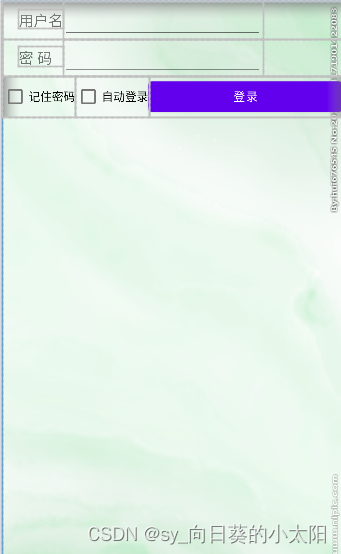
<LinearLayout xmlns:android="http://schemas.android.com/apk/res/android"
    xmlns:tools="http://schemas.android.com/tools"
    android:layout_width="match_parent"
    android:layout_height="match_parent"
    android:background="@drawable/img"
    android:orientation="vertical" >
    <TableLayout
        android:layout_width="match_parent"
        android:layout_height="wrap_content" >
        <TableRow>
            <TextView
                android:layout_width="wrap_content"
                android:layout_height="wrap_content"
                android:layout_marginLeft="20dp"
                android:text="@string/name"
                android:textSize="18sp" />
            <EditText
                android:id="@+id/name"
                android:layout_width="240dp"
                android:layout_height="wrap_content" />
        </TableRow>

        <TableRow>

            <TextView
                android:layout_width="wrap_content"
                android:layout_height="wrap_content"
                android:text="@string/psd"
                android:layout_marginLeft="20dp"
                android:textSize="18sp" />

            <EditText
                android:id="@+id/psd"
                android:layout_height="wrap_content"
                android:inputType="textPassword" />
        </TableRow>
    </TableLayout>

    <LinearLayout
        android:layout_width="match_parent"
        android:layout_height="wrap_content"
        android:orientation="horizontal" >
        <CheckBox
            android:id="@+id/rememberPsd"
            android:layout_width="wrap_content"
            android:layout_height="wrap_content"
            android:text="@string/remember_psd" />
        <CheckBox
            android:id="@+id/autoLogin"
            android:layout_width="wrap_content"
            android:layout_height="wrap_content"
            android:text="@string/auto_login" />
        <Button
            android:id="@+id/login"
            android:layout_width="match_parent"
            android:layout_height="wrap_content"
            android:text="@string/login" />
    </LinearLayout>

</LinearLayout>
版权声明:本文为qq_54147492原创文章,遵循CC 4.0 BY-SA版权协议,转载请附上原文出处链接和本声明。