文章目录
往期
- Netty入门(一) — Reactor线程模型,Netty的线程模型,快速入门Demo
- Netty入门(二)— 任务队列,异步模型剖析,Http服务Demo
- Netty入门(三) — Netty核心组件,Netty群聊系统
七、Google Protobuf
7.1 编码和解码简介
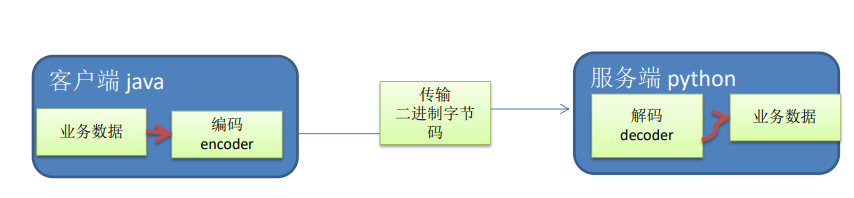
编写网络应用程序时,因为数据在网络中传输的都是二进制字节码数据,在发送数据时就需要编码,接收数据时就需要解码
codec(编解码器) 的组成部分有两个:decoder(解码器) 和 encoder(编码器)
7.2 Netty本身的编解码机制和问题分析
Netty自身提供了一些编解码器
- Netty提供的编码器:
- StringEncoder,对字符串数据进行编码
- ObjectEncoder,对 Java 对象进行编码
- 。。。
- Netty提供的解码器:
- StringDecoder, 对字符串数据进行解码
- ObjectDecoder,对 Java 对象进行解码
问题:
Netty本身带的ObjectDecoder 和 ObjectEncoder 虽然可以用来实现 POJO 对象或各种业务对象的编码和解码
但是底层使用的是Java序列化技术
- Java序列化本身效率不高,
- 且无法跨语言,
- 序列化后体积太大,是二进制码的的5倍多
- 序列化性能太低
所以引出新的解决方案:Google Protobuf
7.3 Protobuf基本介绍
Protobuf 是 Google 发布的开源项目,全称 Google Protocol Buffers,是一种轻便高效的结构化数据存储格式,可以用于结构化数据串行化,或者说序列化。它很适合做数据存储或 RPC[远程过程调用 remote procedure call ] 数据交换格式
目前很多公司在从 http+json 向 rpc+protobuf 转型
参考文档: https://developers.google.com/protocol-buffers/docs/proto
优点:
支持跨平台、跨语言,即客户端服务器端可以使用不同语言编写
高性能,高可靠
使用 protobuf 编译器能自动生成代码
通过 protoc.exe 编译器
7.4 Protobuf发送单对象
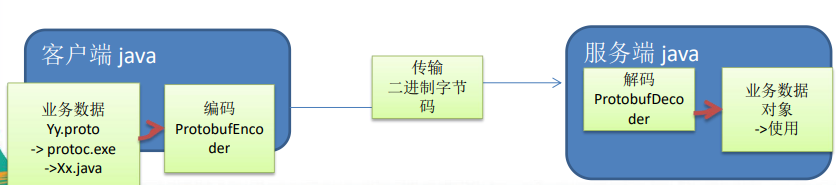
客户端可以发送一个Student PoJo对象到服务器 (通过 Protobuf 编码)
服务端能接收Student PoJo对象,并显示信息(通过 Protobuf 解码)
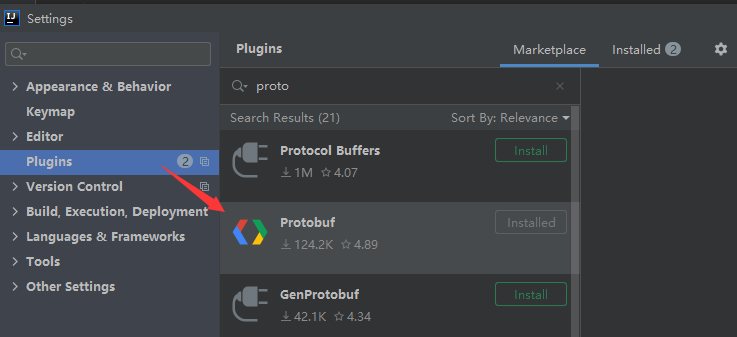
1、idea安装如下插件
2、新建一个Student.proto文件
syntax = "proto3";  //协议版本
option java_outer_classname = "StudentPOJO";    //生成的外部类名,同时也是.java的文件名
//protobuf 使用message 管理数据
message Student{    //在StudentPOJO这个外部类里面生成一个 内部类Student,是真正发送的pojo对象
    int32 id = 1;   //Student类中有一个属性 id 类型为 int32,对应java里的int。  1 不是指,是属性的序号
    string name = 2;
}
- protobuf 使用message 管理数据
- message 等号后面是属性的编号,不是值
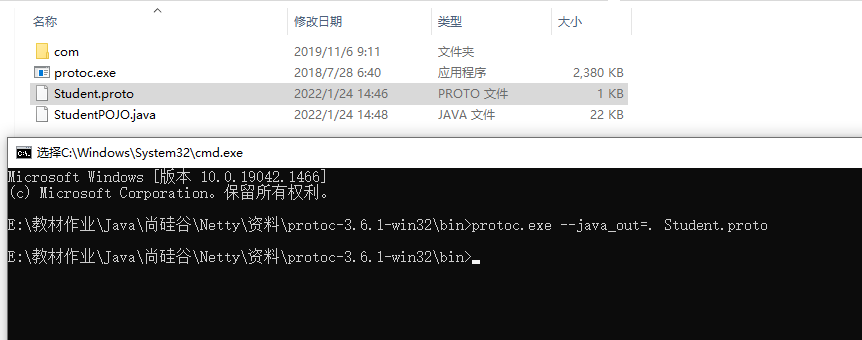
3、使用 protoc.exe 编译。如图:Student.proto ==》StudentPOJO.java
生成java文件的语句:protoc.exe --java_out=. xxx.proto
4、拷贝回项目
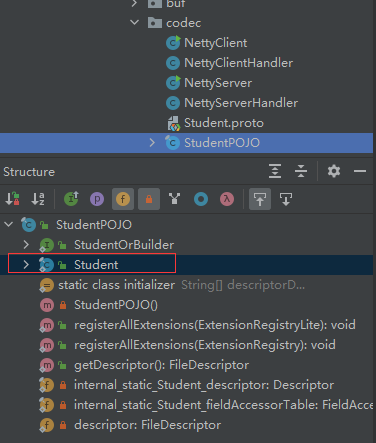
发现StudentPOJO有一个Student内部类
5、编写客户端
NettyClient
public class NettyClient {
    public static void main(String[] args) {

        EventLoopGroup eventExecutors = new NioEventLoopGroup();
        try {
            Bootstrap bootstrap = new Bootstrap();
            bootstrap.group(eventExecutors)     //设置线程组
                    .channel(NioSocketChannel.class)//设置客户端通道实现类
                    .handler(new ChannelInitializer<SocketChannel>() {
                        @Override
                        protected void initChannel(SocketChannel socketChannel) throws Exception {
                            ChannelPipeline pipeline = socketChannel.pipeline();
                            //客户端发送数据,需要加上编码器
                            pipeline.addLast("ProtobufEncoder",new ProtobufEncoder());

                            pipeline.addLast(new NettyClientHandler());
                        }
                    });
            System.out.println("客户端 ok");

            ChannelFuture channelFuture = bootstrap.connect("127.0.0.1", 6666).sync();
            channelFuture.channel().closeFuture().sync();
        } catch (InterruptedException e) {
            e.printStackTrace();
        } finally {
            eventExecutors.shutdownGracefully();
        }
    }
}
注意:ChannelInitializer里要在pipeline里添加编码器(客户端发送)
NettyClientHandler
public class NettyClientHandler extends ChannelInboundHandlerAdapter {

    @Override
    public void channelActive(ChannelHandlerContext ctx) throws Exception {
        //发送一个 Student 对象到服务器
        StudentPOJO.Student student = StudentPOJO.Student.newBuilder().setId(6).setName("豹子头 零冲").build();
        ctx.writeAndFlush(student);
    }

    @Override
    public void exceptionCaught(ChannelHandlerContext ctx, Throwable cause) throws Exception {
        cause.printStackTrace();
        ctx.close();
    }
}
注意:使用StudentPOJO.Student student = StudentPOJO.Student.newBuilder().setId(6).setName("豹子头 零冲").build();获取生成的那个类的实例
6、编写服务器端
NettyServer
public class NettyServer {
    public static void main(String[] args) {

            EventLoopGroup bossGroup = new NioEventLoopGroup(1);
            EventLoopGroup workerGroup = new NioEventLoopGroup();

        try {
            //创建服务器启动对象,用来配置参数
            ServerBootstrap bootstrap = new ServerBootstrap();

            bootstrap.group(bossGroup,workerGroup)
                    .channel(NioServerSocketChannel.class)
                    .option(ChannelOption.SO_BACKLOG,128)   //线程队列得到连接的个数
                    .childOption(ChannelOption.SO_KEEPALIVE,true)   //设置保持活动连接状态
                    .childHandler(new ChannelInitializer<SocketChannel>() {
                        @Override
                        protected void initChannel(SocketChannel socketChannel) throws Exception {
                            ChannelPipeline pipeline = socketChannel.pipeline();
                            //服务器端接收数据,解码
                            pipeline.addLast("ProtobufDecoder",new ProtobufDecoder(StudentPOJO.Student.getDefaultInstance()));
                            pipeline.addLast(new NettyServerHandler());
                        }
                    });

            System.out.println("... 服务器 ok ...");
            ChannelFuture channelFuture = bootstrap.bind(6666).sync();
            channelFuture.channel().closeFuture().sync();

        } catch (InterruptedException e) {
            e.printStackTrace();
        } finally {
            bossGroup.shutdownGracefully();
            workerGroup.shutdownGracefully();
        }

    }
}
pipeline.addLast("ProtobufDecoder",new ProtobufDecoder(StudentPOJO.Student.getDefaultInstance())); 配置解码器,需要和Protobuf生成类类型对应
NettyServerHandler
public class NettyServerHandler extends ChannelInboundHandlerAdapter {


    @Override
    public void channelRead(ChannelHandlerContext ctx, Object msg) throws Exception {
        StudentPOJO.Student student = (StudentPOJO.Student) msg;
        System.out.println("客户端发来:id="+student.getId()+" 姓名="+student.getName());
    }

    @Override
    public void channelReadComplete(ChannelHandlerContext ctx) throws Exception {
        ctx.writeAndFlush(Unpooled.copiedBuffer("hello,客户端",CharsetUtil.UTF_8));
    }

    @Override
    public void exceptionCaught(ChannelHandlerContext ctx, Throwable cause) throws Exception {
        cause.printStackTrace();
        ctx.close();
    }
}
StudentPOJO.Student student = (StudentPOJO.Student) msg;对msg进行强转
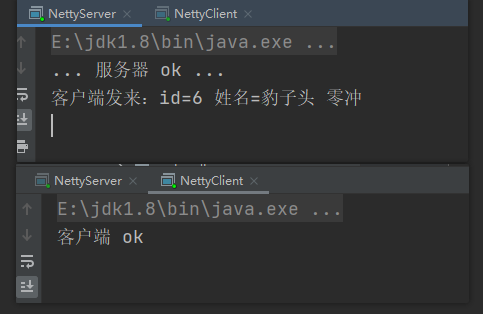
7、运行截图
7.5 Protobuf发送多对象
真实业务中不可能就一种类型,可能有多种类型,这次来传递多种类型
1、编写Message.proto
syntax = "proto3";
option optimize_for = SPEED;//加快解析
option java_package = "com.bandit.netty.codec2";//指定生成包
option java_outer_classname = "MyDataInfo";//外部类名称

//protobuf 可以使用message管理其他message
message MyMessage{
    enum DateType {
        StudentType = 0;//在proto3 要求enum编号从0开始
        TeacherType = 1;
    }
    //用data_type 来标识传递的是哪个枚举类型
    DateType date_type = 1;

    //表示每次枚举类型最多只能出现其中的一个
    oneof dataBody{
        Student student = 2;
        Teacher teacher = 3;
    }
}

//Student类
message Student{
    int32 id = 1;
    string name = 2;
}
//Teacher类
message Teacher{
    string name = 1;
    int32 id = 2;
    int32 age = 3;
}
- option java_package:指定生成包
- option optimize_for = SPEED:加快解析
- protobuf可以使用一个message管理其它多个message
- 在里面创建一个枚举类型,在生成java文件后方便判断编号对应哪个数据
- DateType date_type = 1:用data_type 来标识传递的是哪个枚举类型
- oneof dataBody:表示每次枚举类型最多只能出现其中的一个
2、客户端,和上例类似
NettyClient
public class NettyClient { public static void main(String[] args) { EventLoopGroup eventExecutors = new NioEventLoopGroup(); try { Bootstrap bootstrap = new Bootstrap(); bootstrap.group(eventExecutors) //设置线程组 .channel(NioSocketChannel.class)//设置客户端通道实现类 .handler(new ChannelInitializer<SocketChannel>() { @Override protected void initChannel(SocketChannel socketChannel) throws Exception { ChannelPipeline pipeline = socketChannel.pipeline(); //客户端发送数据,需要加上编码器 pipeline.addLast("ProtobufEncoder",new ProtobufEncoder()); pipeline.addLast(new NettyClientHandler()); } }); System.out.println("客户端 ok"); ChannelFuture channelFuture = bootstrap.connect("127.0.0.1", 6666).sync(); channelFuture.channel().closeFuture().sync(); } catch (InterruptedException e) { e.printStackTrace(); } finally { eventExecutors.shutdownGracefully(); } }}
NettyClientHandler
public class NettyClientHandler extends ChannelInboundHandlerAdapter { @Override public void channelActive(ChannelHandlerContext ctx) throws Exception { //随机发送Student 或者 Teacher int random = new Random().nextInt(3); MyDataInfo.MyMessage myMessage = null; if (0==random) { myMessage = MyDataInfo.MyMessage.newBuilder() .setDateType(MyDataInfo.MyMessage.DateType.StudentType) .setStudent(MyDataInfo.Student.newBuilder().setId(5).setName("学生5号").build()).build(); } else{ myMessage = MyDataInfo.MyMessage.newBuilder() .setDateType(MyDataInfo.MyMessage.DateType.TeacherType) .setTeacher(MyDataInfo.Teacher.newBuilder().setId(1).setAge(20).setName("老师1号").build()).build(); } ctx.writeAndFlush(myMessage); } @Override public void exceptionCaught(ChannelHandlerContext ctx, Throwable cause) throws Exception { cause.printStackTrace(); ctx.close(); }}
在NettyClientHandler中随机发送datatype不同的数据
3、服务端
NettyServer
public class NettyServer { public static void main(String[] args) { EventLoopGroup bossGroup = new NioEventLoopGroup(1); EventLoopGroup workerGroup = new NioEventLoopGroup(); try { //创建服务器启动对象,用来配置参数 ServerBootstrap bootstrap = new ServerBootstrap(); bootstrap.group(bossGroup,workerGroup) .channel(NioServerSocketChannel.class) .option(ChannelOption.SO_BACKLOG,128) //线程队列得到连接的个数 .childOption(ChannelOption.SO_KEEPALIVE,true) //设置保持活动连接状态 .childHandler(new ChannelInitializer<SocketChannel>() { @Override protected void initChannel(SocketChannel socketChannel) throws Exception { ChannelPipeline pipeline = socketChannel.pipeline(); //服务器端接收数据,解码 pipeline.addLast("ProtobufDecoder",new ProtobufDecoder(MyDataInfo.MyMessage.getDefaultInstance())); pipeline.addLast(new NettyServerHandler()); } }); System.out.println("... 服务器 ok ..."); ChannelFuture channelFuture = bootstrap.bind(6666).sync(); channelFuture.channel().closeFuture().sync(); } catch (InterruptedException e) { e.printStackTrace(); } finally { bossGroup.shutdownGracefully(); workerGroup.shutdownGracefully(); } }}
pipeline.addLast("ProtobufDecoder",new ProtobufDecoder(MyDataInfo.MyMessage.getDefaultInstance()));和上例类似
NettyServerHandler
public class NettyServerHandler extends ChannelInboundHandlerAdapter {
    @Override
    public void channelRead(ChannelHandlerContext ctx, Object msg) throws Exception {
        MyDataInfo.MyMessage message = (MyDataInfo.MyMessage) msg;
        //根据dataType显示不同信息
        MyDataInfo.MyMessage.DateType dateType = message.getDateType();
        if (dateType == MyDataInfo.MyMessage.DateType.StudentType){
            MyDataInfo.Student student = message.getStudent();
            System.out.println("学生id:"+student.getId()+" 学生姓名:"+student.getName());
        } else if (dateType == MyDataInfo.MyMessage.DateType.TeacherType){
            MyDataInfo.Teacher teacher = message.getTeacher();
            System.out.println("老师id:"+teacher.getId()+" 年龄:"+teacher.getAge()+"岁 姓名:"+teacher.getName());
        } else {
            System.out.println("传输类型不正确");
        }

    }

    @Override
    public void channelReadComplete(ChannelHandlerContext ctx) throws Exception {
        ctx.writeAndFlush(Unpooled.copiedBuffer("hello,客户端",CharsetUtil.UTF_8));
    }

    @Override
    public void exceptionCaught(ChannelHandlerContext ctx, Throwable cause) throws Exception {
        cause.printStackTrace();
        ctx.close();
    }
}
根据dataType显示不同信息
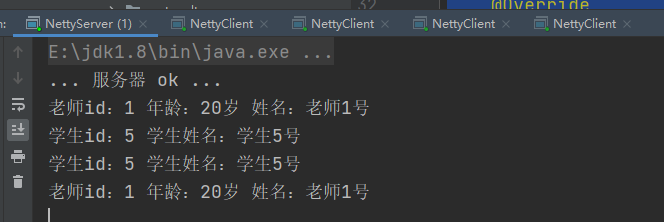
4、运行截图
八、Netty编解码器和handler调用机制
8.1 基本说明
ChannelHandler充当了处理入站和出站数据的应用程序逻辑的容器 。同时,ChannelPipeline又是ChannelHandler链的容器
- 实现ChannelInboundHandler接口(或ChannelInboundHandlerAdapter),就可以接收入站事件和数据,并对这些事数据进行业务处理
- 当要给客户端发送响应时,也可以从ChannelInboundHandler冲刷数据。
- 业务逻辑通常写在一个或者多个ChannelInboundHandler中
- 相反还有个ChannelOutboundHandler,原理和ChannelInboundHandler一样,只是入站出站方向不同
入站和出站
无论是对客户端还是服务器端,数据送出去就是出站,从另外一端传入进来就是入站
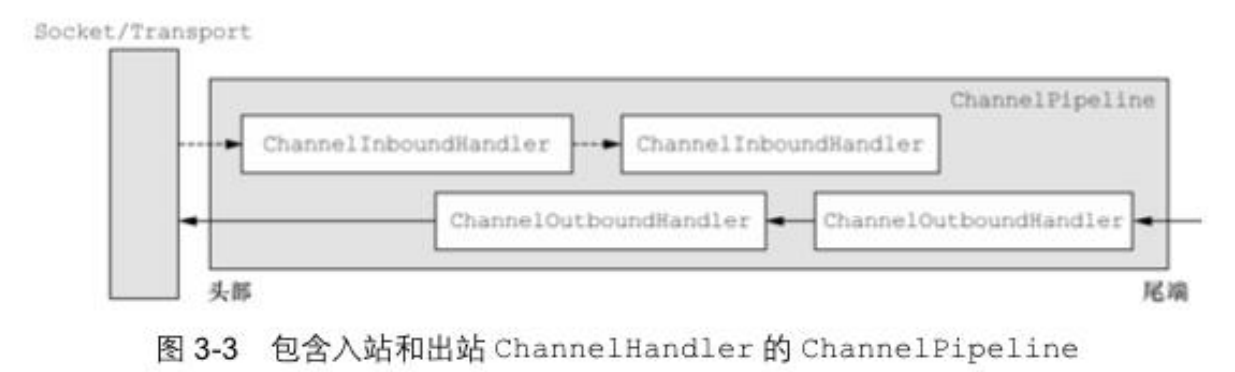
ChannelHandler实际上可以看做一个过滤器,ChannelPipeline可以看作过滤器的链
此处是责任链模式
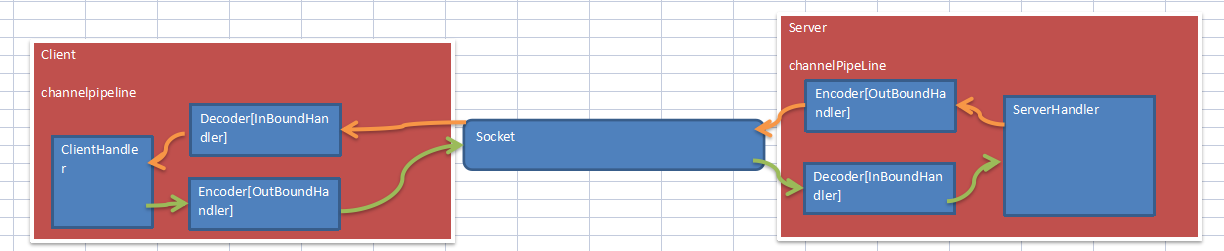
8.2 编解码器基本原理
实际上,编码器实现了ChannelOutboundHandler,对出站数据进行加工;解码器实现了ChannelInboundHadnler,对入站数据进行加工。 在这些类中,channelRead方法已经被重写了。
以入站为例,对于每个从入站Channel读取的消息,这个方法会被调用。随后,它将调用由解码器所提供的decode()方法进行解码,并将已经解码的字节转发给ChannelPipeline中的下一个ChannelInboundHandler,进行下一步处理
8.3 Netty的handler链调用机制
使用自定义的编码器和解码器来说明Netty的handler 调用机制
客户端发送long -> 服务器
服务端发送long -> 客户端
1、编码器和解码器
MyLongToByteEncoder编码器,Long转成Byte
public class MyLongToByteEncoder extends MessageToByteEncoder<Long> {

    @Override
    protected void encode(ChannelHandlerContext channelHandlerContext, Long msg, ByteBuf byteBuf) throws Exception {
        System.out.println("MyLongToByteEncoder->encode 被调用");
        System.out.println("msg="+msg);
        byteBuf.writeLong(msg);
    }
}
MyByteToLongDecoder解码器,Byte转成Long
public class MyByteToLongDecoder extends ByteToMessageDecoder {

    /**
     *  decode 会根据接收的数据,被调用多次,直到没有心得元素被添加到list,
     *  或者是ByteBuf没有更多可读字节为止
     *  如果list不为空,就会将内容交给下一个channelinboundhandler处理,该处理器方法也会被调用多次
     *
     * @param ctx 上下文对象
     * @param in  入站的 ByteBuf
     * @param list  将解码后的数据交给下一个handler处理
     * @throws Exception
     */
    @Override
    protected void decode(ChannelHandlerContext ctx, ByteBuf in, List<Object> list) throws Exception {
        System.out.println("MyByteToLongDecoder->decode被调用");
        if(in.readableBytes()>=8){//Long 8个字节
            list.add(in.readLong());
        }
    }
}
- decode 会根据接收的数据,被调用多次,直到没有心得元素被添加到list,
- 或者是ByteBuf没有更多可读字节为止
- 如果list不为空,就会将内容交给下一个channelinboundhandler处理,该处理器方法也会被调用多次
2、客户端:
MyClient
public class MyClient {
    public static void main(String[] args) {
        EventLoopGroup eventLoopGroup = new NioEventLoopGroup();

        try {
            Bootstrap bootstrap = new Bootstrap();
            bootstrap.group(eventLoopGroup)
                    .channel(NioSocketChannel.class)
                    .handler(new MyClientInitializer());

            System.out.println("客户端准备好了。。");
            ChannelFuture channelFuture = bootstrap.connect("127.0.0.1", 7000).sync();
            channelFuture.channel().closeFuture().sync();
        } catch (Exception e) {
            e.printStackTrace();
        } finally {
            eventLoopGroup.shutdownGracefully();
        }


    }
}
MyClientInitializer
public class MyClientInitializer extends ChannelInitializer<SocketChannel> {
    @Override
    protected void initChannel(SocketChannel ch) throws Exception {
        ChannelPipeline pipeline = ch.pipeline();
        //发送消息,出站,加入编码器 MyLongToByteEncoder
        pipeline.addLast("ClientLongToByteEncoder",new MyLongToByteEncoder());
        pipeline.addLast("ClientByteToLongDecoder",new MyByteToLongDecoder());
        pipeline.addLast(new MyClientHandler());
    }
}
发送消息,出站,加入编码器 MyLongToByteEncoder,后续接收消息加入解码器
MyClientHandler
public class MyClientHandler extends SimpleChannelInboundHandler<Long> {

    @Override
    protected void channelRead0(ChannelHandlerContext ctx, Long msg) throws Exception {
        System.out.println("服务器"+ctx.channel().remoteAddress()+"消息:"+msg);
    }

    //重写channelActive发送数据
    @Override
    public void channelActive(ChannelHandlerContext ctx) throws Exception {
        System.out.println("MyClientHandler发送数据");
        ctx.writeAndFlush(123456L);//直接发一个Long
    }
}
客户端直接发送一个Long
3、服务器端
MyServer
public class MyServer {
    public static void main(String[] args) {
        EventLoopGroup bossGroup = new NioEventLoopGroup(1);
        EventLoopGroup workerGroup = new NioEventLoopGroup();

        try {
            ServerBootstrap serverBootstrap = new ServerBootstrap();
            serverBootstrap.group(bossGroup,workerGroup)
                    .channel(NioServerSocketChannel.class)
                    .childHandler(new MyServerInitializer());//自定义一个初始化类

            ChannelFuture channelFuture = serverBootstrap.bind(7000).sync();
            System.out.println("服务器准备好了。。");
            channelFuture.channel().closeFuture().sync();

        } catch (Exception e) {
            e.printStackTrace();
        } finally {
            bossGroup.shutdownGracefully();
            workerGroup.shutdownGracefully();
        }

    }
}
MyServerInitializer
public class MyServerInitializer extends ChannelInitializer<SocketChannel> {
    @Override
    protected void initChannel(SocketChannel ch) throws Exception {
        ChannelPipeline pipeline = ch.pipeline();
        //服务端接收消息,解码 MyBateToLongDecoder
        pipeline.addLast("ServerBateToLongDecoder",new MyByteToLongDecoder());
        pipeline.addLast("ServerLongToByteEncoder",new MyLongToByteEncoder());
        pipeline.addLast(new MyServerHandler());
    }
}
服务器端接收消息,加入解码器 MyBateToLongDecoder,返回消息加入编码器
MyServerHandler
public class MyServerHandler extends SimpleChannelInboundHandler<Long> {

    @Override
    protected void channelRead0(ChannelHandlerContext ctx, Long msg) throws Exception {
        System.out.println("MyServerHandler读取客户端"+ctx.channel().remoteAddress()+"发来的消息:"+msg);
        //给客户端回送一个Long
        ctx.writeAndFlush(98765L);
    }

    @Override
    public void exceptionCaught(ChannelHandlerContext ctx, Throwable cause) throws Exception {
        ctx.close();
    }
}
4、运行截图
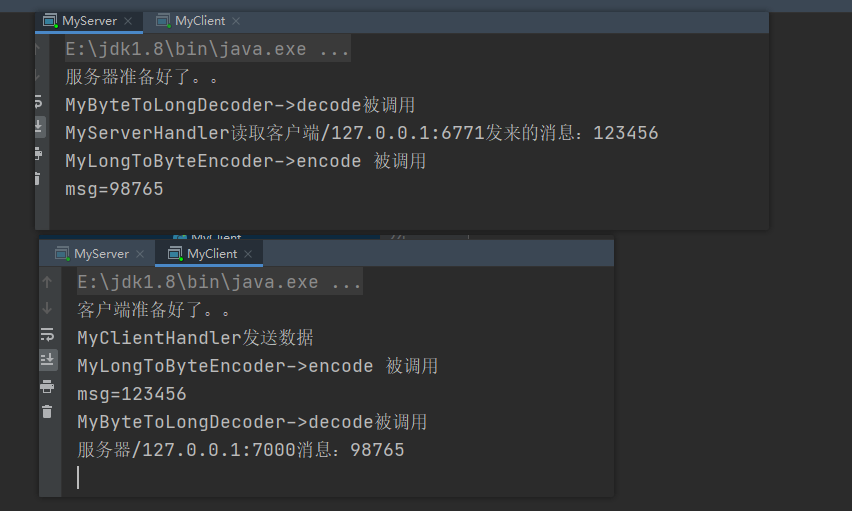
可以看到:
客户端先发消息,所以先编码,后面接收消息再解码
服务器端先接收消息,所以先解码,后面发送消息再编码
8.4 一些简单的解码器
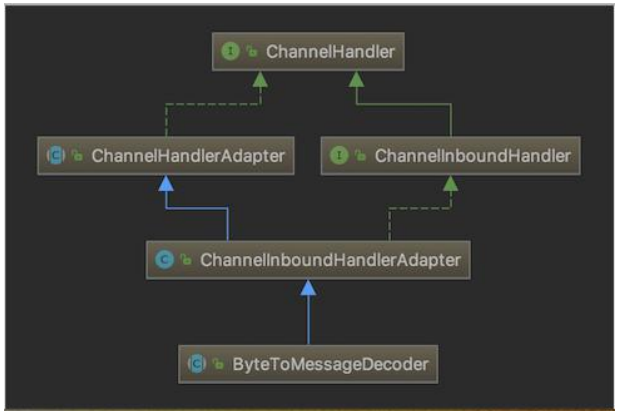
8.4.1 ByteToMessageDecoder 解码器
关系继承图:
一个实例分析:
public class ToIntegerDecoder extends ByteToMessageDecoder {
	@Override
	protected void decode(ChannelHandlerContext ctx, ByteBuf in, List<Object> out) throws Exception{
        if (in.readableBytes() >= 4) {
        	out.add(in.readInt());
        }
	}
}
这个例子,每次入站从ByteBuf中读取4字节,将其解码为一个int,然后将它添加到下一个List中。 当没有更多元素可以被添加到该List中时,它的内容将会被发送给下一个ChannelInboundHandler。 int在被添加到List中时,会被自动装箱为Integer。在调用readInt()方法前必须验证所输入的ByteBuf是否具有足够的数据
8.4.2 ReplayingDecoder解码器
public abstract class ReplayingDecoder<S> extends ByteToMessageDecoder
ReplayingDecoder扩展了ByteToMessageDecoder类,使用这个类,我们不必调用readableBytes()方法判断长度是否够用。参数S指定了用户状态管理的类型,其中Void代表不需要状态管理
ReplayingDecoder使用方便,但它也有一些局限性:
- 并不是所有的 ByteBuf 操作都被支持,如果调用了一个不被支持的方法,将会抛出一个
UnsupportedOperationException - ReplayingDecoder 在某些情况下可能稍慢于 ByteToMessageDecoder ,例如网络缓慢并且消息格式复杂时,消息会被拆成了多个碎片,速度变慢
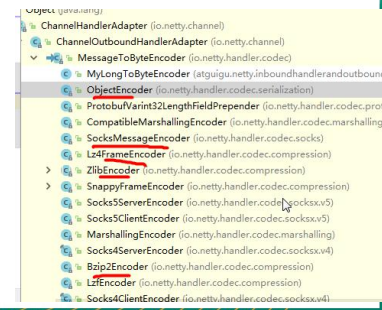
8.4.3 其他的编解码器
- 解码器
- LineBasedFrameDecoder:这个类在Netty内部也有使用,它使用行尾控制字符(\n或者\r\n)作为分隔符来解析数据。
- DelimiterBasedFrameDecoder:使用自定义的特殊字符作为消息的分隔符。
- HttpObjectDecoder:一个HTTP数据的解码器
- LengthFieldBasedFrameDecoder:通过指定长度来标识整包消息,这样就可以自动的处理 黏包和半包消息。
- 。。。
- 编码器
- ObjectEncoder:Java 各种类型
- SocksMessageEncoder:SOCK协议编码器
- ZlibEncoder:压缩
- Bzip2Encoder:压缩
- 。。。
九、TCP粘包和拆包
9.1 粘包和拆包简介
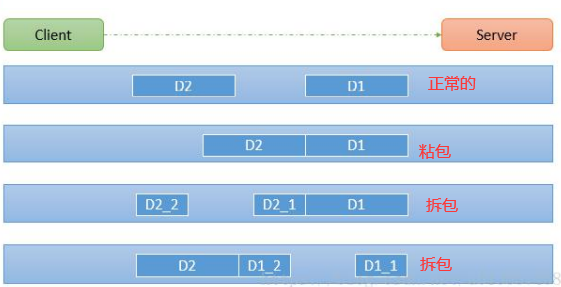
TCP是面向连接的,面向流的,提供高可靠性服务。
收发两端(客户端和服务器端) 都要有一一成对的socket,因此,发送端为了将多个发给接收端的包,更有效的发给对方,使用了优化方法(Nagle算法),将多次间隔较小且数据量小的数据,合并成一个大的数据块,然后进行封包。
这样做虽然提高了效率,但是接收端就难于分辨出完整的数据包了,因为面向流的通信是无消息保护边界的
图解:
9.2 粘包和拆包现象实例
准备一个客户端向服务器端连续发送10个包的demo
1、客户端:
TCPClient
public class TCPClient { public static void main(String[] args) { EventLoopGroup eventLoopGroup = new NioEventLoopGroup(); try { Bootstrap bootstrap = new Bootstrap(); bootstrap.group(eventLoopGroup) .channel(NioSocketChannel.class) .handler(new TCPClientInitializer()); System.out.println("客户端准备好了。。"); ChannelFuture channelFuture = bootstrap.connect("127.0.0.1", 7000).sync(); channelFuture.channel().closeFuture().sync(); } catch (Exception e) { e.printStackTrace(); } finally { eventLoopGroup.shutdownGracefully(); } }}
TCPClientInitializer
public class TCPClientInitializer extends ChannelInitializer<SocketChannel> { @Override protected void initChannel(SocketChannel ch) throws Exception { ChannelPipeline pipeline = ch.pipeline(); pipeline.addLast(new TCPClientHandler()); }}
TCPClientHandler
public class TCPClientHandler extends SimpleChannelInboundHandler<ByteBuf> { private int count; //发包 @Override public void channelActive(ChannelHandlerContext ctx) throws Exception { //客户端发十次包 hello,sever 编号 for (int i = 0; i < 10; i++) { ByteBuf byteBuf = Unpooled.copiedBuffer("hello,sever " + i, CharsetUtil.UTF_8); ctx.writeAndFlush(byteBuf); } } @Override protected void channelRead0(ChannelHandlerContext ctx, ByteBuf msg) throws Exception { byte[] buffer = new byte[msg.readableBytes()]; msg.readBytes(buffer); String message = new String(buffer, CharsetUtil.UTF_8); System.out.println("客户端接收到消息:"+message); System.out.println("客户端接收到几次:"+ ++count); } @Override public void exceptionCaught(ChannelHandlerContext ctx, Throwable cause) throws Exception { ctx.close(); }}
在TCPClientHandler中客户端连续发送十次包:hello,sever 编号
2、服务器端
TCPServer
public class TCPServer {
    public static void main(String[] args) {
        EventLoopGroup bossGroup = new NioEventLoopGroup(1);
        EventLoopGroup workerGroup = new NioEventLoopGroup();

        try {
            ServerBootstrap serverBootstrap = new ServerBootstrap();
            serverBootstrap.group(bossGroup,workerGroup)
                    .channel(NioServerSocketChannel.class)
                    .childHandler(new TCPServerInitializer());//自定义一个初始化类

            ChannelFuture channelFuture = serverBootstrap.bind(7000).sync();
            System.out.println("服务器准备好了。。");
            channelFuture.channel().closeFuture().sync();

        } catch (Exception e) {
            e.printStackTrace();
        } finally {
            bossGroup.shutdownGracefully();
            workerGroup.shutdownGracefully();
        }

    }
}
TCPServerInitializer
public class TCPServerInitializer extends ChannelInitializer<SocketChannel> {
    @Override
    protected void initChannel(SocketChannel ch) throws Exception {
        ChannelPipeline pipeline = ch.pipeline();
        pipeline.addLast(new TCPServerHandler());
    }
}
TCPServerHandler
public class TCPServerHandler extends SimpleChannelInboundHandler<ByteBuf> {

    private int count;

    @Override
    protected void channelRead0(ChannelHandlerContext ctx, ByteBuf msg) throws Exception {
        byte[] buffer = new byte[msg.readableBytes()];
        msg.readBytes(buffer);

        String message = new String(buffer, CharsetUtil.UTF_8);
        System.out.println("服务器端接收到:"+message);
        System.out.println("服务器端接收了几次"+ ++count);

        ByteBuf responseBuf = Unpooled.copiedBuffer(UUID.randomUUID().toString().substring(0, 5), CharsetUtil.UTF_8);
        ctx.writeAndFlush(responseBuf);
    }

    @Override
    public void exceptionCaught(ChannelHandlerContext ctx, Throwable cause) throws Exception {
        ctx.close();
    }
}
服务器打印接收到的数组以及接收到了几次
3、运行截图

我开了两次客户端,第一次全部粘在一起了,第二次后面8个包全粘在一起了
9.3 解决方案:编码解码
使用自定义协议 + 编解码器 来解决
1、新建一个MessageProtocol实体类,用来传输长度和内容
public class MessageProtocol { private int len; private byte[] content; public MessageProtocol(int len, byte[] content) { this.len = len; this.content = content; } public int getLen() { return len; } public void setLen(int len) { this.len = len; } public byte[] getContent() { return content; } public void setContent(byte[] content) { this.content = content; }}
2、新建一个对MessageProtocol的编码器和解码器
public class MessageEncoder extends MessageToByteEncoder<MessageProtocol> { @Override protected void encode(ChannelHandlerContext channelHandlerContext, MessageProtocol messageProtocol, ByteBuf byteBuf) throws Exception { System.out.println("MessageEncoder encode 被调用"); byteBuf.writeInt(messageProtocol.getLen()); byteBuf.writeBytes(messageProtocol.getContent()); }}
public class MessageDecoder extends ReplayingDecoder<Void> { @Override protected void decode(ChannelHandlerContext channelHandlerContext, ByteBuf byteBuf, List<Object> list) throws Exception { System.out.println("MessageDecoder decode 被调用"); //将字节码转成 MessageProtocol对象 数据包 int length = byteBuf.readInt(); byte[] content = new byte[length]; byteBuf.readBytes(content); //封装成 MessageProtocol 放入list list.add(new MessageProtocol(length,content)); }}
3、在刚刚的TCPServerInitializer和TCPClientInitializer添加编码器和解码器
public class TCPServerInitializer extends ChannelInitializer<SocketChannel> { @Override protected void initChannel(SocketChannel ch) throws Exception { ChannelPipeline pipeline = ch.pipeline(); pipeline.addLast("ServerDecoder",new MessageDecoder()); pipeline.addLast("ServerEncoder",new MessageEncoder()); pipeline.addLast(new TCPServerHandler()); }}
public class TCPClientInitializer extends ChannelInitializer<SocketChannel> { @Override protected void initChannel(SocketChannel ch) throws Exception { ChannelPipeline pipeline = ch.pipeline(); pipeline.addLast("ClientDecoder",new MessageDecoder()); pipeline.addLast("ClientEncoder",new MessageEncoder()); pipeline.addLast(new TCPClientHandler()); }}
4、重写TCPClientHandler和TCPServerHandler
public class TCPClientHandler extends SimpleChannelInboundHandler<MessageProtocol> {

    private int count;
    //管道激活就开始发包
    @Override
    public void channelActive(ChannelHandlerContext ctx) throws Exception {
        //客户端发十次包  今天几号?i 号咯
        for (int i = 10; i < 17; i++) {
            String message = "今天几号? "+i+"号咯";
            byte[] content = message.getBytes(StandardCharsets.UTF_8);
            int length = content.length;

            MessageProtocol messageProtocol = new MessageProtocol(length, content);
            ctx.writeAndFlush(messageProtocol);
        }
    }

    @Override
    protected void channelRead0(ChannelHandlerContext ctx, MessageProtocol msg) throws Exception {
        byte[] content = msg.getContent();
        int len = msg.getLen();
        System.out.println("客户端接收到信息:len="+len+" content="+ new String(content, CharsetUtil.UTF_8));
        System.out.println("客户端接收到信息次数"+ ++count + "\n");
    }


    @Override
    public void exceptionCaught(ChannelHandlerContext ctx, Throwable cause) throws Exception {
        ctx.close();
    }

}
public class TCPServerHandler extends SimpleChannelInboundHandler<MessageProtocol> {

    private int count;

    @Override
    protected void channelRead0(ChannelHandlerContext ctx, MessageProtocol msg) throws Exception {
        int len = msg.getLen();
        byte[] content = msg.getContent();
        System.out.println("服务端接收到信息:len="+len+" content="+ new String(content, CharsetUtil.UTF_8));
        System.out.println("服务端接收到信息次数"+ ++count + "\n");

        //回复消息
        String responseContent = UUID.randomUUID().toString().substring(0, 5);
        byte[] resBytes = responseContent.getBytes(StandardCharsets.UTF_8);
        int resLen = resBytes.length;
        MessageProtocol messageProtocol = new MessageProtocol(resLen, resBytes);
        ctx.writeAndFlush(messageProtocol);

    }

    @Override
    public void exceptionCaught(ChannelHandlerContext ctx, Throwable cause) throws Exception {
        ctx.close();
    }
}
5、运行截图
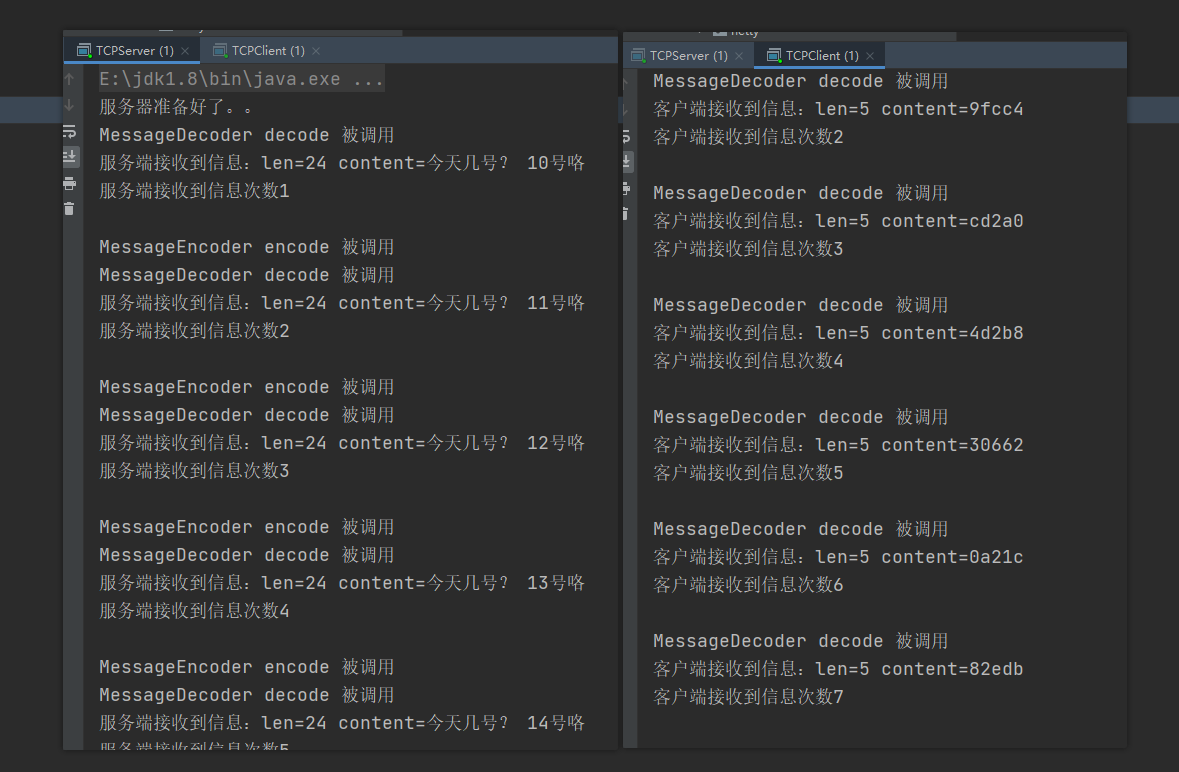
可以看到,进行编码解码之后,就不会粘包和拆包了