开发中遇到了个上传合同的需求,使用的是 elementui 的上传组件,项目中使用比较多,进行了封装,开发完成后总结一下,供大家和自己使用时查看。
上代码!
1. 模板代码
<template>
    <div class="uploadFile" style="margin-top:15px;">
      <!-- 上传组件 -->
        <el-upload
          v-loading="loading"
          multiple
          ref="upload"
          :action="actionUrl"
          :limit="limit"
          :accept="accepted"
          :auto-upload="true"
          :file-list="fileListData"
          :list-type="listType"
          :before-upload="handleBeforeUpload"
          :on-preview="handlePictureCardPreview"
          :on-exceed="handleExceed"
          :on-progress="handleUploadProgress"
          :on-success="handleSuccess"
          :on-error="handleError"
          :http-request="handleRequest"
          :element-loading-text="loadingText"
          :class="isPreview?'hide_box':''"
        >
            <i class="el-icon-plus" slot="default"></i>
            <div slot="file" slot-scope="{file}">
              <!-- 图片显示正常的缩略图 -->
              <img
                v-if="allPicType.includes(file.name.split('.')[1])&&imgConfigEmpty"
                class="el-upload-list__item-thumbnail"
                :src="file.url" alt="图片预览失败"
              >
              <!-- 非图片显示默认缩略图 -->
              <img
                v-if="!allPicType.includes(file.name.split('.')[1])&&imgConfigEmpty"
                class="el-upload-list__item-thumbnail"
                src="../../assets/images/common/defaultFilePic.png" alt="图片预览失败"
              >
              <!-- 预览,上传,删除文件 -->
              <span class="el-upload-list__item-actions">
                <span
                  class="el-upload-list__item-preview"
                  @click="handlePictureCardPreview(file)"
                >
                  <i class="el-icon-zoom-in"></i>
                </span>
                <span class="el-upload-list__item-delete">
                  <a :href="file.url" download style="color: #fff;">
                    <i class="el-icon-download"></i>
                  </a>
                </span>
                <span
                  v-if="isDisabledDel"
                  class="el-upload-list__item-delete"
                  @click="removeFile(file)"
                >
                  <i class="el-icon-delete"></i>
                </span>
              </span>
            </div>
            <!-- 上传提示语 -->
            <div slot="tip" class="el-upload__tip" v-if="!fileListData.length">
                {{ uploadTips }}
            </div>
        </el-upload>
        <!-- 预览时的文件名称样式 -->
        <template v-if="fileListData.length">
          <span v-for="(name,ind) in fileListData" :key="name + ind" class="fileName" :style="{left: `${ind * 155 + 'px' }`}">{{ name.name }}</span>
        </template>
        <!-- 上传是的文件名称样式 -->
        <template v-else>
          <span v-for="(name,ind) in fileNames" :key="name + ind" class="fileName" :style="{left: `${ind * 155 + 'px' }`}">{{ name }}</span>
        </template>
        <!-- 预览图片 -->
        <el-dialog :visible.sync="dialogVisible" title="查看" append-to-body >
            <img width="100%" :src="dialogImageUrl" alt="" />
        </el-dialog>
    </div>
</template>
- 参数解释:
multiple:是否支持多选文件actionUrl:上传服务urlhttp-request: 自定义上传(我这里是上传到金山云):class="isPreview?'hide_box':''"预览隐藏上传操作element-loading-text上传加载提示语auto-upload是否在选取文件后立即进行上传
2. js代码
import Vue from 'vue';
// import UUID from 'uuid'; 上传是所需要的一个随机生成的id

export default {
  props: {
    fileListData: { // 合同文件列表
      type: Array,
      default: () => {
        return [];
      }
    },
    isPreview: { // 是否需要隐藏上传操作
      type: Boolean,
      default: false
    },
    limit: { // 限制文件上传个数
      type: Number,
      default: 1
    },
    noLimitSize: { // 是否限制文件上传大小
      type: Boolean,
      default: true
    },
    fileType: { // 文件类型
      type: Array,
      default: function() {
        return ['png', 'jpg', 'jpeg'];
      }
    },
    url: { // 文件上传的地址
      type: String,
      default: ''
    },
    loadingText: { // 加载文案
      type: String,
      default: '加载中...'
    },
    // * 文件的大小个单位   [3,'kb']或[3.'m']
    fileSize: {
      type: Array,
      default: () => {
        return [];
      }
    },
    listType: { // 文件列表的类型 ('text' 'picture' 'picture-car')
      type: String,
      default: () => {
        return 'picture-car';
      }
    },
    headers: { // 设置上传的请求头部
      type: Object,
      default: () => {
        return {};
      }
    },
    isDisabledDel: { // 是否展示删除功能
      type: Boolean,
      default: false
    },
    isShowFileName: { // 是否展示文件名称
      type: Boolean,
      default: true
    }
  },
  data() {
    return {
      dialogVisible: false, // 图片预览框
      dialogImageUrl: '', // 图片预览路径
      uploadTips: '', // 提示文案
      accepted: '', // 支持上传的文件类型
      allPicType: ['jpg', 'png', 'jpeg'], // * 图片使用弹窗预览
      loading: false, // 加载
      form: {}, // 上传金山云参数
      imgConfig: {}, // 上传金山云参数
      actionUrl: '', // 上传服务路径
      fileLists: [], // 当前上传的文件
      fileNames: [] // 当前上传的文件名称
    };
  },
  computed: {
    imgConfigEmpty() {
      return JSON.stringify(this.imgConfig) !== '{}';
    }
  },
  mounted() {
    this.getImgConfig();
    this.init();
  },
  methods: {
    init() {
      // 提示内容
      if (!this.fileType.length) {
        if (!this.fileSize.length) {
          this.uploadTips = `最多支持上传${this.limit}个` + '可以上传jpg/png/jpeg/doc/docx/pdf文件';
        } else {
          this.uploadTips = `最多支持上传${this.limit}个` + '可以上传jpg/png/jpeg/doc/docx/pdf文件,且文件不能大于' + this.fileSize[0] + this.fileSize[1];
        }
      } else {
        this.uploadTips = `最多支持上传${this.limit}个` + '可以上传';
        if (this.fileSize.length === 0) {
          for (let i = 0; i < this.fileType.length; i++) {
            if (i === this.fileType.length - 1) {
              this.uploadTips += this.fileType[i] + '文件';
            } else {
              this.uploadTips += this.fileType[i] + '/';
            }
          }
        } else {
          for (let i = 0; i < this.fileType.length; i++) {
            if (i === this.fileType.length - 1) {
              this.uploadTips += this.fileType[i] + '文件,且文件不能大于' + this.fileSize[0] + this.fileSize[1];
            } else {
              this.uploadTips += this.fileType[i] + '/';
            }
          }
        }
      }
      // 允许上传的文件类型
      if (this.fileType.length) this.accepted = this.fileType.join(',');
    },
    handlePictureCardPreview(file) { // 预览文件
      if (!file.url) {
        this.$message.error('下载失败');
        return;
      }
      const type = file.name.split('.')[1];
      if (['jpg', 'png', 'jpeg'].includes(type)) {
        this.dialogImageUrl = file.url;
        this.dialogVisible = true;
        return;
      }
      // 判断文件类型
      if (type === 'doc' || type === 'docx') {
        // 在当前浏览器直接下载
        document.location.href = file.url;
      } else {
        // 图片在浏览器打开 新的页面展示
        window.open(file.url, '预览');
      }
    },
    handlerUploadErr() { // 上传失败提示
      if (!((Object.keys(this.imgConfig)).length)) {
        this.$message.error('上传文件失败,请稍后再试');
        return false;
      }
    },
    getImgConfig() { //* 获取金山云权限
      Vue.http
        .get('url')
        .then(config => {
          if (config.code === 0) {
            this.imgConfig = config.data;
            this.actionUrl = `https://${config.data.host}`;
          } else {
            this.$message.error('网络错误,文件将无法上传');
            this.loading = false;
            return false;
          }
        }).catch(err => {
          this.$handleError(err, '网络错误,文件将无法上传');
          this.loading = false;
        });
    },
    handleRequest(fileObj) { // * 将文件上传至金山云
      this.getImgConfig(); // ! 防止金山云凭证过期
      this.handlerUploadErr(); // 获取金山云权限失败禁止继续上传
      let imgConfig = this.imgConfig;
      let form = this.form;
      let formData = new FormData();
      // 处理参数
      formData.append('key', form.keyPrefix + '/' + form.key);
      formData.append('KSSAccessKeyId', form.KSSAccessKeyId);
      formData.append('policy', form.policy);
      formData.append('signature', form.signature);
      formData.append('file', form.file);
      this.loading = true;
      let hostAddress = imgConfig.host.indexOf('http') > -1 ? imgConfig.host : `https://${imgConfig.host}`;
      return Vue.axios({
        timeout: 0,
        headers: {
          'Content-Type': 'multipart/form-data;'
        },
        onUploadProgress: progressEvent => {
          const complete = (progressEvent.loaded / progressEvent.total * 100 | 0);
          fileObj.onProgress({ percent: complete });
        }
      })
        .post(hostAddress, formData)
        .then(() => {
          let url = '/' + imgConfig.bucket + '/' + form.keyPrefix + '/' + form.key;
          return this.getImgUrl(url).then(result => {
            return {
              uid: form.file.uid,
              name: form.name,
              size: form.file.size,
              url: result.urls[0] || ''
            };
          });
        }).catch(err => {
          this.$handleError(err, '上传文件失败');
          this.loading = false;
        });
    },
    getImgUrl(url) { // * 获取文件金山云路径
      return Vue.http
        .post('url', {
          keys: [url]
        })
        .then(resp => Vue.checkResp(resp))
        .catch(err => {
          this.$handleError(err, '上传文件失败');
          this.loading = false;
        });
    },
    handleBeforeUpload(file) { // 上传之前校验
      let imgConfig = this.imgConfig;
      let lastIdx = file.name.lastIndexOf('.');
      let keyName = '';
      if (lastIdx > 0) {
        let fileSuffix = file.name.substring(lastIdx);
        let reg = /[\u4e00-\u9fa5]/g;
        if (!reg.test(fileSuffix)) {
          keyName = fileSuffix;
        }
      }
      this.form = {
        name: file.name,
        key: feConfig.IMG_SERVICE + UUID.v4() + keyName,
        KSSAccessKeyId: imgConfig.ak,
        policy: imgConfig.policy,
        signature: imgConfig.signature,
        keyPrefix: imgConfig.keyPrefix,
        file
      };
      if (!this.noLimitSize) {
        this.$message.warning('上传文件大小不能超过 ' + this.fileSize[0] + this.fileSize[1]);
        return false;
      }
      let splitName = file.name.split('.');
      let nameLength = splitName.length;
      if (this.fileType.indexOf(splitName[nameLength - 1]) < 0) {
        this.$message.error('上传文件格式错误!');
        return false;
      }
    },
    removeFile(file) { // 处理移出文件
      this.fileLists.splice(this.fileLists.findIndex(i => i.uid === file.uid), 1);
      this.fileNames.splice(this.fileNames.findIndex(i => i === file.name), 1);
      this.$emit('removeFileName', file);
    },

    handleExceed(files, fileList) { // 判断文件上传数量
      this.$message.warning(
        `当前限制最多上传 ${this.limit} 个文件,
        本次选择了 ${files.length} 个文件,
        共选择了 ${files.length + fileList.length} 个文件`
      );
    },
    handleSuccess(response, file, fileList) { // 上传文件成功之后的回调
      this.fileNames = [];
      this.$nextTick(() => {
        fileList.forEach(i => this.fileNames.push(i.name));
      });
      clearInterval(this.interval);
      this.fileLists = fileList;
      this.$emit('uploadSuccess', response, file, fileList);
      this.loading = false;
      this.uploadPercent = file.percentage;
      const timeOut = setTimeout(() => {
        this.flag = false;
        this.uploadPercent = 0;
        clearTimeout(timeOut);
      }, 1000);
    },
    handleError() { // 处理上传失败的回调
      this.loading = false;
      this.flag = false;
      this.uploadPercent = 0;
      this.$message.error('文件' + this.form.name + '上传失败');
    },
    handleUploadProgress(event, file, fileList) { // 上传进度
    }
  }
};
</script>
js 代码代码中的上传金山云如果用不到可以去掉这三个函数
getImgConfig(), handleRequest(), getImgUrl()直接把你的后端的 url 加到actionUrl中即可,下载使用的浏览器自带的功能。
3. css 代码
<style scoped>
.uploadFile {
  position: relative;
}

/* vue深度选择器 <<< 等同于 /deep/ */
.hide_box >>> .el-upload--picture-card {
  display: none;
}

.fileName {
  position: absolute;
  top: 150px;
  left: 0;
  width: 150px;
  overflow: hidden;
  color: #12a1b7;
  text-align: center;
  text-overflow: ellipsis;
  white-space: nowrap;
}
</style>
4. 组件中使用
// 根据自己的实际开发情况添加参数;
<fileUpload
          :is-preview="isPreview"
          :file-list-data="item.contract||[]"
          :is-disabled-del="false"
          :list-type="listType"
          :loading-text="loadingText"
          :no-limit-size="true"
          @removeFileName="removeFileName"
          @uploadSuccess="uploadSuccess"
        />
5. 效果图
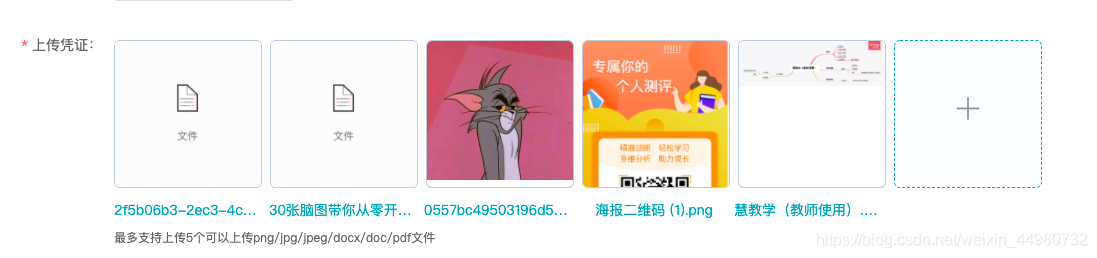
PS:开发中还是遇到挺多问题的,文件名称的显示写的不太好 使用calc 动态调节的样式这个后面可以优化,在网上查找都是重写上传组件,时间紧迫就没有搞了,上传组件的上传进度之前使用的 el-progress 但是有问题,后续再研究添加上上传进度显示,有些过的可以留言交流下。
希望能够帮助到你,有问题可以随时留言交流!
版权声明:本文为weixin_44980732原创文章,遵循CC 4.0 BY-SA版权协议,转载请附上原文出处链接和本声明。