JDK8函数式接口Function、Consumer、Predicate、Supplier
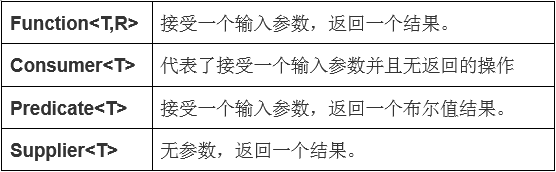
备注1:观察发现,函数式接口下共有
1、三种方法
1.1 唯一的抽象方法
1.2 使用default定义普通方法(默认方法),通过对象调用。
实现接口后,因为默认方法不是抽象方法,所以可以不重写,但是如果开发需要,也可以重写 。当然如果接口中的默认方法不能满足某个实现类需要,那么实现类可以覆盖默认方法。签名跟接口default方法一致,但是不能再加default修饰符。
3.使用static定义静态方法,通过接口名调用。
2、一个新注解
如果现在某一个接口就是为了函数式接口而生的,定义的时候就让其只有一个抽象方法,所以有了一个新的注解:函数式接口@FunctionInterface
备注2:关于lambda表达式
JDK8以前,通过匿名内部类可以实现接口
        Function<Integer, String> fun = new Function<Integer, String>() {


            @Override


            public String apply(Integer t) {


                return String.valueOf(t);


            }


        };
JDK8中,通过lambda表达式实现
Function<Integer, String> fun = (x) -> String.valueOf(x);
可以得出一个结论,lambda表达式就是为了优化匿名内部类而生。
String res = fun.apply(1000);


System.out.println(res);
lambda表达式的性能最差也就和匿名内部类一样, 但是好的情况会更好。
案例demo:
package com.lyj.demo.customTests;

import com.lyj.demo.functionInterface.CustomerFunctionInterface;
import org.junit.Test;
import org.junit.runner.RunWith;
import org.springframework.test.context.junit4.SpringJUnit4ClassRunner;

import java.util.function.Consumer;
import java.util.function.Function;
import java.util.function.Predicate;
import java.util.function.Supplier;

/**
 * @author 凌兮
 * @date 2020/10/7 16:58
 * 函数式接口测试类
 */
@RunWith(SpringJUnit4ClassRunner.class)
public class FunctionInterfaceTest {

    /**
     * Function功能性函数接口 接受一个输入参数T,返回一个结果R
     */
    @Test
    public void functionTest() {
        int originNum = 10;
        // 定义函数式方法
        Function<Integer, Integer> function = value -> value +20;
        // 原样输出函数式入参值
        System.out.println(function.apply(originNum));
        // 第一次函数式value作为function1的参数,返回一个结果,该结果作为function2的参数,返回一个最终结果
        Integer andThenApply = function.andThen(function).apply(originNum);
        System.out.println(andThenApply);
        // 连续两次函数式方法计算返回结果值
        Integer composeValue = function.compose(function).apply(originNum);
        System.out.println(composeValue);
        // 原样输出
        System.out.println(Function.identity().apply(originNum));
    }

    public int modifyValue(int originValue, Function<Integer, Integer> function) {
        return function.apply(originValue);
    }

    /**
     * Consumer消费型函数式接口测试-代表了 接受一个输入参数并且无返回的操作
     */
    @Test
    public void consumerTest() {
        int num = 10;
        // 定义函数式接口
        Consumer<Integer> consumer = value -> System.out.println(value + 10);
        // 无返回值,直接输出
        consumer.accept(num);
        // 连续两次输出,并且前后两次计算互不影响
        consumer.andThen(consumer).accept(num);
    }

    /**
     * Predicate断言型函数式接口-接受一个输入参数,返回一个布尔值结果
     */
    @Test
    public void PredicateTest() {
        int num = 10;
        // 定义函数式接口
        Predicate<Integer> predicate = value -> value == 10;
        Predicate<Integer> predicate1 = value -> value > 20;
        // 对入参进行断言
        boolean predicateResultFlag = predicate.test(20);
        System.out.println(predicateResultFlag);
        // and(与)断言
        boolean test = predicate.and(predicate1).test(num);
        System.out.println(test);
        // or(或)断言
        boolean test1 = predicate.or(predicate1).test(num);
        System.out.println(test1);
        // 反向(相反)断言
        boolean test2 = predicate.negate().test(10);
        System.out.println(test2);
    }

    /**
     * Supplier供给型函数式接口-无参数,返回一个结果
     */
    @Test
    public void supplierTest() {
        String item = "aaa";
        // 定义函数式接口
        Supplier<String> supplier = () -> item+"无参返回";
        // 获取返回值
        System.out.println(supplier.get());

    }

    /**
     * 自定义函数式接口测试
     */
    @Test
    public void customerTest() {
        // 定义函数式接口并定义实现
        CustomerFunctionInterface customerFunctionInterface = (a, b, c) -> a+b+c;
        // 设置初始默认值
        int opertateThree = customerFunctionInterface.opertateThree(1, 2, 3);
        System.out.println(opertateThree);
    }
}
自定义函数式接口使用
自定义函数式接口注解
package com.lyj.demo.annotation;

import java.lang.annotation.Documented;
import java.lang.annotation.ElementType;
import java.lang.annotation.Retention;
import java.lang.annotation.RetentionPolicy;
import java.lang.annotation.Target;

/**
 * @author 凌兮
 * @date 2020/10/7 19:30
 * 自定义函数式接口注解
 */
@Target(value = {ElementType.TYPE})
@Documented
@Retention(RetentionPolicy.RUNTIME)
public @interface FunctionInterface {
}
自定义函数式接口:
package com.lyj.demo.functionInterface;

import com.lyj.demo.annotation.FunctionInterface;

/**
 * @author 凌兮
 * @date 2020/10/7 19:27
 * 自定义函数式接口
 */
@FunctionInterface
public interface CustomerFunctionInterface {
     int opertateThree(int a, int b, int c);
}
测试在上面demo里
总结:
其实上面的4个函数式接口,都有一个共同的特点,都使用了@FunctionInterface注解,所以这四个接口个人觉得只是按使用习惯归类好的有代表性的函数式接口,可以直接拿来使用,其实你也可以用@FunctionInterface注解自定义想要的函数式接口,比如接收3个参数,返回1个结果。
版权声明:本文为qq_40093255原创文章,遵循CC 4.0 BY-SA版权协议,转载请附上原文出处链接和本声明。