Overleaf 使用记录
Latex 基本用法
Latex上下标、根号、分号
- 指数或上标用^表示,下标用_表示,上下标如果多于一个字母或符号,需要用一对{ }括起来
- 平方根号用\sqrt{ }表示,其他根号的输入用命令\sqrt[“几次幂”]{ }
- 分数用命令\frac
Latex的点乘、叉乘、除以
点乘:a \cdot b
叉乘:a \times b
除以:a \div b
Latex 多行公式
\begin{eqnarray*}
\cos 2\theta & = & \cos^2 \theta - \sin^2 \theta \\
& = & 2 \cos^2 \theta - 1.
\end{eqnarray*}
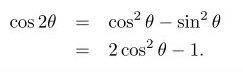
其中&是对其点,表示在此对齐。
*使latex不自动显示序号,如果想让latex自动标上序号,则把*去掉
\begin{Equation}
\begin{aligned}
  // 对齐的地方加 $ 换行的地方加 \\
\end{aligned}
\end{Equation}
Latex 箭头上添加文字
$0\stackrel{a}{\longrightarrow}1$
效果:
Latex常用符号
Latex argmax argmin 使用
\begin{equation}
	\mathop{\arg\min}_{\theta}
\end{equation}

\begin{equation}
	\mathop{\arg\max}_{\theta}
\end{equation}
Latex 技巧
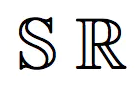
在Latex插入空心字母
$\mathbb{S}$
$\mathbb{R}$
overleaf插入图片
- 插入pdf
\begin{figure}[htbp]
\centerline{\includegraphics[width=0.4\textwidth]{...图片位置...}}
\caption{图片注释内容.}
\label{fig}
\end{figure}
- 插入eps
\begin{figure}
\centering
\includegraphics[width=3.33in, keepaspectratio]{fig_name}
\caption{title}
\end{figure}
- 插入svg
将svg转换为pdf
版权声明:本文为tangyuan0217原创文章,遵循CC 4.0 BY-SA版权协议,转载请附上原文出处链接和本声明。