微信小程序 用fixed设置弹窗蒙层,当弹窗和内容都存在滚动时,滑动弹窗蒙层,下面的页面会有滚动。
解决方式: 主页面用scroll-view标签,弹窗时 scroll-y设置为false
希望的效果是弹窗内能正常滚动,滑动弹窗蒙层,下面页面不会产生滚动。
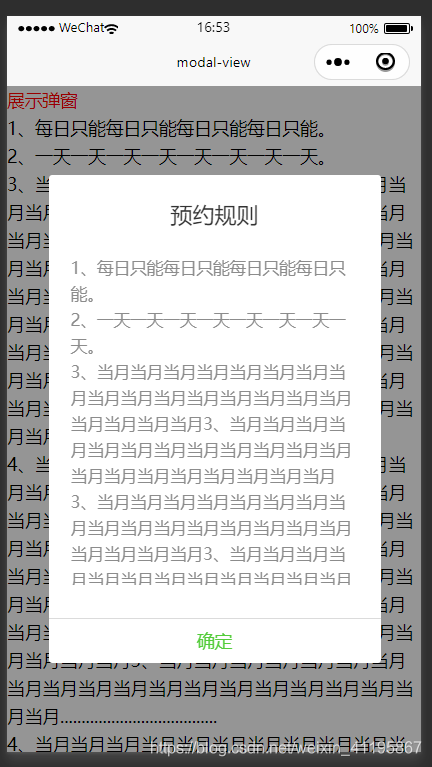
代码块:https://developers.weixin.qq.com/s/SmCJ1smL73mG
https://developers.weixin.qq.com/s/dRtNMlm97mmt
modal.wxml
<scroll-view class="main-view"  scroll-y="{{!modal}}">
	<view>

	    <view class="red" bindtap="handleModal">展示弹窗</view>
	    <view>1、每日只能每日只能每日只能每日只能。</view>
	    <view>2、一天一天一天一天一天一天一天一天。</view>
	    <view>3、当月当月当月当月当月当月当月当月当月当月当月当月当月当月当月当月当月当月当月当月3、当月当月当月当月当月当月当月当月当月当月当月当月当月当月当月当月当月当月当月当月3、当月当月当月当月当月当月当月当月当月当月当月当月当月当月当月当月当月当月当月当月3、当月当月当月当月当月当月当月当月当月当月当月当月当月当月当月当月当月当月当月当月3、当月当月当月当月当月当月当月当月当月当月当月当月当月当月当月当月当月当月当月当月.....................................</view>
	    <view>4、当月当月当月当月当月当月当月当月当月当月当月当月当月当月当月当月当月当月当月当月3、当月当月当月当月当月当月当月当月当月当月当月当月当月当月当月当月当月当月当月当月3、当月当月当月当月当月当月当月当月当月当月当月当月当月当月当月当月当月当月当月当月3、当月当月当月当月当月当月当月当月当月当月当月当月当月当月当月当月当月当月当月当月3、当月当月当月当月当月当月当月当月当月当月当月当月当月当月当月当月当月当月当月当月.....................................</view>
	    <view>4、当月当月当月当月当月当月当月当月当月当月当月当月当月当月当月当月当月当月当月当月3、当月当月当月当月当月当月当月当月当月当月当月当月当月当月当月当月当月当月当月当月3、当月当月当月当月当月当月当月当月当月当月当月当月当月当月当月当月当月当月当月当月3、当月当月当月当月当月当月当月当月当月当月当月当月当月当月当月当月当月当月当月当月3、当月当月当月当月当月当月当月当月当月当月当月当月当月当月当月当月当月当月当月当月.....................................</view>
	    <view class="red" bindtap="handleModal">展示弹窗</view>
	    <view>4、当月当月当月当月当月当月当月当月当月当月当月当月当月当月当月当月当月当月当月当月3、当月当月当月当月当月当月当月当月当月当月当月当月当月当月当月当月当月当月当月当月3、当月当月当月当月当月当月当月当月当月当月当月当月当月当月当月当月当月当月当月当月3、当月当月当月当月当月当月当月当月当月当月当月当月当月当月当月当月当月当月当月当月3、当月当月当月当月当月当月当月当月当月当月当月当月当月当月当月当月当月当月当月当月.....................................</view>
	    <view>4、当月当月当月当月当月当月当月当月当月当月当月当月当月当月当月当月当月当月当月当月3、当月当月当月当月当月当月当月当月当月当月当月当月当月当月当月当月当月当月当月当月3、当月当月当月当月当月当月当月当月当月当月当月当月当月当月当月当月当月当月当月当月3、当月当月当月当月当月当月当月当月当月当月当月当月当月当月当月当月当月当月当月当月3、当月当月当月当月当月当月当月当月当月当月当月当月当月当月当月当月当月当月当月当月.....................................</view>
	    <view>4、当月当月当月当月当月当月当月当月当月当月当月当月当月当月当月当月当月当月当月当月3、当月当月当月当月当月当月当月当月当月当月当月当月当月当月当月当月当月当月当月当月3、当月当月当月当月当月当月当月当月当月当月当月当月当月当月当月当月当月当月当月当月3、当月当月当月当月当月当月当月当月当月当月当月当月当月当月当月当月当月当月当月当月3、当月当月当月当月当月当月当月当月当月当月当月当月当月当月当月当月当月当月当月当月.....................................</view>

	</view>
</scroll-view>


<!-- 弹窗 -->
<view class="model-masking" wx:if="{{modal}}">
  <view class="model-box ">
    <view class="modal-title">预约规则</view>
    <scroll-view class="scroll-view" scroll-y="true" scroll-x="false" >
      <view class="modal-content">
          <view>1、每日只能每日只能每日只能每日只能。</view>
          <view>2、一天一天一天一天一天一天一天一天。</view>
          <view>3、当月当月当月当月当月当月当月当月当月当月当月当月当月当月当月当月当月当月当月当月3、当月当月当月当月当月当月当月当月当月当月当月当月当月当月当月当月当月当月当月当月3、当月当月当月当月当月当月当月当月当月当月当月当月当月当月当月当月当月当月当月当月3、当月当月当月当月当月当月当月当月当月当月当月当月当月当月当月当月当月当月当月当月3、当月当月当月当月当月当月当月当月当月当月当月当月当月当月当月当月当月当月当月当月.....................................</view>
          <view>4、当月当月当月当月当月当月当月当月当月当月当月当月当月当月当月当月当月当月当月当月3、当月当月当月当月当月当月当月当月当月当月当月当月当月当月当月当月当月当月当月当月3、当月当月当月当月当月当月当月当月当月当月当月当月当月当月当月当月当月当月当月当月3、当月当月当月当月当月当月当月当月当月当月当月当月当月当月当月当月当月当月当月当月3、当月当月当月当月当月当月当月当月当月当月当月当月当月当月当月当月当月当月当月当月.....................................</view>
      </view>
    </scroll-view>
    <view class="btn-view">
      <view class="success-btn" style="width:100%" bindtap="handleModal">
        确定
      </view>
    </view>
  </view>
</view>
modal.js
var collarnumservices = require('./../../../services/collarnumservices.js')
var app = getApp()
Page({

    /**
     * 页面的初始数据
     */
    data: {
        modal:true
    },

    /**
     * 生命周期函数--监听页面加载
     */
    onLoad: function (options) {
    },
    handleModal(e){
      this.setData({
        modal: !this.data.modal
      })
    },
    outMove_(e){

    },
.wxss
.main-view{
  max-height: 100%;
}

.red{
  color: red;
}

/* ------弹窗内容----- */
.model-masking{
  position: fixed;
  top: 0;
  left: 0;
  z-index: 900;
  width: 100%;
  height: 100%;
  overflow: hidden;
  background: rgba(0, 0, 0, 0.4);
  display: flex;
  align-items: center;
    touch-action: none;
}
.model-box{
  background: #fff;
  border-radius: 3px;
  margin: 0 auto;
  width: 80%;
  display: block;
  z-index: 999;
}
.model-box .scroll-view{
  max-height: 300px;
  overflow: auto;
}
.modal-title{
    display: block;
    font-size: 20px;
    padding: 20px 20px;
    text-align: center;
    color: #333;
  }
.modal-content{
  display: block;
  padding: 0  20px;
  font-size: 15px;
  color: #8c8c8c;
  font-family: Microsoft YaHei;
}
.btn-view{
  margin-top: 30px;
  text-align: center;
  border-top: 1px solid #dbdbdb;
  height: 40px;
  line-height: 40px;
  font-family: Microsoft YaHei;
  display: flex;
}
.success-btn{
  color: #54CC3A;
}
版权声明:本文为weixin_41195867原创文章,遵循CC 4.0 BY-SA版权协议,转载请附上原文出处链接和本声明。