实现简单版Vuex
实现简单版Vuex
介绍
本文目的是实现一个简易版本的Vuex用以学习,也是对从网课学习的总结和复习。其中内容为简易实现,多有不足之处,请多多交流。
内容拆分
实现Store类
分开保存构造函数参数
维持一个响应式的state
实现commit方法和dispatch方法
实现getters
实现install方法
- 挂载$store
插件测试
先修改插件的引入信息以供实现过程中输出信息查看,也便于发现错误问题。
- 复制store文件夹命名为kstore并修改main.js中引入路径
// 修改前
import store from "./store";
// 修改后
import store from "./kstore";
- 创建kvuex.js并修改kstore/index.js中引入路径
// 修改前
import Vuex from "vuex";
// 修改后
import Vuex from "./kvuex.js";
到此,就修改好了,可以开始插件的实现了。
插件实现
插件构建
首先搭建一个插件的架子,根据上文的内容拆分
主体Store类
install方法
可以得到如下代码
class Store{}
fucntion install(){}
export default {Store,install}
有别于kvue-router的实现方式,原因是vuex在使用上就与VueRouter有所不同。
// vue-router
const router = new VueRouter({...})
export default router
// vuex
export default new Vuex.Store({})
所以vuex要导出的是包含了Store类和install方法的对象。
install方法实现
在install方法中,主要任务是
保存参数中Vue的构造方法
采用mixin混入方式挂载$store
任务内容与kvue-router类似,不在过多赘述。
let Vue;
function install(_Vue) {
  Vue = _Vue;

  Vue.mixin({
    beforeCreate() {
      if (this.$options.store) {
        Vue.prototype.$store = this.$options.store;
      }
    },
  })
}
Store类实现
在Store勒种,主要任务是:
分开保存构造函数参数
维持一个响应式的state
实现commit方法和dispatch方法
实现getters
分开保存构造函数参数
这一任务其实属于优化内容,只是为了代码方便编写,可做可不做。
constructor(options) {
    this._mutations = options.mutations
    this._actions = options.actions
}
这样将参数分开保存,在实现commit和dispatch方法时会更方便。
维持一个响应式的state
使用过vuex的同学都了解,vuex中的数据和页面中的数据一样,改动后都会马上在页面上显示,即都为响应式数据。所以在vuex中要对state里的数据做响应化处理。
但是有两点需要注意
响应化数据但不能被代理
- state里的数据不能通过this.xxx去访问,只能通过this.$store.state.xxx访问。所以在对state数据做响应化处理的时候还要防止state数据被代理到Vue实例上。
不能直接修改state数据
- 实际上通过this.$store.state.xxx是可以直接修改的,但并不建议。原因如下:
Vuex源码中使用watch功能来监听这个state里的数据。注意,这个功能是有缺陷的。如果state里的值为数组,对数组通过下标修改时是无法触发监听的。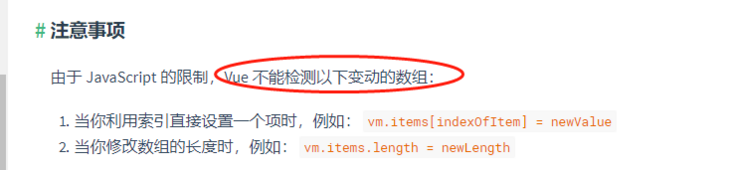
- 我们尽可能的通过commit方法提交mutations中方法才能修改,所以需要设置get、set属性
- 实际上通过this.$store.state.xxx是可以直接修改的,但并不建议。原因如下:
this._vm = new Vue({
    data: {
      $$state: options.state
      // 加上两个$,数据会做响应式处理但没有挂到Vue实例上不会被代理
    }
})
get state(){
  return this._vm._data.$$state;
}
set state(v){
console.log('please use replaceState to reset state');
}
实现commit、dispatch方法
- commit方法用于提交变更数据:commit(type,payload)
constructor(){
  // 绑定上下文
  this.commit = this.commit.bind(this);
}
commit(type, payload) {
    // 获取type在mutations选项中对应的函数并调用
    const fn = this.$options.mutations[type];
    if (!fn) {
      console.error(`${type}方法不存在`);
      return;
    }
    fn(this, this.state, payload);
}
- dispatch方法用于触发actions中有关于异步操作等方法:dispatch(type,payload)
constructor(){
  // 绑定上下文
  this.dispatch = this.dispatch.bind(this);
}
dispatch(type, payload) {
    // 获取type在mutations选项中对应的函数并调用
    const fn = this.$options.actions[type];
    if (!fn) {
      console.error(`${type}方法不存在`);
      return;
    }
    fn(this, payload);
}
实现getters
在这里,我们为了让getters具有缓存的效果,采用计算属性实现getters。
这里缓存效果也可以不用,基本原理都是循环options.getters,通过Object.defineProperty方法给空的getters对象添加属性。
 constructor(options) {
    this._wrapGetters = options.getters;
    this.getters = {};
    const computed = {};
    const store = this;
    Object.keys(this._wrapGetters).forEach(key => {
      const fn = store._wrapGetters[key];
      computed[key] = function () {
        return fn(store.state)
      }
      Object.defineProperty(store.getters, key, {
      // 如果不需要使用计算属性,将store._vm[key]换成fn(store.state)即可
        get: () => store._vm[key]
      })
    })
    // state
    this._vm = new Vue({
      data: {
        $$state: options.state
      },
      computed
    })

}