之前一直用的vue - electron 但可以正常打包win应用 其他版本的打包一直有问题,所以想着重新创建项目用electron- vue ,最终成功脱坑。在这里记录下自己脱坑的日记。为以后遇到同样问题的兄弟们提供个参考。
1、electron 框架安装
目前从网上查的一般是
1.执行 vue init simulatedgreg/electron-vue 但大部分人是下载不下来的。具体原因就不细说
我同样也遇到这个问题,最后查资料 可以直接gitee 上clone electron的项目到本地,然后执行创建electron-vue项目
具体命令
electron-vue gitee 的项目地址: https://gitee.com/mirrors/electron-vue
F:\privateProjects\workspace\project\Elc\ele-vue\electron-vue
是下载下来后的项目路径(根 据 自 己 下 载 的 位 置 自 行 调 整),my-project 是项目名称。
之后根据如下代码,即可快速构建项目模板。
vue init F:\privateProjects\workspace\project\Elc\ele-vue\electron-vue my-project
静等安装完成
2、运行本地创建的项目my-project
2-1、执行命令
npm install
npm run dev
2-2、运行npm run dev 报错
Electron-vue运行时报错“ReferenceError:process is not defined”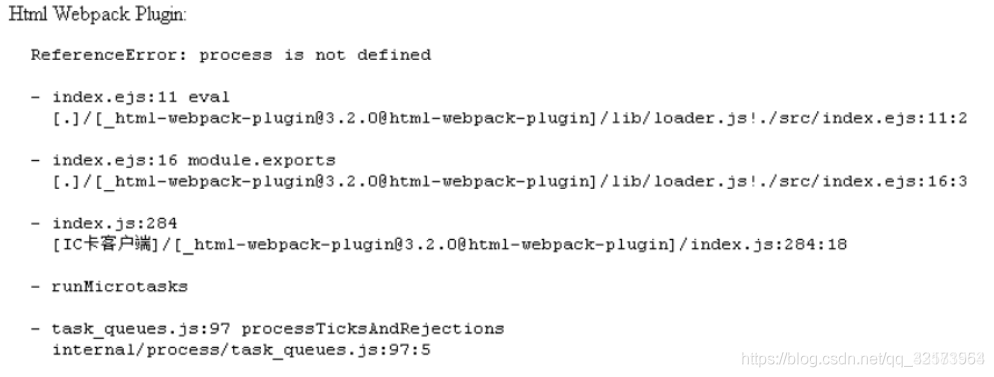
2-3、解决方案:
修改.electron-vue/webpack.web.config.js和.electron-vue/webpack.renderer.config.js文件的HtmlWebpackPlugin,添加templateParameters,如下:
plugins: [
    new VueLoaderPlugin(),
    new MiniCssExtractPlugin({filename: 'styles.css'}),
    new HtmlWebpackPlugin({
      filename: 'index.html',
	  template: path.resolve(__dirname, '../src/index.ejs'),
	  templateParameters(compilation, assets, options) {
        return {
          compilation: compilation,
          webpack: compilation.getStats().toJson(),
          webpackConfig: compilation.options,
          htmlWebpackPlugin: {
            files: assets,
            options: options
          },
          process,
        };
      },
      minify: {
        collapseWhitespace: true,
        removeAttributeQuotes: true,
        removeComments: true
      },
      nodeModules: process.env.NODE_ENV !== 'production'
        ? path.resolve(__dirname, '../node_modules')
        : false
    }),
    new webpack.HotModuleReplacementPlugin(),
    new webpack.NoEmitOnErrorsPlugin()
  ],
然后重新npm run dev 就可以了
3、运行打包命令 npm run build:linux 报错 ,此问题是由于系统打包需要下载环境依赖。但国内下载不下来!
下载tmp-9456-0-electron-v2.0.18-linux-x64.zip 错误:read ECONNRESET
解决方案,从淘宝镜像下载 所需环境依赖包 ,注: 请不要直接复制上边的版本号,由于每个人所用的electron版本不一致,所以请根据自己报错的版本号,到镜像网站搜索下载!
我自己电脑我下载的环境包放在: C:\Users\Administrator.electron 大家根据自己电脑的情况查找具体路径即可
环境包下载镜像网站: https://npm.taobao.org/mirrors/electron/2.0.18/
4、一般接下来执行运行基本打包出来都是OK的。这是本人踩得坑做个记录,也方便他人! 如果能帮助的大家的欢迎给个赞