用户名为学生自己的姓名,密码为学号,如果用户名或者密码不正确,输出用户名错误或者密码错误,第1次第2次输入错误!;第3次输入错误时,提示“用户名和密码输入超过3次错误,登录失败!”;登陆成功后,显示信息位“***同学登录成功”。选择合理的布局方式,实现各按钮的事件处理。
package LoginTestFrame;
import java.awt.event.*;
import java.awt. *;
import javax.swing.*;
public class LoginTestFrame extends JFrame implements ActionListener{
    final int NUMBER=3;
    JTextField inputName=new JTextField (20);
    JPasswordField inputPass=new JPasswordField (20);
    JLabel promptLbl1=new JLabel("用户名");
    JLabel promptLbl2=new JLabel("密码");
    int inputCount=0;
    JPanel  jp1=new JPanel();
    JPanel  jp2=new JPanel();
    JPanel  jp3=new JPanel();
    JButton btn1=new JButton("确定");
    JButton btn2=new JButton("取消");
    LoginTestFrame(){
        super("2021-L-登陆界面");
        setLocationRelativeTo(null);
        setDefaultCloseOperation(JFrame.EXIT_ON_CLOSE);
        setSize(330,200);
        Container ct=this.getContentPane();
        ct.setLayout(new GridLayout(3,1));
        jp1.setLayout(new FlowLayout());
        jp1.add(promptLbl1);
        jp1.add(inputName);
        ct.add(jp1,BorderLayout.NORTH);
        jp2.setLayout(new FlowLayout());
        jp2.add(promptLbl2);
        jp2.add(inputPass);
        ct.add(jp2,BorderLayout.CENTER);
        jp3.setLayout(new FlowLayout());
        jp3.add(btn1);
        jp3.add(btn2);
        ct.add(jp3,BorderLayout.SOUTH);
        btn1.addActionListener(this);
        btn2.addActionListener(this);
        setVisible(true);
    }
    @Override
    public void actionPerformed(ActionEvent e){
        if(e.getSource()==btn1){
            if(inputCount<NUMBER){
                String name=inputName.getText().trim();
                String pass=inputPass.getText().trim();
                if(!name.equals("L")||name.equals("")){
                    inputCount++;
                    String s1="用户名不存在,第"+inputCount+"次输入错误!";
                    JOptionPane.showMessageDialog(null,s1);
                    inputName.setText("");
                    inputPass.setText("");
                }
                else if (!pass.equals("123456")||pass.equals("")){
                    inputCount++;
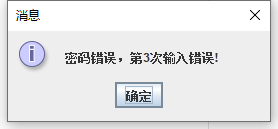
                    String s1="密码错误,第"+inputCount+"次输入错误!";
                    JOptionPane.showMessageDialog(null,s1);
                    inputPass.setText("");
                }
                else{
                    inputCount=0;
                    inputName.setText("");
                    inputPass.setText("");
                    String s1="L同学登录成功";
                    JOptionPane.showMessageDialog(null,s1);
                }
            }else{
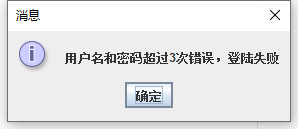
                String s1="用户名和密码超过3次错误,登陆失败";
                JOptionPane.showMessageDialog(null,s1);
                inputName.setText("");
                inputPass.setText("");
            }
        }
        else{
            System.exit(0);
        }
    }
    public static void main (String[] args){
        LoginTestFrame ltf=new LoginTestFrame();
        ltf.setVisible(true);
    }
}
结果运行
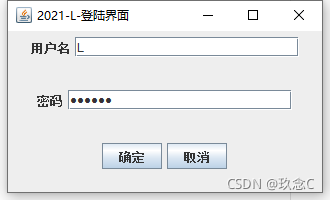
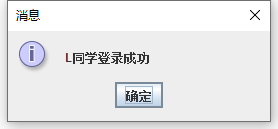
用户名或者密码不正确,输出用户名错误或者密码错误
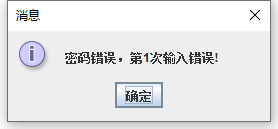
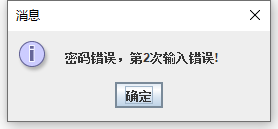
如以上有错误的地方,请在评论区中指出,谢谢!
小可爱们看完点个赞再走一走~~
版权声明:本文为Cap1205467408原创文章,遵循CC 4.0 BY-SA版权协议,转载请附上原文出处链接和本声明。