要实现RichTextBox内容的自滚动,首先要建立一个WPF Application 的工程,这里工程命名为FreeScroll。
1.应用软件:VS2010
2. 程序完成的功能:
2.1 在richtextBox中载入Xaml文件
2.2 设置滚动速度
2.3 滚动
2.4 鼠标双击停止滚动
3. 程序用到的控件:RichTextBox,Button,Label,TextBox
4.程序的实现
4.1 控件布局
WPF中布局好的控件图如下:
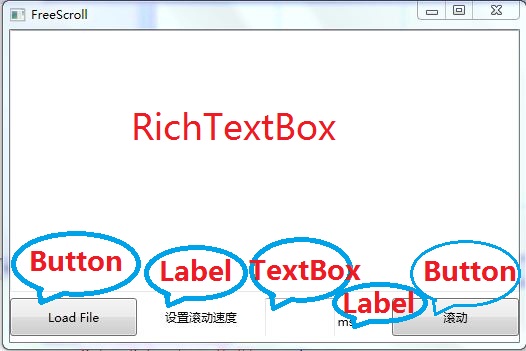
4.2 实现控件的响应函数

 代码
代码namespace FreeScroll {
/// <summary>
/// Interaction logic for MainWindow.xaml
/// </summary>
public partial class MainWindow : Window {
public MainWindow() {
InitializeComponent();
textBox1.Text = "" ;
}
// 载入文件
private void Load_Click( object sender, RoutedEventArgs e) {
tmp = 0 ;
if ( this .timer != null ) { timer.Tick -= new EventHandler(timer_Tick); }
OpenFileDialog openDialog = new OpenFileDialog ();
if (openDialog.ShowDialog() == true )
{
using (FileStream fs = new FileStream (openDialog.FileName,FileMode.Open))
{
richTextBox1.Document = XamlReader.Load(fs) as FlowDocument;
richTextBox1.Background = richTextBox1.Document.Background;
}
}
}
// 实现滚动
private void Scroll_Click( object sender, RoutedEventArgs e) {
if (timer != null )
{
timer.Tick -= new EventHandler (timer_Tick);
}
int timeInterval;
if (textBox1.Text != "" ) {
timeInterval = System.Int32.Parse(textBox1.Text);
if (timeInterval >= 0 ) {
timer.Interval = new TimeSpan( 0 , 0 , 0 , 0 , timeInterval);
timer.Tick += new EventHandler(timer_Tick);
timer.Start();
} else {
MessageBox.Show( " 请输入合适的时间间隔! " );
}
} else {
MessageBox.Show( " 请输入合适的时间间隔! " );
}
}
void timer_Tick( object sender, EventArgs e) {
this .richTextBox1.ScrollToVerticalOffset(tmp ++ );
}
// 鼠标双击停止滚动
private void richTextBox1_MouseDoubleClick( object sender, MouseButtonEventArgs e) {
timer.Tick -= new EventHandler(timer_Tick);
}
double tmp = 0 ;
DispatcherTimer timer = new DispatcherTimer();
}
}
/// <summary>
/// Interaction logic for MainWindow.xaml
/// </summary>
public partial class MainWindow : Window {
public MainWindow() {
InitializeComponent();
textBox1.Text = "" ;
}
// 载入文件
private void Load_Click( object sender, RoutedEventArgs e) {
tmp = 0 ;
if ( this .timer != null ) { timer.Tick -= new EventHandler(timer_Tick); }
OpenFileDialog openDialog = new OpenFileDialog ();
if (openDialog.ShowDialog() == true )
{
using (FileStream fs = new FileStream (openDialog.FileName,FileMode.Open))
{
richTextBox1.Document = XamlReader.Load(fs) as FlowDocument;
richTextBox1.Background = richTextBox1.Document.Background;
}
}
}
// 实现滚动
private void Scroll_Click( object sender, RoutedEventArgs e) {
if (timer != null )
{
timer.Tick -= new EventHandler (timer_Tick);
}
int timeInterval;
if (textBox1.Text != "" ) {
timeInterval = System.Int32.Parse(textBox1.Text);
if (timeInterval >= 0 ) {
timer.Interval = new TimeSpan( 0 , 0 , 0 , 0 , timeInterval);
timer.Tick += new EventHandler(timer_Tick);
timer.Start();
} else {
MessageBox.Show( " 请输入合适的时间间隔! " );
}
} else {
MessageBox.Show( " 请输入合适的时间间隔! " );
}
}
void timer_Tick( object sender, EventArgs e) {
this .richTextBox1.ScrollToVerticalOffset(tmp ++ );
}
// 鼠标双击停止滚动
private void richTextBox1_MouseDoubleClick( object sender, MouseButtonEventArgs e) {
timer.Tick -= new EventHandler(timer_Tick);
}
double tmp = 0 ;
DispatcherTimer timer = new DispatcherTimer();
}
}