最近开发中需要好多各式各样的控件,其中就有一个是日历控件,网络上的自定义日历控件质量参差不齐,看了好多发现源码中都有bug,加上时间比较紧张,就找了一个普通的日历控件,二次封装了一下,希望能给大家提供帮助。(PS:原谅我技术不太好QAQ,但我觉得应该勉强能入眼吧)
//因为是公司项目不方便给大家放项目源码,所以我尽量写的详细一点QAQ 给你们看下效果图,可以左右滑动切换月份
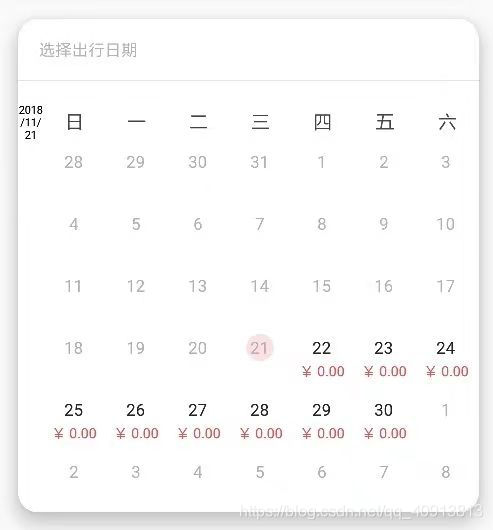
//导入一个依赖
compile 'com.github.codbking:CalendarExaple:v1.0.0'//放这部分布局 CardView是那个外面的圆角布局
                <android.support.v7.widget.CardView
                    android:layout_width="335dp"
                    android:layout_height="wrap_content"
                    android:layout_centerHorizontal="true"
                    android:layout_marginTop="25dp"
                    app:cardCornerRadius="14dp"
                    app:cardElevation="10dp"
                    android:layout_gravity="center">
                    <LinearLayout
                        android:layout_width="match_parent"
                        android:layout_height="wrap_content"
                        android:orientation="vertical">
                        <RelativeLayout
                            android:layout_width="match_parent"
                            android:layout_height="44dp">
                            <TextView
                                android:layout_width="wrap_content"
                                android:layout_height="wrap_content"
                                android:text="选择出行日期"
                                android:layout_centerVertical="true"
                                android:layout_marginLeft="15dp"
                                android:textColor="@color/gray_B1"
                                android:textSize="@dimen/text_12_sp"/>
                        </RelativeLayout>
                        <View
                            android:layout_width="match_parent"
                            android:layout_height="1dp"
                            android:background="@color/gray_E2E3E7"/>
                        <LinearLayout
                            android:layout_width="match_parent"
                            android:layout_height="wrap_content"
                            android:orientation="horizontal"
                            android:layout_marginTop="15dp">
                            <LinearLayout
                                android:layout_width="18dp"
                                android:layout_height="wrap_content"
                                android:gravity="center_vertical"
                                android:orientation="horizontal">
                                <TextView
                                    android:id="@+id/title"
                                    android:layout_width="0dp"
                                    android:layout_height="match_parent"
                                    android:layout_weight="1"
                                    android:gravity="center"
                                    android:text="2016/10/10"
                                    android:textColor="#000"
                                    android:textSize="8sp"/>
                            </LinearLayout>

                            <LinearLayout
                                android:layout_width="match_parent"
                                android:layout_height="wrap_content"
                                android:orientation="vertical">
                                <LinearLayout
                                    android:layout_width="match_parent"
                                    android:layout_height="28dp"
                                    android:orientation="horizontal"
                                    >

                                    <TextView
                                        android:layout_width="0dp"
                                        android:layout_height="match_parent"
                                        android:layout_weight="1"
                                        android:gravity="center"
                                        android:text="日"
                                        android:textColor="#444444"
                                        />

                                    <TextView
                                        android:layout_width="0dp"
                                        android:layout_height="match_parent"
                                        android:layout_weight="1"
                                        android:gravity="center"
                                        android:text="一"
                                        android:textColor="#444444"
                                        />

                                    <TextView
                                        android:layout_width="0dp"
                                        android:layout_height="match_parent"
                                        android:layout_weight="1"
                                        android:gravity="center"
                                        android:text="二"
                                        android:textColor="#444444"
                                        />

                                    <TextView
                                        android:layout_width="0dp"
                                        android:layout_height="match_parent"
                                        android:layout_weight="1"
                                        android:gravity="center"
                                        android:text="三"
                                        android:textColor="#444444"
                                        />

                                    <TextView
                                        android:layout_width="0dp"
                                        android:layout_height="match_parent"
                                        android:layout_weight="1"
                                        android:gravity="center"
                                        android:text="四"
                                        android:textColor="#444444"
                                        />

                                    <TextView
                                        android:layout_width="0dp"
                                        android:layout_height="match_parent"
                                        android:layout_weight="1"
                                        android:gravity="center"
                                        android:text="五"
                                        android:textColor="#444444"
                                        />

                                    <TextView
                                        android:layout_width="0dp"
                                        android:layout_height="match_parent"
                                        android:layout_weight="1"
                                        android:gravity="center"
                                        android:text="六"
                                        android:textColor="#444444"
                                        />

                                </LinearLayout>
                                <com.ctsmedia.hltravel.canelndar.MyCalendarDateView
                                    android:id="@+id/calendarDateView"
                                    android:layout_width="match_parent"
                                    android:layout_height="wrap_content"/>
                            </LinearLayout>


                        </LinearLayout>
                    </LinearLayout>
                </android.support.v7.widget.CardView>
//自定义类 MyCalendarDateView
public class MyCalendarDateView extends ViewPager implements CalendarTopView {

    HashMap<Integer, CalendarView> views = new HashMap<>();
    private CaledarTopViewChangeListener mCaledarLayoutChangeListener;
    private CalendarView.OnItemClickListener onItemClickListener;

    private LinkedList<CalendarView> cache = new LinkedList();

    private int MAXCOUNT=6;


    private int row = 6;

    private CaledarAdapter mAdapter;
    private int calendarItemHeight = 0;

    public void setAdapter(CaledarAdapter adapter) {
        mAdapter = adapter;
        initData();
    }

    public void setOnItemClickListener(CalendarView.OnItemClickListener onItemClickListener) {
        this.onItemClickListener = onItemClickListener;
    }

    public MyCalendarDateView(Context context, AttributeSet attrs) {
        super(context, attrs);
        TypedArray a = context.obtainStyledAttributes(attrs, R.styleable.CalendarDateView);
        row = a.getInteger(R.styleable.CalendarDateView_cbd_calendar_row, 6);
        a.recycle();
        init();
    }

    @Override
    protected void onMeasure(int widthMeasureSpec, int heightMeasureSpec) {
        super.onMeasure(widthMeasureSpec, heightMeasureSpec);

        int calendarHeight = 0;
        if (getAdapter() != null) {
            CalendarView view = (CalendarView) getChildAt(0);
            if (view != null) {
                calendarHeight = view.getMeasuredHeight();
                calendarItemHeight = view.getItemHeight();
            }
        }
        setMeasuredDimension(widthMeasureSpec, MeasureSpec.makeMeasureSpec(calendarHeight, MeasureSpec.EXACTLY));
    }

    private void init() {
        final int[] dateArr= CalendarUtil.getYMD(new Date());

        setAdapter(new PagerAdapter() {
            @Override
            public int getCount() {
                return Integer.MAX_VALUE;
            }

            @Override
            public boolean isViewFromObject(View view, Object object) {
                return view == object;
            }

            @Override
            public Object instantiateItem(ViewGroup container, final int position) {

                CalendarView view;

                if (!cache.isEmpty()) {
                    view = cache.removeFirst();
                } else {
                    view = new CalendarView(container.getContext(), row);
                }

                view.setOnItemClickListener(onItemClickListener);
                view.setAdapter(mAdapter);

                view.setData(getMonthOfDayList(dateArr[0],dateArr[1]+position-Integer.MAX_VALUE/2),position==Integer.MAX_VALUE/2);
                container.addView(view);
                views.put(position, view);

                return view;
            }

            @Override
            public void destroyItem(ViewGroup container, int position, Object object) {
                container.removeView((View) object);
                cache.addLast((CalendarView) object);
                views.remove(position);
            }
        });

        addOnPageChangeListener(new SimpleOnPageChangeListener() {
            @Override
            public void onPageSelected(int position) {
                super.onPageSelected(position);

                if (onItemClickListener != null) {
                    CalendarView view = views.get(position);
                    Object[] obs = view.getSelect();
                    onItemClickListener.onItemClick((View) obs[0], (int) obs[1], (CalendarBean) obs[2]);


                }
                if(mCaledarLayoutChangeListener!=null){
                    mCaledarLayoutChangeListener.onLayoutChange(MyCalendarDateView.this);
                }

            }
        });
    }


    private void initData() {
        setCurrentItem(Integer.MAX_VALUE/2, false);
        getAdapter().notifyDataSetChanged();

    }

    @Override
    public int[] getCurrentSelectPositon() {
        CalendarView view = views.get(getCurrentItem());
        if (view == null) {
            view = (CalendarView) getChildAt(0);
        }
        if (view != null) {
            return view.getSelectPostion();
        }
        return new int[4];
    }

    @Override
    public int getItemHeight() {
        return calendarItemHeight;
    }

    @Override
    public void setCaledarTopViewChangeListener(CaledarTopViewChangeListener listener) {
        mCaledarLayoutChangeListener = listener;
    }


}
//我是从后台拿到的价格和 XX-XX-XX格式的日期 因为基于选的的这个控件不大好,我是在上个界面请求,传过来的数据
//在initDta的时候就先设置日历的适配器 不要忘记先初始化这个控件哦
        mCalendarDateView.setAdapter(new CaledarAdapter() {
            @Override
            public View getView(View convertView, ViewGroup parentView, CalendarBean bean) {

                if (convertView == null) {
                    convertView = LayoutInflater.from(parentView.getContext()).inflate(R.layout.item_xiaomi, null);
                }

                TextView chinaText = (TextView) convertView.findViewById(R.id.chinaText);
                TextView text = (TextView) convertView.findViewById(R.id.text);

                text.setText("" + bean.day);
                if (bean.mothFlag != 0) {
                    text.setTextColor(0xff9299a1);
                } else {
                    text.setTextColor(0xff444444);
                }
                int flag=0;//默认不同
                String price="";
                for (int i=0;i<datePriceList.size();i++){
                    //判断日期是否相同
                    String string = datePriceList.get(i).getStartDate();
                    String[] split = string.split("-");
                    Log.e("tuanzi","第"+i+"日历="+split[0]+","+split[1]+","+split[2]);
                    if (split[0].equals(bean.year+"")&&split[1].equals(bean.moth+"")&&split[2].equals(bean.day+"")){
                        flag=1;
                        price="¥ "+datePriceList.get(i).getRoomPrice();
                    }
                }
                if (flag==1){
                    chinaText.setText(price);
                    Log.e("tuanzi","这个日期:"+bean.moth+":"+bean.day+"="+price);
                    text.setTextColor(getResources().getColor(R.color.black_7));
                }else {
                    chinaText.setText("");
                    text.setTextColor(getResources().getColor(R.color.gray_B1));
                }

                return convertView;
            }
        });
//设置完适配器就开始设置点击事件吧
        mCalendarDateView.setOnItemClickListener(new CalendarView.OnItemClickListener() {
            @Override
            public void onItemClick(View view, int postion, CalendarBean bean) {
                int flag=0;//默认不同
                String price="";
                for (int i=0;i<datePriceList.size();i++){
                    //判断日期是否相同
                    String string = datePriceList.get(i).getStartDate();
                    String[] split = string.split("-");
                    Log.e("tuanzi","第"+i+"日历="+split[0]+","+split[1]+","+split[2]);
                    if (split[0].equals(bean.year+"")&&split[1].equals(bean.moth+"")&&split[2].equals(bean.day+"")){
                        flag=1;
                        price=datePriceList.get(i).getRoomPrice();
                        roomPrice = Double.valueOf(datePriceList.get(i).getRoomPrice());
                        skuid = datePriceList.get(i).getId();
                    }
                }
                mTitle.setText(bean.year + "/" + bean.moth + "/" + bean.day);
                if (price!=null&&!price.isEmpty()){
                    jiaqianzonghe.setText("¥ "+price);
                }else {
                    jiaqianzonghe.setText("¥ 0.00");
                }


            }
        });

        int[] data = CalendarUtils.getYMD(new Date());
        mTitle.setText(data[0] + "/" + data[1] + "/" + data[2]);
//item_xiaomi布局
<LinearLayout xmlns:android="http://schemas.android.com/apk/res/android"
              android:layout_width="match_parent"
              android:layout_height="48dp"
              android:gravity="center"
              android:orientation="vertical">
    <TextView
        android:id="@+id/text"
        android:layout_width="20dp"
        android:layout_height="20dp"
        android:gravity="center"
        android:textSize="12dp"
        android:layout_gravity="center"
        android:background="@drawable/background_item_xiaomi"/>

    <TextView
        android:id="@+id/chinaText"
        android:layout_width="wrap_content"
        android:layout_height="wrap_content"
        android:gravity="center"
        android:textSize="10sp"
        android:textColor="@color/red_E9453"/>

</LinearLayout>
//点击选中时文字背景变色 background_item_xiaomi
<?xml version="1.0" encoding="utf-8"?>
<selector xmlns:android="http://schemas.android.com/apk/res/android">
    <item android:state_selected="true">
        <shape android:shape="oval">
            <solid android:color="#fce0e3"/>
        </shape>
    </item>

    <item android:drawable="@android:color/transparent"/>
</selector>
//就这样很简单的完成了哦,是不是敲容易咧~~
版权声明:本文为qq_40913813原创文章,遵循CC 4.0 BY-SA版权协议,转载请附上原文出处链接和本声明。