很久没有使用过react项目了,今天要测试下多模块包的项目的打包配置,折腾了很久终于把项目架子搭建出来了,其实不难,主要就是各种版本的loader兼容性问题,版本太多了,处理起来有点乱!
1.package.json文件,现在是版本是兼容好的
{
  "scripts": {
    "build": "webpack --config ./build/webpack.pro.config.js",
    "dev": "webpack-dev-server --inline --progress --config ./build/webpack.dev.config.js"
  },
  "devDependencies": {
    "@babel/core": "^7.14.6",
    "@babel/preset-env": "^7.14.5",
    "@babel/preset-react": "^7.14.5",
    "babel-loader": "^8.2.2",
    "css-loader": "^5.2.6",
    "file-loader": "^6.2.0",
    "html-webpack-plugin": "^3.1.10",
    "sass": "^1.35.1",
    "sass-loader": "^8.0.0",
    "style-loader": "^2.0.0",
    "url-loader": "^4.1.1",
    "webpack": "^4.46.0",
    "webpack-cli": "^3.1.2",
    "webpack-dev-server": "^3.11.2",
    "webpack-merge": "^5.8.0"
  },
  "dependencies": {
    "react": "^17.0.2",
    "react-dom": "^17.0.2"
  }
}
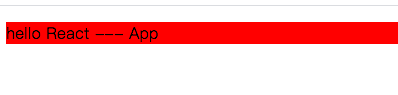
运行成功的效果,当然还有其他的配置没处理,可以自己按需加进去
2.webpack.base.config.js
const utils = require("../utils");
console.log(`utils.join`, utils.join);
module.exports = {
  // 入口
  entry: {
    app: "./src/index",
  },
  // 出口
  output: {
    path: utils.resolve("../dist"),
    filename: "js/[name].[hash:8].js",
    publicPath: "/", // 打包后的资源的访问路径前缀
  },
  resolve: {
    extensions: [".js", ".json"], // 解析扩展。(当我们通过路导入文件,找不到改文件时,会尝试加入这些后缀继续寻找文件)
    alias: {
      "@a": utils.resolve("../src/assets"), // 在项目中使用@符号代替src路径,导入文件路径更方便
    },
  },
  // 模块
  module: {
    // 模块
    rules: [
      {
        test: /\.(js|jsx)$/,
        exclude: /(node_modules|bower_components)/,
        use: {
          loader: "babel-loader",
          options: {
            presets: ["@babel/preset-react"],
          },
        },
      },
      {
        test: /\.scss$/,
        use: [
          // fallback to style-loader in development
          "style-loader",
          "css-loader",
          "sass-loader",
        ],
      },
      {
        test: /\.(png|jpe?g|gif|svg)(\?.*)?$/,
        loader: "url-loader",
        options: {
          limit: 10000, // url-loader 包含file-loader,这里不用file-loader, 小于10000B的图片base64的方式引入,大于10000B的图片以路径的方式导入
          name: "static/img/[name].[hash:7].[ext]",
        },
      },
    ],
  },
};
2.webpack.dev.config.js
const HtmlWebpackPlugin = require("html-webpack-plugin");
const baseWebpackConfig = require("./webpack.base.config");
const { merge } = require("webpack-merge");
const webpack = require("webpack");
const devConfig = {
  mode: "development",

  // 插件
  plugins: [
    new HtmlWebpackPlugin({
      filename: "index.html",
      template: "./index.html",
      inject: true,
      hash: true,
      /* minify: {
        removeComments: true, //去注释
        collapseWhitespace: true, //压缩空格
        removeAttributeQuotes: true,
      }, */
    }),
    new webpack.HotModuleReplacementPlugin(),
    new webpack.NamedModulesPlugin(),
  ],
  // 开发环境本地启动的服务配置
  devServer: {
    historyApiFallback: true, // 当找不到路径的时候,默认加载index.html文件
    hotOnly: true, //关闭热替换 注释掉这行就行
    open: true,
    contentBase: false, // 告诉服务器从哪里提供内容。只有在你想要提供静态文件时才需要
    compress: true, // 一切服务都启用gzip 压缩:
    port: "8080", // 指定段靠谱
    publicPath: "/", // 访问资源加前缀
    proxy: {
      // 接口请求代理
    },
  },
};

module.exports = merge(baseWebpackConfig, devConfig);
3.webpack.pro.config.js
const HtmlWebpackPlugin = require("html-webpack-plugin");
const baseWebpackConfig = require("./webpack.base.config");
const { merge } = require("webpack-merge");
const proConfig = {
  mode: "production",
  // 模块
  module: {},
  // 插件
  plugins: [
    new HtmlWebpackPlugin({
      filename: "index.html",
      template: "./index.html",
      inject: true,
      hash: true,
      minify: {
        removeComments: true, //去注释
        collapseWhitespace: true, //压缩空格
        removeAttributeQuotes: true,
      },
    }),
  ],
  // 开发环境本地启动的服务配置
  devServer: {},
};

module.exports = merge(baseWebpackConfig, proConfig);
4.src/index.js
import React from "react";
import ReactDom from "react-dom";
import App from "./App.js";

ReactDom.render(<App />, document.getElementById("app"));

if (module.hot) {
  console.log(`我被更新了`);
  module.hot.accept("./test", () => {
    const nextComponent = component();
    document.body.replaceChild(nextComponent, demoComponent);
    demoComponent = nextComponent;
  });
}
5.src/App.js
import React from "react";

export default class App extends React.Component {
  render() {
    return (
      <div className="test test2">
        <p>hello React --- App</p>
      </div>
    );
  }
}
整个项目的雏形结构设计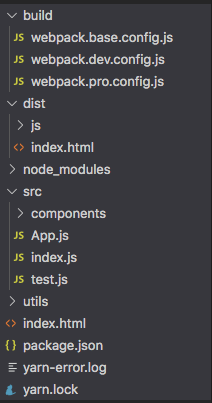
版权声明:本文为qq_27702739原创文章,遵循CC 4.0 BY-SA版权协议,转载请附上原文出处链接和本声明。