Spring Security 用户名密码登录源码解析
简介
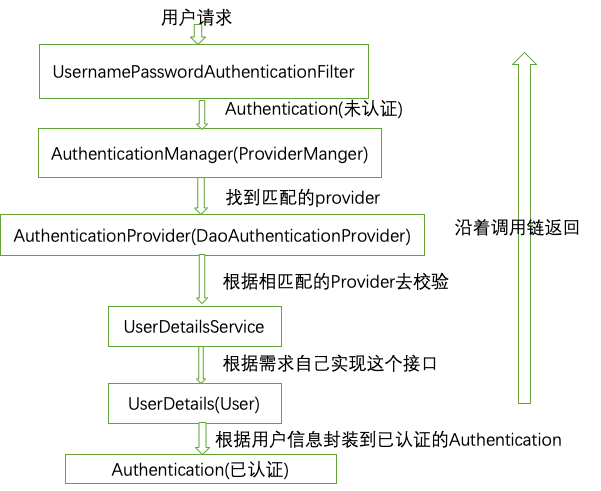
本文主要讲解SpringSecurity中账号密码登录部分的源码解析,其基本流程如下图所示。用户请求首先会进入到UsernamePasswordAuthenticationFilter中,此时的Authentication是未认证的。接着通过ProviderManager找到匹配的Provider,此处找到是DaoAuthenticationProvider,接着去校验相关相关逻辑。UserDetailService需要自己实现这个接口,在这里主要是通过用户名加载密码,并且返回实现了UserDetails接口的对象。最后根据用户信息封装到Authentication对象中。沿着调用链返回时最后会经过
SecurityContexPersistenceFilter。该过滤器在过滤器链的最前面,当请求过来的时候检查Session里是否有SecurityContex,有的话则拿出来放到线程里。如果没有则通过。最后返回时经过该过滤器时,如果有SecurityContex则拿出来放到Session中。
源码详情
UsernamePasswordAuthenticationFilter
该类的attemptAuthentication方法主要从request中获取账号密码,访问IP地址,sessionId等信息构造成未经过认证的Authentication.然后调用ProviderManager中的authenticate方法,并将Authentication对象作为参数传进去
public Authentication attemptAuthentication(HttpServletRequest request,
      HttpServletResponse response) throws AuthenticationException {
   if (postOnly && !request.getMethod().equals("POST")) {
      throw new AuthenticationServiceException(
            "Authentication method not supported: " + request.getMethod());
   }

   String username = obtainUsername(request);
   String password = obtainPassword(request);

   if (username == null) {
      username = "";
   }

   if (password == null) {
      password = "";
   }

   username = username.trim();

   UsernamePasswordAuthenticationToken authRequest = new UsernamePasswordAuthenticationToken(
         username, password);

   // Allow subclasses to set the "details" property
   // 将一些机器ip,session等存入authRequest
   setDetails(request, authRequest);

   return this.getAuthenticationManager().authenticate(authRequest);
}
ProviderManager
遍历AuthenticationProvider的实现类,校验的逻辑都在这些实现类中,挨个判断这些provider能否支持当前的这个authentication类型
public Authentication authenticate(Authentication authentication)
      throws AuthenticationException {
   Class<? extends Authentication> toTest = authentication.getClass();
   AuthenticationException lastException = null;
   Authentication result = null;
   boolean debug = logger.isDebugEnabled();
    //遍历AuthenticationProvider的实现类,校验的逻辑都在这些实现类中,
    //挨个判断这些provider能否支持当前的这个authentication类型
   for (AuthenticationProvider provider : getProviders()) {
      if (!provider.supports(toTest)) {
         continue;
      }

      if (debug) {
         logger.debug("Authentication attempt using "
               + provider.getClass().getName());
      }

      try {
      //AbstractUserDetailsAuthenticationProvider具体调用这里的方法
         result = provider.authenticate(authentication);

         if (result != null) {
            copyDetails(authentication, result);
            break;
         }
      }
      catch (AccountStatusException e) {
         prepareException(e, authentication);
         // SEC-546: Avoid polling additional providers if auth failure is due to
         // invalid account status
         throw e;
      }
      catch (InternalAuthenticationServiceException e) {
         prepareException(e, authentication);
         throw e;
      }
      catch (AuthenticationException e) {
         lastException = e;
      }
   }

   if (result == null && parent != null) {
      // Allow the parent to try.
      try {
         result = parent.authenticate(authentication);
      }
      catch (ProviderNotFoundException e) {
         // ignore as we will throw below if no other exception occurred prior to
         // calling parent and the parent
         // may throw ProviderNotFound even though a provider in the child already
         // handled the request
      }
      catch (AuthenticationException e) {
         lastException = e;
      }
   }

   if (result != null) {
      if (eraseCredentialsAfterAuthentication
            && (result instanceof CredentialsContainer)) {
         // Authentication is complete. Remove credentials and other secret data
         // from authentication
         ((CredentialsContainer) result).eraseCredentials();
      }

      eventPublisher.publishAuthenticationSuccess(result);
      return result;
   }

   // Parent was null, or didn't authenticate (or throw an exception).

   if (lastException == null) {
      lastException = new ProviderNotFoundException(messages.getMessage(
            "ProviderManager.providerNotFound",
            new Object[] { toTest.getName() },
            "No AuthenticationProvider found for {0}"));
   }

   prepareException(lastException, authentication);

   throw lastException;
}
AbstractUserDetailsAuthenticationProvider
上述代码中result = provider.authenticate(authentication); authenticate方法在该抽象类中。该方法先获取User对象,然后实现预检查,检查isAccountNonLocked(),isEnabled(),isAccountNonExpired(),
再检查密码是否匹配,具体实现在DaoAuthenticationProvider中,最后再检查isCredentialsNonExpired字段,所有检查都通过则认为用户认证成功了。如果认证成功则根据用户信息,真正请求的信息,创建一个success的Authentication。
public Authentication authenticate(Authentication authentication)
      throws AuthenticationException {
   Assert.isInstanceOf(UsernamePasswordAuthenticationToken.class, authentication,
         messages.getMessage(
               "AbstractUserDetailsAuthenticationProvider.onlySupports",
               "Only UsernamePasswordAuthenticationToken is supported"));

   // Determine username
   String username = (authentication.getPrincipal() == null) ? "NONE_PROVIDED"
         : authentication.getName();

   boolean cacheWasUsed = true;
   UserDetails user = this.userCache.getUserFromCache(username);

   if (user == null) {
      cacheWasUsed = false;

      try {
        //获取User对象
         user = retrieveUser(username,
               (UsernamePasswordAuthenticationToken) authentication);
      }
      catch (UsernameNotFoundException notFound) {
         logger.debug("User '" + username + "' not found");

         if (hideUserNotFoundExceptions) {
            throw new BadCredentialsException(messages.getMessage(
                  "AbstractUserDetailsAuthenticationProvider.badCredentials",
                  "Bad credentials"));
         }
         else {
            throw notFound;
         }
      }

      Assert.notNull(user,
            "retrieveUser returned null - a violation of the interface contract");
   }

   try {
      //实现预检查,检查isAccountNonLocked(),isEnabled(),isAccountNonExpired()
      preAuthenticationChecks.check(user);
      //检查密码是否匹配,具体实现在DaoAuthenticationProvider中
      additionalAuthenticationChecks(user,
            (UsernamePasswordAuthenticationToken) authentication);
   }
   catch (AuthenticationException exception) {
      if (cacheWasUsed) {
         // There was a problem, so try again after checking
         // we're using latest data (i.e. not from the cache)
         cacheWasUsed = false;
         user = retrieveUser(username,
               (UsernamePasswordAuthenticationToken) authentication);
         preAuthenticationChecks.check(user);
         additionalAuthenticationChecks(user,
               (UsernamePasswordAuthenticationToken) authentication);
      }
      else {
         throw exception;
      }
   }
   //最后再检查isCredentialsNonExpired字段,所有检查都通过则认为用户认证成功了
   postAuthenticationChecks.check(user);

   if (!cacheWasUsed) {
      this.userCache.putUserInCache(user);
   }

   Object principalToReturn = user;

   if (forcePrincipalAsString) {
      principalToReturn = user.getUsername();
   }
//最后根据用户信息,真正请求的信息,创建一个success的Authentication
   return createSuccessAuthentication(principalToReturn, authentication, user);
}

protected Authentication createSuccessAuthentication(Object principal,
      Authentication authentication, UserDetails user) {
   // Ensure we return the original credentials the user supplied,
   // so subsequent attempts are successful even with encoded passwords.
   // Also ensure we return the original getDetails(), so that future
   // authentication events after cache expiry contain the details
   // 主要加入user中的用户权限信息
   UsernamePasswordAuthenticationToken result = new UsernamePasswordAuthenticationToken(
         principal, authentication.getCredentials(),
         authoritiesMapper.mapAuthorities(user.getAuthorities()));
   result.setDetails(authentication.getDetails());

   return result;
}
DaoAuthenticationProvider
该类继承了AbstractUserDetailsAuthenticationProvider,并且实现了retrieveUser方法,该方法则会调用到我们自己实现了UserDetailsServices接口的类,通过loadUserByUsername方法获得实现了UserDetails接口的类,这里的默认实现是User类。
protected final UserDetails retrieveUser(String username,
      UsernamePasswordAuthenticationToken authentication)
      throws AuthenticationException {
   UserDetails loadedUser;

   try {
      loadedUser = this.getUserDetailsService().loadUserByUsername(username);
   }
   catch (UsernameNotFoundException notFound) {
      if (authentication.getCredentials() != null) {
         String presentedPassword = authentication.getCredentials().toString();
         passwordEncoder.isPasswordValid(userNotFoundEncodedPassword,
               presentedPassword, null);
      }
      throw notFound;
   }
   catch (Exception repositoryProblem) {
      throw new InternalAuthenticationServiceException(
            repositoryProblem.getMessage(), repositoryProblem);
   }

   if (loadedUser == null) {
      throw new InternalAuthenticationServiceException(
            "UserDetailsService returned null, which is an interface contract violation");
   }
   return loadedUser;
}
AbstractAuthenticationProcessingFilter
如果成功则调用AbstractAuthenticationProcessingFilter的successfulAuthentication方法。方法如果失败则调用AbstractAuthenticationProcessingFilter的unsuccessfulAuthentication方法。successfulAuthentication,unsuccessfulAuthentication中可以调用自己的处理成功或者失败的处理器。即通过以下这两行代码
- successHandler.onAuthenticationSuccess(request, response, authResult);
- failureHandler.onAuthenticationFailure(request, response, failed);
public void doFilter(ServletRequest req, ServletResponse res, FilterChain chain)
      throws IOException, ServletException {

   HttpServletRequest request = (HttpServletRequest) req;
   HttpServletResponse response = (HttpServletResponse) res;

   if (!requiresAuthentication(request, response)) {
      chain.doFilter(request, response);

      return;
   }

   if (logger.isDebugEnabled()) {
      logger.debug("Request is to process authentication");
   }

   Authentication authResult;

   try {
      authResult = attemptAuthentication(request, response);
      if (authResult == null) {
         // return immediately as subclass has indicated that it hasn't completed
         // authentication
         return;
      }
      sessionStrategy.onAuthentication(authResult, request, response);
   }
   catch (InternalAuthenticationServiceException failed) {
      logger.error(
            "An internal error occurred while trying to authenticate the user.",
            failed);
      unsuccessfulAuthentication(request, response, failed);

      return;
   }
   catch (AuthenticationException failed) {
      // Authentication failed
      unsuccessfulAuthentication(request, response, failed);

      return;
   }

   // Authentication success
   if (continueChainBeforeSuccessfulAuthentication) {
      chain.doFilter(request, response);
   }

   successfulAuthentication(request, response, chain, authResult);
}
protected void successfulAuthentication(HttpServletRequest request,
      HttpServletResponse response, FilterChain chain, Authentication authResult)
      throws IOException, ServletException {

   if (logger.isDebugEnabled()) {
      logger.debug("Authentication success. Updating SecurityContextHolder to contain: "
            + authResult);
   }

   SecurityContextHolder.getContext().setAuthentication(authResult);

   rememberMeServices.loginSuccess(request, response, authResult);

   // Fire event
   if (this.eventPublisher != null) {
      eventPublisher.publishEvent(new InteractiveAuthenticationSuccessEvent(
            authResult, this.getClass()));
   }
// 调用自己写的成功的处理器
   successHandler.onAuthenticationSuccess(request, response, authResult);
}

protected void unsuccessfulAuthentication(HttpServletRequest request,
      HttpServletResponse response, AuthenticationException failed)
      throws IOException, ServletException {
   SecurityContextHolder.clearContext();

   if (logger.isDebugEnabled()) {
      logger.debug("Authentication request failed: " + failed.toString(), failed);
      logger.debug("Updated SecurityContextHolder to contain null Authentication");
      logger.debug("Delegating to authentication failure handler " + failureHandler);
   }

   rememberMeServices.loginFail(request, response);

   failureHandler.onAuthenticationFailure(request, response, failed);
}
SecurityContexPersistenceFilter
该过滤器在过滤器链的最前面,当请求过来的时候检查Session里是否有SecurityContex,有的话则拿出来放到线程里。如果没有则通过。最后返回时经过该过滤器时,如果有SecurityContex则拿出来放到Session中。
protected void successfulAuthentication(HttpServletRequest request,
      HttpServletResponse response, FilterChain chain, Authentication authResult)
      throws IOException, ServletException {

   if (logger.isDebugEnabled()) {
      logger.debug("Authentication success. Updating SecurityContextHolder to contain: "
            + authResult);
   }
    //将认证成功的Authentication放到securityContex中,再将securityContex放到SecurityContextHolder中
   SecurityContextHolder.getContext().setAuthentication(authResult);

   rememberMeServices.loginSuccess(request, response, authResult);

   // Fire event
   if (this.eventPublisher != null) {
      eventPublisher.publishEvent(new InteractiveAuthenticationSuccessEvent(
            authResult, this.getClass()));
   }

   successHandler.onAuthenticationSuccess(request, response, authResult);
}