Hive常用技巧记录
https://cwiki.apache.org/confluence/display/Hive/LanguageManual+UDF
一、函数部分
1. 时间函数
-- 2021-12-17 12:35:31.123,含毫秒格式,screenshottime是map字段
select
  from_unixtime(cast(screenshottime as bigint) / 1000,'yyyy-MM-dd HH:mm:ss.sss') as screenshottime
from (select 1612851637476 as screenshottime) a
;

with a as (
select '20220310' dt
union all
select '2022-03-07' dt
)
select dt
,regexp_replace(dt,'-','')
,from_unixtime(unix_timestamp(regexp_replace(dt,'-',''),'yyyymmdd'),'yyyy-mm-dd')
,case when length(dt)=8 then from_unixtime(unix_timestamp(dt,'yyyymmdd'),'yyyy-mm-dd')
  else dt
 end
from a
;

2. 拆分函数
select
  param
 ,split(param,'&') aab
 ,concat_ws(',',split(param,'&'))
 ,str_to_map(concat_ws(',',split(param,'&')) ,',','=') as jsonparam
 ,size(str_to_map(concat_ws(',',split(param,'&')) ,',','='))
from (select '?type=onlineProductPageList&tag=0&productId=166&productType=Online' param ) a

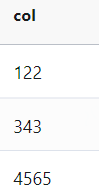
3. 列转行函数
select explode(split(concat_ws(',',122,343,4565),',')) ;
4. 行转列函数
注:本例将除uid之外的列都转到行,其中collect_set会去重,collect_list不会去重
with t as (
select 1101 uid ,-1 cityid,'F' value,1066 labelid   -- 性别
union all
select 1111 uid ,-1 cityid,'M' value,1066 labelid
union all
select 1111 uid ,-1 cityid,'55' value,1175 labelid   -- 年龄
union all
select 1101 uid ,-1 cityid,'28' value,1175 labelid
)
,t1 (
select
   concat('"uid":','"',uid,'"') as uid
   ,explode(
             split(
                     concat_ws(','
                               ,concat('"cityid":','"',cityid,'"')
                               ,concat('"labelid":','"',labelid,'"')
                               ,concat('"value":','"',value,'"')
                              )
                    ,','
                  )
          ) col
from t
)
select
  uid,collect_set(col)
from t1
group by uid
;

4.1 string 类型list 现行行转列
with t as (
select '["621","32"]' col
)
select
  col
  ,regexp_replace(col,'\\[|\\]','') col1
  ,split(regexp_replace(col,'\\[|\\]',''),',') col2
  ,explode(split(regexp_replace(col,'\\[|\\]',''),',')) col3
from t

5. json格式字符串作为列进行查询
json字符串:
{
    "uid":"111445478",
    "age":"8061",
    "sex":"F",
    "home":"15",
    "residence":"2",
    "regdate":"2014-01-15",
    "lastvisit":"2022-02-08",
    "pref":[
        {
            "cityid":"4",
            "labelid ":"7291",
            "value":"0.54849154"
        },
        {
            "cityid":"12",
            "labelid ":"5391",
            "value":"0.54849154"
        }
    ]
}
json sql(只要在双引号前加反斜杠“\”即可):
with j as (
select
"
{
    \"uid\":\"111445478\",
    \"age\":\"8061\",
    \"sex\":\"F\",
    \"home\":\"15\",
    \"residence\":\"2\",
    \"regdate\":\"2014-01-15\",
    \"lastvisit\":\"2022-02-08\",
    \"pref\":[
        {
            \"cityid\":\"4\",
            \"labelid \":\"7291\",
            \"value\":\"0.54849154\"
        },
        {
            \"cityid\":\"12\",
            \"labelid \":\"5391\",
            \"value\":\"0.54849154\"
        }
    ]
}
" as js
)
select
  get_json_object(js, '$.uid') uid
 ,get_json_object(js, '$.age') age
 ,get_json_object(js, '$.sex') sex
 ,get_json_object(js, '$.home') home
 ,get_json_object(js, '$.residence') residence
 ,get_json_object(js, '$.regdate') regdate
 ,get_json_object(js, '$.lastvisit') lastvisit
 ,get_json_object(js, '$.pref') pref
from j

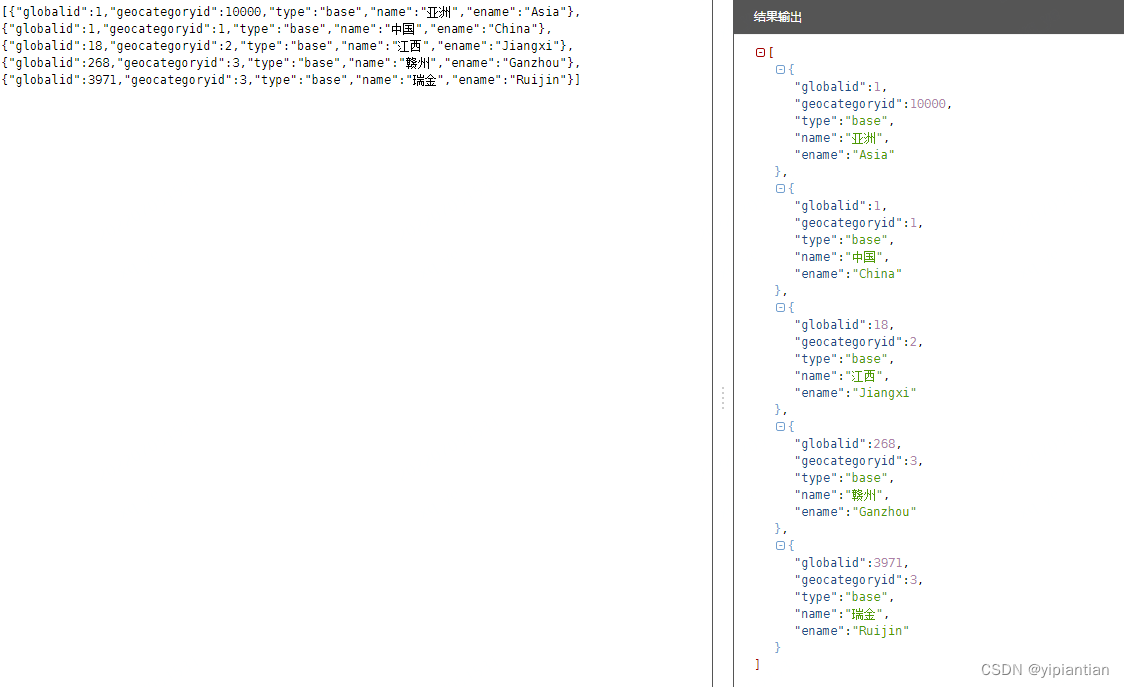
6.JSON数组解析
SQL 脚本:
with a as (
select '
[{"globalid":1,"geocategoryid":10000,"type":"base","name":"亚洲","ename":"Asia"},{"globalid":1,"geocategoryid":1,"type":"base","name":"中国","ename":"China"},{"globalid":18,"geocategoryid":2,"type":"base","name":"江西","ename":"Jiangxi"},{"globalid":268,"geocategoryid":3,"type":"base","name":"赣州","ename":"Ganzhou"},{"globalid":3971,"geocategoryid":3,"type":"base","name":"瑞金","ename":"Ruijin"}]
' as col
,1 as id
)
,b (
select id,
 explode(split(regexp_replace(regexp_replace(regexp_replace(col,' ',''), '\\[|\\]',''),'\\}\\,\\{','\\}\\|\\{'),'\\|')) tags
from a
)
,c (
select
  b.id
  ,c.globalid,c.geocategoryid,c.type,c.name,c.ename
from b lateral view json_tuple(tags,'globalid','geocategoryid','type','name','ename') c as globalid,geocategoryid,type,name,ename
)
select
  c.id
  ,max(case when geocategoryid=3 then globalid end) as city						-- 城市
  ,max(case when geocategoryid=3 then name end) as cityname
  ,max(case when geocategoryid=3 then ename end) as cityename
  ,max(case when geocategoryid=2 then globalid end) as province				-- 省份
  ,max(case when geocategoryid=2 then name end) as provincename
  ,max(case when geocategoryid=2 then ename end) as provinceename
  ,max(case when geocategoryid=1 then globalid end) as country					-- 国家
  ,max(case when geocategoryid=1 then name end) as  countryname
  ,max(case when geocategoryid=1 then ename end) as  countryename
  ,max(case when geocategoryid=10000 then globalid end) as continent		-- 洲际
  ,max(case when geocategoryid=10000 then name end) as continentname
  ,max(case when geocategoryid=10000 then ename end) as continentename
from c
group by id
输出
7.NVL函数
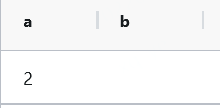
NVL(expr1,expr2),如果第一个参数为NULL(空)那么显示第二个参数值,如果第一个参数的值不为null(空),则显示第一个参数值
select nvl(NULL,2) a,nvl('',2) b ;
8. Coalesce函数
Coalese函数与NVL函数相似,优势在于更多的选项。
Coalesce(expr1, expr2, expr3…… exprn),所有表达式类型必须相同,或可以隐性转换为相同类型,若所有参数均为 NULL,则 返回 NULL .
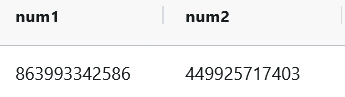
9. 随机函数(指定位数)
select
 cast(ceiling(rand() * 1000000000000) as bigint) num1
,cast(floor(rand() * 1000000000000) as bigint) num2
10. 复杂数据结构处理
- array
- map
- struct
二、Hive sql 传参
set dt=2021-11-30;
with t1 as (
    select uid
    from dwhtldb.edw_usr_uf_user_ordlist
    where d='${hivevar:dt}'
    group by uid
)
,t2 (
    select uid
    from dwhtldb.edw_usr_uf_user_ordlist
    where d=date_add('${hivevar:dt}',1)
    group by uid
)
select
    count(1)
from t1 join t2 on t1.uid=t2.uid
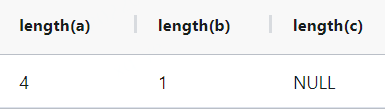
三、Hive sql NULL与空字符的表示方法
NULL不是空值而是特殊值,不参与任何计算,
如与NULL计算,返回值仍为NULL .
with a as (
select
       'NULL' a     -- NULL字符串,长度为4
      ,' ' b        -- 空格字符串,长度为1
      ,NULL c       -- NULL,空的显示表示法,不参与任何计算
)
select length(a),length(b),length(c)
from a
版权声明:本文为yipiantian原创文章,遵循CC 4.0 BY-SA版权协议,转载请附上原文出处链接和本声明。