vConsole
A lightweight, extendable front-end developer tool for mobile web page.
一个轻量级、可扩展的移动网页前端开发工具
是腾讯的一个开源工具。
功能:
查看控制台日志
查看网络请求
查看文件元素
查看Cookies、LocalStorage和SessionStorage。
手动执行JS命令
自定义插件
使用方法:
npm install vconsole
or
<script src="path/to/vconsole.min.js"></script>
<script>
  // init vConsole
  var vConsole = new VConsole();
  console.log('Hello world');
</script>
打印的类型有5种+2种
5 types of log method are supported, with different styles:

console.log('foo');   // black word, white bakcground
console.info('bar');  // purple word, white background
console.debug('oh');  // orange word, white background
console.warn('foo');  // orange word, yellow background
console.error('bar'); // red word, pink background
Supported console methods:

console.time('foo');    // start a timer named "foo"
console.timeEnd('foo'); // stop "foo" timer and print the elapsed time
公共属性和方法:
属性:
vConsole.version
Readonly
Type: string
vConsole.version // => "3.4.1"
vConsole.option
Writable
Type: object
// get
vConsole.option // => {...}
// set
vConsole.setOption('maxLogNumber', 5000);
// or:
vConsole.setOption({maxLogNumber: 5000});
vConsole.activedTab //The actived tab's plugin id.
Readonly
Type: string
Default: "default"
vConsole.activedTab // => "system"
vConsole.tabList
A list of installed tabs' plugin id.

Readonly
Type: array(string)
Example:

vConsole.tabList // => ["default", "system"]
vConsole.$dom
vConsole's HTML element.

Type: HTMLDivElement
方法:
vConsole.setOption(keyOrObj[, value])
vConsole.setOption('maxLogNumber', 5000);
// or:
vConsole.setOption({maxLogNumber: 5000});
vConsole.setSwitchPosition(x, y)
Update the position of switch button.
vConsole.setSwitchPosition(20, 20);
vConsole.destroy()
Destroy an vConsole instance object and remove vConsole panel from document.
var vConsole = new VConsole();
// ... do something
vConsole.destroy();
vConsole.addPlugin(plugin)
Add a new plugin to vConsole. Duplicate plugin will be ignored.
var myPlugin = new VConsolePlugin('my_plugin', 'My Plugin');
vConsole.addPlugin(myPlugin);
vConsole.removePlugin(pluginID)
vConsole.showTab(pluginID)
Activating a tab according to its plugin id.

Plugin event hide will be triggered for previous actived tab, and show for current actived tab.
vConsole.showTab("system"); // show System tab
vConsole.show()
Show vConsole panel. This method will trigger plugin event showConsole.
vConsole.hide()
Hide vConsole panel. This method will trigger plugin event hideConsole.
vConsole.showSwitch()
Show vConsole switch button.
vConsole.hideSwitch()
Hide vConsole switch button.
可以看到vconsole有很多属性和方法,我们是可以改造,增加插件等自己做很多事情的。
同时,它还提供了很大辅助功能,我们可以操作dom元素,增加,删除,修改,渲染等。
存储,监听事件等。
列举几个重要的:
vConsole.$.render(tpl, data, toString)
Compile a template into an element object or a HTML string with given data.
将一个模板编译成一个元素对象或一个HTML字符串。
var tpl = '<ul>' +
	'{{for (var i = 0; i < list.length; i++)}}' +
		'<li>' + '{{list[i]}}' + '</li>' +
	'{{/for}}' +
'</ul>';
var data = {
	list: ['Red', 'Blue', 'Yellow']
};

var html = vConsole.$.render(tpl, data, true);
document.body.innerHTML += html;
vConsole.$.bind(elements, eventType, fn, useCapture)
将一个事件绑定到元素上。
var $btn = vConsole.$.one('#submit');
vConsole.$.bind($btn, 'click', function(event) {
	event.preventDefault();
	alert('submit!');
});
vConsole.$.addClass(elements, className)
Add the specified class(es) to element(s).将指定的类添加到元素
var $items = vConsole.$.all('.item');
vConsole.$.addClass($items, 'selected');
vConsole.$.all(selectors, baseElement)
返回文档或baseElement中符合指定选择器组的元素列表。
更多详情请看这
增加插件
三部曲:
- 创建一个vConsole插件对象
- 将插件事件绑定到该对象
- 将此对象添加到vConsole
var myPlugin = new VConsole.VConsolePlugin('my_plugin', 'My Plugin');

myPlugin.on('init', function() {
	console.log('My plugin init');
});
myPlugin.on('renderTab', function(callback) {
	var html = '<div>Click the tool button below!</div>';
	callback(html);
});
myPlugin.on('addTool', function(callback) {
	var button = {
		name: 'Reload',
		onClick: function(event) {
			location.reload();
		}
	};
	callback([button]);
});

vConsole.addPlugin(myPlugin);
console-webpack-plugin
webpack plugin for vConsole
帮助开发者在移动端进行调试,本插件是在 vConsole 的基础上封装的 webpack 插件,通过 webpack 配置即可自动添加 vConsole 调试功能,方便实用。
安装
npm install vconsole-webpack-plugin --save-dev
使用
webpack.conf.js 文件配置里增加以下插件配置即可
// 引入插件
var vConsolePlugin = require('vconsole-webpack-plugin');

module.exports = {
    ...

    plugins: [
        new vConsolePlugin({
            filter: [],  // 需要过滤的入口文件
            enable: true // 发布代码前记得改回 false
        }),
        ...
    ]
    ...
}
vConsole 作为一个调试模块,注定了需要在发布前把它去掉,为了避免人为操作失误而影响线上功能,这里建议配置如下:
package.json 文件配置:
scripts: {
    "dev": "webpack -w --debug",
    "prod": "webpack -p"
}
webpack.conf.js 配置:
// 引入插件
var vConsolePlugin = require('vconsole-webpack-plugin');
// 接收运行参数
const argv = require('yargs')
    .describe('debug', 'debug 环境') // use 'webpack --debug'
    .argv;

module.exports = {
    ...

    plugins: [
        new vConsolePlugin({enable: !!argv.debug}),
        ...
    ]
    ...
}
这样,在开发的时候运行 npm run dev,发布的时候运行 npm run prod 即可。
webpack-dev-server 的配套用法:
用法其实跟上面一样,只是别忘记在启动脚本的时候增加 --debug 即可。如下:
  // package.json
  "scripts": {
    ...
    "start:dev": "webpack-dev-server --debug",
    ...
  },
vconsole-stats-plugin
一个vConsole插件,可以在前端显示统计信息。
基于统计https://github.com/mrdoob/stats.js
import VConsole from 'vconsole';
import VConsoleStatsPlugin from 'vconsole-stats-plugin';
const vConsole = new VConsole();
const plugin = new VConsoleStatsPlugin(vConsole);
JavaScript性能监控
该类提供了一个简单的信息框,可以帮助你监控你的代码性能。
FPS 在最后一秒渲染的帧数。数字越高越好。
MS 渲染一帧所需的毫秒数。数值越低越好。
MB 分配的内存字节数。(使用–enable-precise-memory-info运行Chrome浏览器)
CUSTOM 用户自定义面板支持。
简单放几张图: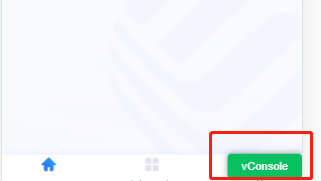
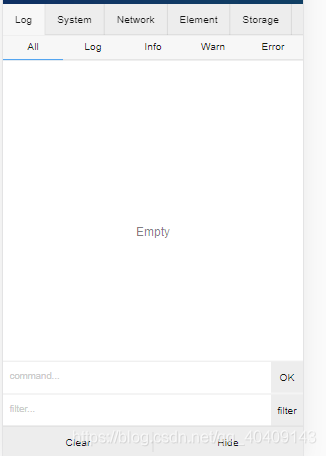
有了上面的基础,就开始撸源码吧:
nice!
// Vconsole类
class VConsole {

  constructor(opt) {
    if (!!$.one(VCONSOLE_ID)) {
      console.debug('vConsole is already exists.');
      return;
    }
    let that = this;

    this.version = pkg.version;
    this.$dom = null;

    this.isInited = false;
    // 面板展示的内容'system', 'network', 'element', 'storage'
    this.option = {
      defaultPlugins: ['system', 'network', 'element', 'storage']
    };

    this.activedTab = '';// 激活的tab
    this.tabList = [];
    this.pluginList = {};

    this.switchPos = {
      hasMoved: false, // exclude click event
      x: 0, // right
      y: 0, // bottom
      startX: 0,
      startY: 0,
      endX: 0,
      endY: 0
    };

    // export helper functions to public
    this.tool = tool;
    this.$ = $;

    // merge options
    if (tool.isObject(opt)) {
      for (let key in opt) {
        this.option[key] = opt[key];
      }
    }

    // add built-in plugins
    this._addBuiltInPlugins();

    // try to init
    let _onload = function() {
      if (that.isInited) {
        return;
      }
      that._render();
      that._mockTap();
      that._bindEvent();
      that._autoRun();
    };
    if (document !== undefined) {
      if (document.readyState === 'loading') {
        $.bind(window, 'DOMContentLoaded', _onload);
      } else {
        _onload();
      }
    } else {
      // if document does not exist, wait for it
      let _timer;
      let _pollingDocument = function() {
        if (!!document && document.readyState == 'complete') {
          _timer && clearTimeout(_timer);
          _onload();
        } else {
          _timer = setTimeout(_pollingDocument, 1);
        }
      };
      _timer = setTimeout(_pollingDocument, 1);
    }
  }
  /**
   * add built-in plugins
   */
  _addBuiltInPlugins() {
    // add default log plugin
    this.addPlugin(new VConsoleDefaultPlugin('default', 'Log'));

    // add other built-in plugins according to user's config
    const list = this.option.defaultPlugins;
    const plugins = {
      'system': {proto: VConsoleSystemPlugin, name: 'System'},
      'network': {proto: VConsoleNetworkPlugin, name: 'Network'},
      'element': {proto: VConsoleElementPlugin, name: 'Element'},
      'storage': {proto: VConsoleStoragePlugin, name: 'Storage'}
    };
    if (!!list && tool.isArray(list)) {
      for (let i=0; i<list.length; i++) {
        let tab = plugins[list[i]];
        if (!!tab) {
          this.addPlugin(new tab.proto(list[i], tab.name));
        } else {
          console.debug('Unrecognized default plugin ID:', list[i]);
        }
      }
    }
  }
 /**
   * render panel DOM
   * @private
   */
  _render() {
    if (! $.one(VCONSOLE_ID)) {
      const e = document.createElement('div');
      e.innerHTML = tpl;
      document.documentElement.insertAdjacentElement('beforeend', e.children[0]);
    }
    this.$dom = $.one(VCONSOLE_ID);

    // reposition switch button
    const $switch = $.one('.vc-switch', this.$dom);
    let switchX = tool.getStorage('switch_x') * 1,
        switchY = tool.getStorage('switch_y') * 1;
    this.setSwitchPosition(switchX, switchY);

    // modify font-size
    const dpr = window.devicePixelRatio || 1;
    const viewportEl = document.querySelector('[name="viewport"]');
    if (viewportEl && viewportEl.content) {
      const initialScale = viewportEl.content.match(/initial\-scale\=\d+(\.\d+)?/);
      const scale = initialScale ? parseFloat(initialScale[0].split('=')[1]) : 1;
      if (scale < 1) {
        this.$dom.style.fontSize = 13 * dpr + 'px';
      }
    }

    // remove from less to present transition effect
    $.one('.vc-mask', this.$dom).style.display = 'none';

    // set theme
    this._updateTheme();
  }
 /**
   * auto run after initialization
   * @private
   */
  _autoRun() {
    this.isInited = true;

    // init plugins
    for (let id in this.pluginList) {
      this._initPlugin(this.pluginList[id]);
    }

    // show first tab
    if (this.tabList.length > 0) {
      this.showTab(this.tabList[0]);
    }

    this.triggerEvent('ready');
  }
 /**
   * trigger a vConsole.option event
   * @protect
   */
  triggerEvent(eventName, param) {
    eventName = 'on' + eventName.charAt(0).toUpperCase() + eventName.slice(1);
    if (tool.isFunction(this.option[eventName])) {
      this.option[eventName].apply(this, param);
    }
  }
 /**
   * init a plugin
   * @private
   */
  _initPlugin(plugin) {
    let that = this;
    plugin.vConsole = this;
    // start init
    plugin.trigger('init');
    // render tab (if it is a tab plugin then it should has tab-related events)
    plugin.trigger('renderTab', function(tabboxHTML) {
      // add to tabList
      that.tabList.push(plugin.id);
      // render tabbar
      let $tabbar = $.render(tplTabbar, {id: plugin.id, name: plugin.name});
      $.one('.vc-tabbar', that.$dom).insertAdjacentElement('beforeend', $tabbar);
      // render tabbox
      let $tabbox = $.render(tplTabbox, {id: plugin.id});
      if (!!tabboxHTML) {
        if (tool.isString(tabboxHTML)) {
          $tabbox.innerHTML += tabboxHTML;
        } else if (tool.isFunction(tabboxHTML.appendTo)) {
          tabboxHTML.appendTo($tabbox);
        } else if (tool.isElement(tabboxHTML)) {
          $tabbox.insertAdjacentElement('beforeend', tabboxHTML);
        }
      }
      $.one('.vc-content', that.$dom).insertAdjacentElement('beforeend', $tabbox);
    });
    // render top bar
    plugin.trigger('addTopBar', function(btnList) {
      if (!btnList) {
        return;
      }
      let $topbar = $.one('.vc-topbar', that.$dom);
      for (let i=0; i<btnList.length; i++) {
        let item = btnList[i];
        let $item = $.render(tplTopBarItem, {
          name: item.name || 'Undefined',
          className: item.className || '',
          pluginID: plugin.id
        });
        if (item.data) {
          for (let k in item.data) {
            $item.dataset[k] = item.data[k];
          }
        }
        if (tool.isFunction(item.onClick)) {
          $.bind($item, 'click', function(e) {
            let enable = item.onClick.call($item);
            if (enable === false) {
              // do nothing
            } else {
              $.removeClass($.all('.vc-topbar-' + plugin.id), 'vc-actived');
              $.addClass($item, 'vc-actived');
            }
          });
        }
        $topbar.insertAdjacentElement('beforeend', $item);
      }
    });
    // render tool bar
    plugin.trigger('addTool', function(toolList) {
      if (!toolList) {
        return;
      }
      let $defaultBtn = $.one('.vc-tool-last', that.$dom);
      for (let i=0; i<toolList.length; i++) {
        let item = toolList[i];
        let $item = $.render(tplToolItem, {
          name: item.name || 'Undefined',
          pluginID: plugin.id
        });
        if (item.global == true) {
          $.addClass($item, 'vc-global-tool');
        }
        if (tool.isFunction(item.onClick)) {
          $.bind($item, 'click', function(e) {
            item.onClick.call($item);
          });
        }
        $defaultBtn.parentNode.insertBefore($item, $defaultBtn);
      }
    });
    // end init
    plugin.isReady = true;
    plugin.trigger('ready');
  }
 /**
   * show console panel
   * @public
   */
  show() {
    if (!this.isInited) {
      return;
    }
    let that = this;
    // before show console panel,
    // trigger a transitionstart event to make panel's property 'display' change from 'none' to 'block'
    let $panel = $.one('.vc-panel', this.$dom);
    $panel.style.display = 'block';

    // set 10ms delay to fix confict between display and transition
    setTimeout(function() {
      $.addClass(that.$dom, 'vc-toggle');
      that._triggerPluginsEvent('showConsole');
      let $mask = $.one('.vc-mask', that.$dom);
      $mask.style.display = 'block';
    }, 10);
  }
这是一些关键步骤的代码,其实看代码还是可以看懂的,就不多解释了。
思考:
const RenderFunction = {
// escape HTML to text
text: (str) => {
if (typeof str !== 'string' && typeof str !== 'number') { return str; }
return String(str).replace(/[<>&" ]/g, (c) => {
return { '<': '<', '>': '>', '&': '&', '"': '"', ' ': ' ' }[c];
});
},
};
在代码中做了XSS攻击预防。
为什么使用slice而不是Array.from?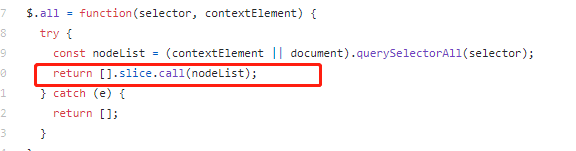
看看兼容性吧: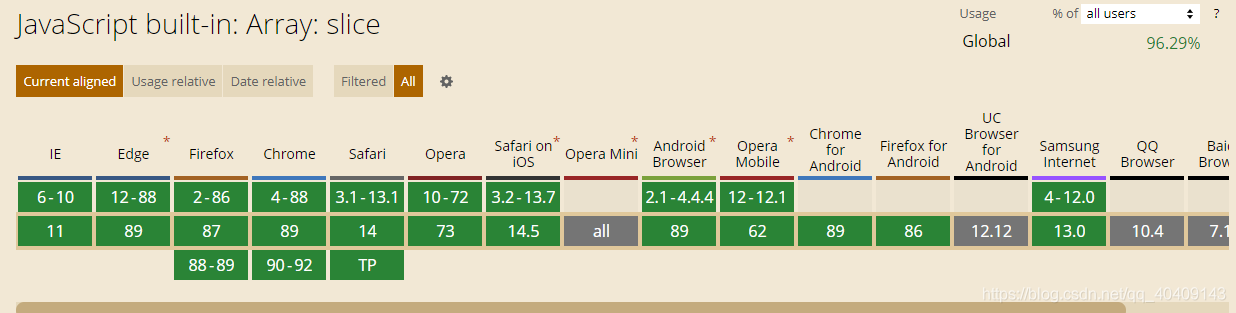
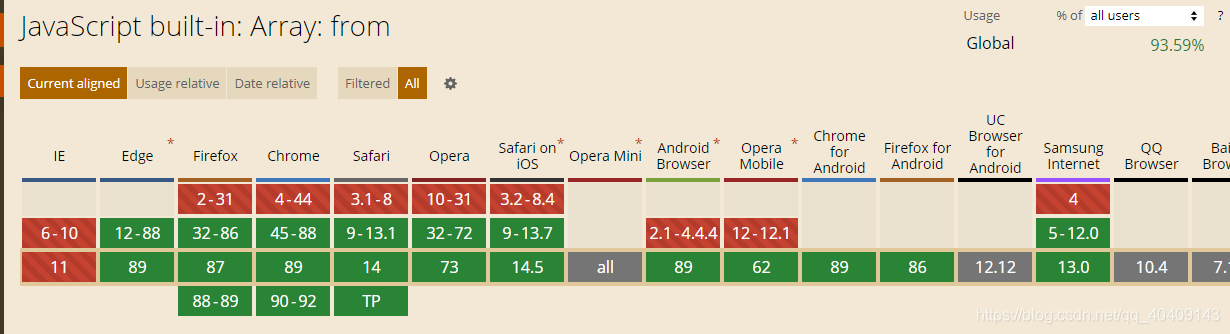
是不是slice更加兼容呢。