写在前面
关于登录页面的练习,我们在前面页练习过,今天我们再来写一个练习一下,如果前面还没有学会的,这次可以继续练习起来。
以下是今天小练习的最终效果:

GIF图
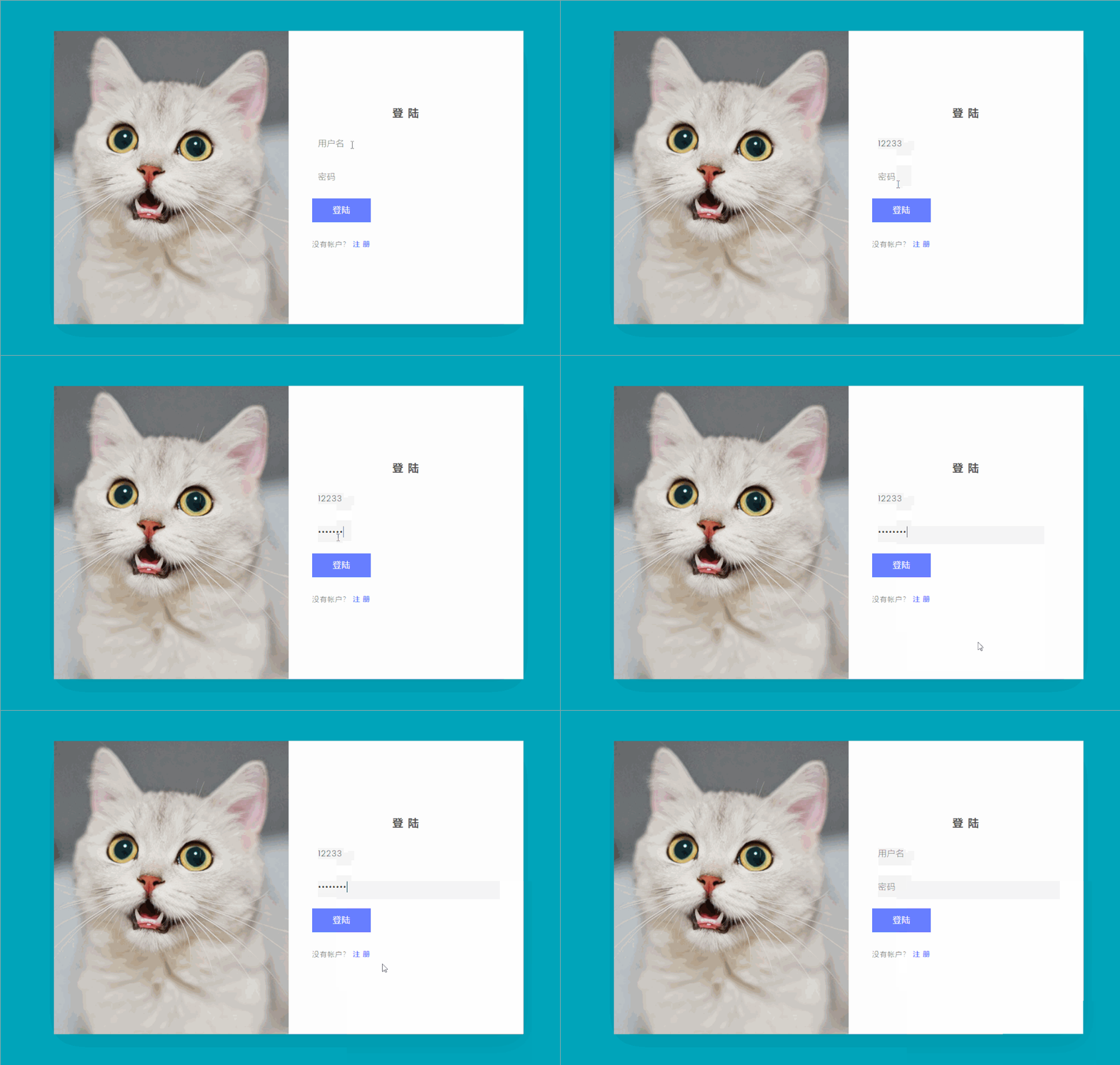
这个动图效果真的不好,所以在前面截图了,具体样式,看前面的截图。
现在,我们还是一起来看一下它的实现代码。
HTML:
<!DOCTYPE html>
<html>
    <head>
        <meta name="viewport" content="width=device-width, initial-scale=1.0">
        <title>【每日一练】58— 写一个登录和注册页</title>
        <link rel="stylesheet" type="text/css" href="style.css">
    </head>
    <body>
        <section>
            <div class="container">
                <div class="user signinBx">
                    <div class="imgBx"><img src="img1.jpg"></div>
                    <div class="formBx">
                        <form>
                            <h2>登 陆</h2>
                            <input type="text" name="" placeholder="用户名">
                            <input type="password" name="" placeholder="密码">
                            <input type="submit" name="" value="登陆">
                            <p class="signup">没有帐户? <a href="#" onclick="toggleForm();">注 册</a></p>
                        </form>
                    </div>
                </div>
                <div class="user signupBx">
                    <div class="formBx">
                        <form>
                            <h2>创建一个帐户</h2>
                            <input type="text" name="" placeholder="Username">
                            <input type="email" name="" placeholder="">
                            <input type="password" name="" placeholder="Create Password">
                            <input type="password" name="" placeholder="Confirm Password">
                            <input type="submit" name="" value="注册">
                            <p class="signup">已经有一个帐户? <a href="#" onclick="toggleForm();">登 陆</a></p>
                        </form>
                    </div>
                    <div class="imgBx"><img src="img2.jpg"></div>
                </div>
            </div>
        </section>
        <script type="text/javascript">
            function toggleForm(){
                var container = document.querySelector('.container');
                var section = document.querySelector('section');
                container.classList.toggle('active')
                section.classList.toggle('active')
            }
</script>
    </body>
</html>
CSS:
*
{
    margin: 0;
    padding: 0;
    box-sizing: border-box;
    font-family: 'Poppins', sans-serif;
}
section
{
    position: relative;
    min-height: 100vh;
    background: #00a6bc;
    display: flex;
    padding: 20px;
    justify-content: center;
    align-items: center;
    transition: 0.5s;
}
section.active
{
    background: #006abc;
}
section .container
{
    position: relative;
    width: 800px;
    height: 500px;
    background: #fff;
    box-shadow: 0 15px 50px rgba(0,0,0,.1);
    overflow: hidden;
}
section .container .user
{
    position: absolute;
    top: 0;
    left: 0;
    width: 100%;
    height: 100%;
    display: flex;
}
section .container .user .imgBx
{
    position: relative;
    width: 50%;
    height: 100%;
    background: #ff0;
    transition: 0.5s;
}
section .container .user .imgBx img
{
    position: absolute;
    top: 0;
    left: 0;
    width: 100%;
    height: 100%;
    object-fit: cover;
}
section .container .user .formBx
{
    position: relative;
    width: 50%;
    height: 100%;
    background: #fff;
    display: flex;
    justify-content: center;
    align-items: center;
    padding: 40px;
    transition: 0.5s;
}
section .container .user .formBx form h2
{
    font-size: 18px;
    font-weight: 600;
    text-transform: uppercase;
    letter-spacing: 2px;
    text-align: center;
    width: 100%;
    margin-bottom: 10px;
    color: #555;
}
section .container .user .formBx form input
{
    width: 100%;
    padding: 10px;
    background: #f5f5f5;
    color: #333;
    border: none;
    outline: none;
    box-shadow: none;
    font-size: 14px;
    margin: 8px 0;
    letter-spacing: 1px;
    font-weight: 300;
}
section .container .user .formBx form input[type="submit"]
{
    max-width: 100px;
    background: #677eff;
    color: #fff;
    cursor: pointer;
    font-size: 14px;
    font-weight: 500;
    letter-spacing: 1px;
    transition: 0.5s;
}
section .container.active .user .formBx form input[type="submit"]
{
    background: #e73e49;
}
section .container .user .formBx form .signup
{
    position: relative;
    margin-top: 20px;
    font-size: 12px;
    letter-spacing: 1px;
    color: #555;
    text-transform: uppercase;
    font-weight: 300;
}
section .container .user .formBx form .signup a
{
    font-weight: 600;
    text-decoration: none;
    color: #677eff;
}
section .container .signupBx
{
    pointer-events: none;
}
section .container.active .signupBx
{
    pointer-events: initial;
}
section .container .signupBx .formBx
{
    top: 100%;
}
section .container.active .signupBx .formBx
{
    top: 0%;
}
section .container .signupBx .imgBx
{
    top: -100%;
}
section .container.active .signupBx .imgBx
{
    top: 0%;
}


section .container .signinBx .formBx
{
    top: 0;
}
section .container.active .signinBx .formBx
{
    top: 100%;
}
section .container .signinBx .imgBx
{
    top: 0;
}
section .container.active .signinBx .imgBx
{
    top: -100%;
}


@media (max-width: 991px)
{
    section .container
    {
        max-width: 400px;
    }
    section .container .imgBx
    {
        display: none;
    }
    section .container .user .formBx
    {
        width: 100%;
    }
    section .container.active .signinBx .formBx
    {
        top: -100%;
    }
}
写在最后
以上就是【每日一练】的全部内容,希望今天的小练习对你有用,如果你觉得有帮助的话,请点赞我,关注我,并将它分享给你身边做开发的朋友,也许能够帮助到他。
我是杨小爱,我们明天见。
学习更多技能
请点击下方公众号