1:在pom文件中加入代码自动生成插件
<build>
        <plugins>
            <plugin>
                <groupId>org.springframework.boot</groupId>
                <artifactId>spring-boot-maven-plugin</artifactId>
                <configuration>
                    <excludes>
                        <exclude>
                            <groupId>org.projectlombok</groupId>
                            <artifactId>lombok</artifactId>
                        </exclude>
                    </excludes>
                </configuration>
            </plugin>
            <!--Mybatis代码自动生成器-->
            <plugin>
                <groupId>org.mybatis.generator</groupId>
                <artifactId>mybatis-generator-maven-plugin</artifactId>
                <version>1.3.5</version>
                <dependencies>
                    <dependency>
                        <groupId> mysql</groupId>
                        <artifactId> mysql-connector-java</artifactId>
                        <version> 5.1.39</version>
                    </dependency>
                    <dependency>
                        <groupId>org.mybatis.generator</groupId>
                        <artifactId>mybatis-generator-core</artifactId>
                        <version>1.3.5</version>
                    </dependency>
                </dependencies>
                <executions>
                    <execution>
                        <id>Generate MyBatis Artifacts</id>
                        <phase>package</phase>
                        <goals>
                            <goal>generate</goal>
                        </goals>
                    </execution>
                </executions>
                <configuration>
                    <!--允许移动生成的文件 -->
                    <verbose>true</verbose>
                    <!-- 是否覆盖 -->
                    <overwrite>true</overwrite>
                    <!-- 自动生成的配置 -->
                    <configurationFile>src/main/resources/generatorConfig.xml</configurationFile>
                </configuration>
            </plugin>

        </plugins>
    </build>
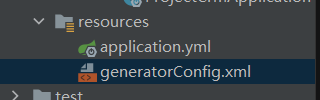
2:编写代码自动生成器的配置
<?xml version="1.0" encoding="UTF-8"?>
<!DOCTYPE generatorConfiguration
PUBLIC "-//mybatis.org//DTD MyBatis Generator Configuration 1.0//EN"
"http://mybatis.org/dtd/mybatis-generator-config_1_0.dtd">
<generatorConfiguration>
<context id="DB2Tables" targetRuntime="MyBatis3">
<commentGenerator>
<property name="suppressDate" value="true"/>
<property name="suppressAllComments" value="true"/>
</commentGenerator>
<!--数据库链接地址账号密码-->
<jdbcConnection driverClass="com.mysql.jdbc.Driver"
connectionURL="jdbc:mysql://localhost:3306/db01?useUnicode=true&serverTimezone=GMT%2b8&characterEncoding=UTF-8&useSSL=false&failOverReadOnly=false"
userId="root" password="123456">
</jdbcConnection>
<javaTypeResolver>
<property name="forceBigDecimals" value="false"/>
</javaTypeResolver>
<!--生成Model类存放位置-->
<javaModelGenerator targetPackage="com.dongmu.pojo" targetProject="src/main/java">
<property name="enableSubPackages" value="true"/>
<property name="trimStrings" value="true"/>
</javaModelGenerator>
<!--生成映射文件存放位置-->
<!--这个位置一定要和dao接口的路径一样才能找到-->
<sqlMapGenerator targetPackage="com.dongmu.dao" targetProject="src/main/resources">
<property name="enableSubPackages" value="true"/>
</sqlMapGenerator>
<!--生成Dao类存放位置-->
<!-- 客户端代码,生成易于使用的针对Model对象和XML配置文件 的代码
type="ANNOTATEDMAPPER",生成Java Model 和基于注解的Mapper对象
type="MIXEDMAPPER",生成基于注解的Java Model 和相应的Mapper对象
type="XMLMAPPER",生成SQLMap XML文件和独立的Mapper接口
-->
<javaClientGenerator type="XMLMAPPER" targetPackage="com.dongmu.dao" targetProject="src/main/java">
<property name="enableSubPackages" value="true"/>
</javaClientGenerator>
<!--生成对应表及类名-->
<table tableName="dept" domainObjectName="Dept" enableCountByExample="false" enableUpdateByExample="false"
enableDeleteByExample="false" enableSelectByExample="false" selectByExampleQueryId="false">
<!--添加属性useActualColumnNames为true,那么生成的对象字段就跟表一样-->
<property name="useActualColumnNames" value="true"/>
</table>
<!--<table tableName="stockTheme" domainObjectName="StockTheme" enableCountByExample="false" enableUpdateByExample="false" enableDeleteByExample="false" enableSelectByExample="false" selectByExampleQueryId="false"></table>-->
</context>
</generatorConfiguration>
3:配置maven命令

4:点击运行即可生成代码
版权声明:本文为qq_45401910原创文章,遵循CC 4.0 BY-SA版权协议,转载请附上原文出处链接和本声明。