需求功能及其说明
1、客户端
2、服务端
测试环境:
win7
python 3.3.2
chardet 2.3.0
脚本作用:
检测系统中访问异常(请求返回code值非200)的链接
开发环境
运行环境
业务逻辑流程图
程序项目结构图
演示效果图(实际运行)
脚本涉及到的一些技巧
遇到的一些问题和解决方案
总结
用Python实现批量测试一组url的可用性(可以包括HTTP状态、响应时间等)并统计出现不可用情况的次数和频率等。
类似的,这样的脚本可以判断某个服务的可用性,以及在众多的服务提供者中选择最优的。
需求以及脚本实现的功能如下:
默认情况下,执行脚本会检测一组url的可用性。
如果可用,返回从脚本所在的机器到HTTP服务器所消耗的时间和内容等信息。
如果url不可用,则记录并提示用户,并显示不可用发生的时间。
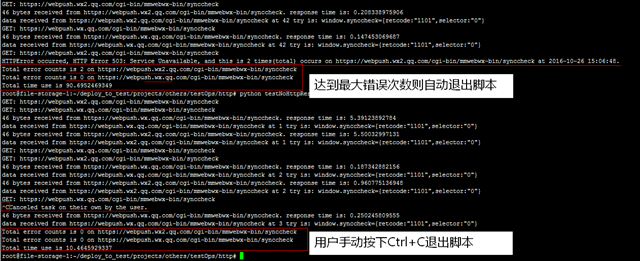
默认情况下,允许最大的错误次数是200,数目可以自定义,如果达到允许的最大错误次数,则在输出信息的最后,根据每一个url做出错误统计。
如果用户手动停止脚本,则需要在输出信息的最后,根据每一个url做出错误统计。
脚本中涉及的一些技巧:
使用gevent并发处理多个HTTP请求,多个请求之间无须等待响应(gevent还有很多使用技巧,可再自行学习);
使用signal模块捕获信号,如果捕获到则处理并退出,避免主进程接收到KeyboardInterrupt直接退出但无法处理的问题;
注意留意脚本中关于统计次数方面的小技巧;
脚本运行效果图(如果图片看不清楚,请选择“在新标签页中打开图片”)如下:
脚本可以参见Github,https://github.com/DingGuodong/LinuxBashShellScriptForOps/tree/master/projects/checkServicesAvailability/HttpService
脚本如下:
1 2 3 4 5 6 7 8 9 10 11 12 13 14 15 16 17 18 19 20 21 22 23 24 25 26 27 28 29 30 31 32 33 34 35 36 37 38 39 40 41 42 43 44 45 46 47 48 49 50 51 52 53 54 55 56 57 58 59 60 61 62 63 64 65 66 67 68 69 70 71 72 73 74 75 76 77 78 79 80 81 82 83 84 85 86 87 88 89 90 91 92 93 94 95 96 97 98 | #!/usr/bin/python# encoding: utf-8# -*- coding: utf8 -*-"""Created by PyCharm.File: LinuxBashShellScriptForOps:testNoHttpResponseException,testHttpHostAvailability.pyUser: GuodongCreate Date: 2016/10/26Create Time: 12:09Function: test Http Host AvailabilitySome helpful message: For CentOS: yum -y install python-devel python-pip; pip install gevent For Ubuntu: apt-get -y install python-dev python-pip; pip install gevent For Windows: pip install gevent """import signalimport timeimport sys# execute some operations concurrently using pythonfrom gevent import monkeymonkey.patch_all()import geventimport urllib2hosts = ['https://webpush.wx2.qq.com/cgi-bin/mmwebwx-bin/synccheck', 'https://webpush.wx.qq.com/cgi-bin/mmwebwx-bin/synccheck', ]errorStopCounts = 200quit_flag = Falsestatistics = dict()def changeQuit_flag(signum, frame): del signum, frame global quit_flag quit_flag = True print "Canceled task on their own by the user."def testNoHttpResponseException(url): tryFlag = True global quit_flag errorCounts = 0 tryCounts = 0 global statistics globalStartTime = time.time() while tryFlag: if not quit_flag: tryCounts += 1 print('GET: %s' % url) try: startTime = time.time() resp = urllib2.urlopen(url) # using module 'request' will be better, request will return header info.. endTime = time.time() data = resp.read() responseTime = endTime - startTime print '%d bytes received from %s. response time is: %s' % (len(data), url, responseTime) print "data received from %s at %d try is: %s" % (url, tryCounts, data) gevent.sleep(2) except urllib2.HTTPError as e: errorCounts += 1 statistics[url] = errorCounts currentTime = time.strftime('%Y-%m-%d %H:%M:%S', time.localtime()) print "HTTPError occurred, %s, and this is %d times(total) occurs on %s at %s." % ( e, statistics[url], url, currentTime) if errorCounts >= errorStopCounts: globalEndTime = time.time() tryFlag = False else: globalEndTime = time.time() break for url in statistics: print "Total error counts is %d on %s" % (statistics[url], url) hosts.remove(url) for url in hosts: print "Total error counts is 0 on %s" % url globalUsedTime = globalEndTime - globalStartTime print "Total time use is %s" % globalUsedTime sys.exit(0)try: # Even if the user cancelled the task, # it also can statistics the number of errors and the consumption of time for each host. signal.signal(signal.SIGINT, changeQuit_flag) gevent.joinall([gevent.spawn(testNoHttpResponseException, host) for host in hosts])except KeyboardInterrupt: # Note: this line can NOT be reached, because signal has been captured! print "Canceled task on their own by the user." sys.exit(0) |
tag:python计算HTTp可用性,python 统计次数,python gevent
--end--
做渗透测试的时候/大量推广客户,有个比较大的项目,里面有几百个网站,这样你必须首先确定哪些网站是正常,哪些网站是不正常的。所以自己就编了一个小脚本,为以后方便使用。
具体实现的代码如下:
|
|
测试结果如下:

遇到的问题:
刚开始测试的时候,遇到只要是不能错误,或者不存在的,直接报错停止程序。后来发现是因为response.status_code != 200这里取状态码的时候错误。
因为有的网站不能打开的话,不会返回状态码。所以程序就不知道!==200怎么处理了。
解决方法:
使用try except else捕捉异常
具体代码为:
|
|
Python检测URL状态
Python检测URL状态,并追加保存200的URL:
1.Requests
1 2 3 4 5 6 7 8 9 10 11 12 13 14 15 16 17 18 19 20 21 22 23 24 25 | #! /usr/bin/env python#coding=utf-8import sysimport requestsdef getHttpStatusCode(url): try: request = requests.get(url) httpStatusCode = request.status_code return httpStatusCode except requests.exceptions.HTTPError as e: return eif __name__ == "__main__": with open('1.txt', 'r') as f: for line in f: try: status = getHttpStatusCode(line.strip('\n'))#换行符 if status == 200: with open('200.txt','a') as f: f.write(line + '\n') print line else: print 'no 200 code' except Exception as e: print e |

 1 #! /usr/bin/env python
 2 # -*--coding:utf-8*-
 3
 4 import requests
 5
 6 def request_status(line):
 7     conn = requests.get(line)
 8     if conn.status_code == 200:
 9         with open('url_200.txt', 'a') as f:
10             f.write(line + '\n')
11         return line13     else:
14         return None
15
16
17 if __name__ == '__main__':
18     with open('/1.txt', 'rb') as f:
19         for line in f:
20             try:
21                 purge_url = request_status(line.strip('\n'))
22             except Exception as e:
23                 pass
2.Urllib
#! /usr/bin/env python
#coding:utf-8
import os,urllib,linecache
import sys
result = list()

for x in linecache.updatecache(r'1.txt'):
    try:
       a = urllib.urlopen(x.replace('/n','')).getcode()
       #print x,a
    except Exception,e:
        print e
    if a == 200:
        #result.append(x)                             #保存
        #result.sort()                                       #排序结果
        #open('2.txt', 'w').write('%s' % '\n'.join(result)) #保存入结果文件
        with open ('200urllib.txt','a') as f: ## r只读,w可写,a追加
            f.write(x + '\n')
    else:
        print 'error'