第六章-缺陷检测
关于缺陷检测
回顾工业视觉的任务

常见的缺陷与对应算法
常见的缺陷有:
- 对象轮廓凸凹不平
- 非曲面轮廓的: 凸点斜光打亮,凹点垂直光打暗
- 曲面轮廓的:
- 对象内部污点、内部凸凹点、瑕疵点、空洞和破损等
- 对象表面划痕
- 打光,采用低角度环形光 & 同轴光
总结:检测缺陷的几个方法如下
- 打光,光的角度
- 光源选型,如波长
- 图像处理算法:
- blob分析+特征检测
- blob分析+特征检测+差分
- 频域分析+空间域分析
- 光度立体法
- 特征训练(深度学习领域)
- 测量+拟合方法(通过测量结果知道有缺陷)
Halcon中的缺陷检测案例
案例一(blob+特征)
检测饼干?完整性
这里的blob+特征中的特征意思是,根据对象的形状特征来判断好坏,比如这里通过对分割得到的区域的面积阈值来判断是否有碎块

//check_hazelnut_wafers.hdev
* This example demonstrates a quality inspection on hazelnut wavers.
* Using the morphology tools the waver is extracted and examined
* according to a few shape features like Rectangularity and AreaHoles.
* This program also shows the use of the operator area_holes.
*
read_image (Image, 'food/hazelnut_wafer_01')
dev_close_window ()
dev_open_window_fit_image (Image, 0, 0, -1, -1, WindowHandle)
dev_update_window ('off')
dev_set_line_width (3)
dev_set_draw ('margin')
set_display_font (WindowHandle, 20, 'mono', 'true', 'false')
*
for Index := 1 to 24 by 1
    read_image (Image, 'food/hazelnut_wafer_' + Index$'.02')
    binary_threshold (Image, Foreground, 'smooth_histo', 'light', UsedThreshold)
    opening_circle (Foreground, FinalRegion, 8.5)
    area_holes (FinalRegion, AreaHoles)
    rectangularity (FinalRegion, Rectangularity)
    dev_display (Image)
    if (AreaHoles > 300 or Rectangularity < 0.92)
        dev_set_color ('red')
        Text := 'Not OK'
    else
        dev_set_color ('forest green')
        Text := 'OK'
    endif
    dev_display (FinalRegion)
    disp_message (WindowHandle, Text, 'window', 12, 12, '', 'false')
    if (Index < 24)
        disp_continue_message (WindowHandle, 'black', 'true')
        stop ()
    endif
endfor
案例二(blob+差分)
差分就是减法操作,其实是相对的像素值求导
实现工件突刺毛刺凸起的检测
背光源打光,选择了亮的一边作为背景

* fin.hdev: Detection of a fin
*
dev_update_window ('off')
read_image (Fins, 'fin' + [1:3])
get_image_size (Fins, Width, Height)
dev_close_window ()
dev_open_window (0, 0, Width[0], Height[0], 'black', WindowID)
set_display_font (WindowID, 14, 'mono', 'true', 'false')
for I := 1 to 3 by 1
    select_obj (Fins, Fin, I)
    dev_display (Fin)
    binary_threshold (Fin, Background, 'max_separability', 'light', UsedThreshold)
    dev_set_color ('blue')
    dev_set_draw ('margin')
    dev_set_line_width (4)
    dev_display (Background)
    disp_continue_message (WindowID, 'black', 'true')
    stop ()
// 闭操作:先膨胀后腐蚀,这里因为背景是白色,所以采用了250即对背景进行了一次膨胀腐蚀操作,从而抹去了毛刺
    closing_circle (Background, ClosedBackground, 250)
    dev_set_color ('green')
    dev_display (ClosedBackground)
    disp_continue_message (WindowID, 'black', 'true')
    stop ()
// 区域做减法:用带有毛刺的图片-抹去毛刺的图片=毛刺
    difference (ClosedBackground, Background, RegionDifference)
    opening_rectangle1 (RegionDifference, FinRegion, 5, 5)
    dev_display (Fin)
    dev_set_color ('red')
    dev_display (FinRegion)
    area_center (FinRegion, FinArea, Row, Column)
    if (I < 3)
        disp_continue_message (WindowID, 'black', 'true')
        stop ()
    endif
endfor
案例三(blob+特征+极坐标变换)
检测瓶嘴
因为是圆形的,所以使用极坐标的效果会更好一些
可以看到右侧是利用坐标变换把圆形拉直的结果(看OCR那里有这个知识点)

* This example checks bottle necks for defects.
* First, the bottle is detected with basic morphology,
* edge detection and circle fitting.
* Then, the neck area is transformed with a polar transformation.
* After that, in the transformed image a dynamic threshold is used
* to detect defects. Finally, the results are displayed.
*
*
* tuning parameters
SmoothX := 501
ThresholdOffset := 25
MinDefectSize := 50
*
* initialization
PolarResolution := 640
RingSize := 70
get_system ('store_empty_region', StoreEmptyRegion)
set_system ('store_empty_region', 'false')
read_image (Image, 'bottles/bottle_mouth_01')
dev_update_off ()
dev_close_window ()
dev_close_window ()
dev_open_window_fit_image (Image, 0, 0, 640, 512, WindowHandle1)
set_display_font (WindowHandle1, 16, 'mono', 'true', 'false')
dev_display (Image)
dev_set_draw ('margin')
dev_set_line_width (3)
dev_open_window_fit_size (0, 648, RingSize, PolarResolution, 150, 512, WindowHandle)
dev_set_draw ('margin')
dev_set_line_width (3)
dev_set_color ('red')
*
* Main loop
*
* Detect defects in bottle necks
for Index := 1 to 16 by 1
    read_image (Image, 'bottles/bottle_mouth_' + Index$'.02')
    *
    * Part 1: Use basic morphology to detect bottle
    auto_threshold (Image, Regions, 2)
    select_obj (Regions, DarkRegion, 1)
    opening_circle (DarkRegion, RegionOpening, 3.5)
    closing_circle (RegionOpening, RegionClosing, 25.5)
    fill_up (RegionClosing, RegionFillUp)
    boundary (RegionFillUp, RegionBorder, 'outer')
    dilation_circle (RegionBorder, RegionDilation, 3.5)
    reduce_domain (Image, RegionDilation, ImageReduced)
    *
    * Find the bottle center by fitting a circle to extracted edges
    edges_sub_pix (ImageReduced, Edges, 'canny', 0.5, 20, 40)
    segment_contours_xld (Edges, ContoursSplit, 'lines_circles', 5, 4, 2)
    union_cocircular_contours_xld (ContoursSplit, UnionContours, 0.9, 0.5, 0.5, 200, 50, 50, 'true', 1)
    length_xld (UnionContours, Length)
    select_obj (UnionContours, LongestContour, sort_index(Length)[|Length| - 1] + 1)
    fit_circle_contour_xld (LongestContour, 'ahuber', -1, 0, 0, 3, 2, Row, Column, Radius, StartPhi, EndPhi, PointOrder)
    *
    * Part 2: Transform the ring-shaped bottle neck region to a rectangle
    gen_circle (Circle, Row, Column, Radius)
    dilation_circle (Circle, RegionDilation, 5)
    erosion_circle (Circle, RegionErosion, RingSize - 5)
    difference (RegionDilation, RegionErosion, RegionDifference)
    reduce_domain (Image, RegionDifference, ImageReduced)
    polar_trans_image_ext (ImageReduced, ImagePolar, Row, Column, 0, rad(360), Radius - RingSize, Radius, PolarResolution, RingSize, 'nearest_neighbor')
    *
    * Part 3: Find defects with a dynamic threshold
    * Note the strong smoothing in x-direction in the transformed image.
    scale_image_max (ImagePolar, ImageScaleMax)
    mean_image (ImageScaleMax, ImageMean, SmoothX, 3)
    dyn_threshold (ImageScaleMax, ImageMean, Regions1, 55, 'not_equal')
    connection (Regions1, Connection)
    select_shape (Connection, SelectedRegions, 'height', 'and', 9, 99999)
    * ignore noise regions
    closing_rectangle1 (SelectedRegions, RegionClosing1, 10, 20)
    union1 (RegionClosing1, RegionUnion)
    * re-transform defect regions for visualization
    polar_trans_region_inv (RegionUnion, XYTransRegion, Row, Column, 0, rad(360), Radius - RingSize, Radius, PolarResolution, RingSize, 1280, 1024, 'nearest_neighbor')
    *
    * Part 4: Display results
    * display original image with results
    dev_set_window (WindowHandle1)
    dev_display (Image)
    dev_set_color ('blue')
    dev_display (RegionDifference)
    dev_set_color ('red')
    dev_display (XYTransRegion)
    * display polar transformed inspected region with results
    * The image and resulting region are rotated by 90 degrees
    * only for visualization purposes! (I.e. to fit better on the screen)
    * The rotation is NOT necessary for the detection algorithm.
    dev_set_window (WindowHandle)
    rotate_image (ImagePolar, ImageRotate, 90, 'constant')
    dev_display (ImageRotate)
    count_obj (RegionUnion, Number)
    if (Number > 0)
        mirror_region (RegionUnion, RegionMirror, 'diagonal', PolarResolution)
        mirror_region (RegionMirror, RegionMirror, 'row', PolarResolution)
        dev_display (RegionMirror)
        disp_message (WindowHandle1, 'Not OK', 'window', 12, 12, 'red', 'false')
    else
        disp_message (WindowHandle1, 'OK', 'window', 12, 12, 'forest green', 'false')
    endif
    if (Index < 16)
        disp_continue_message (WindowHandle1, 'black', 'true')
        stop ()
    endif
endfor
* Reset system parameters
set_system ('store_empty_region', StoreEmptyRegion)
案例四(blob+特征)
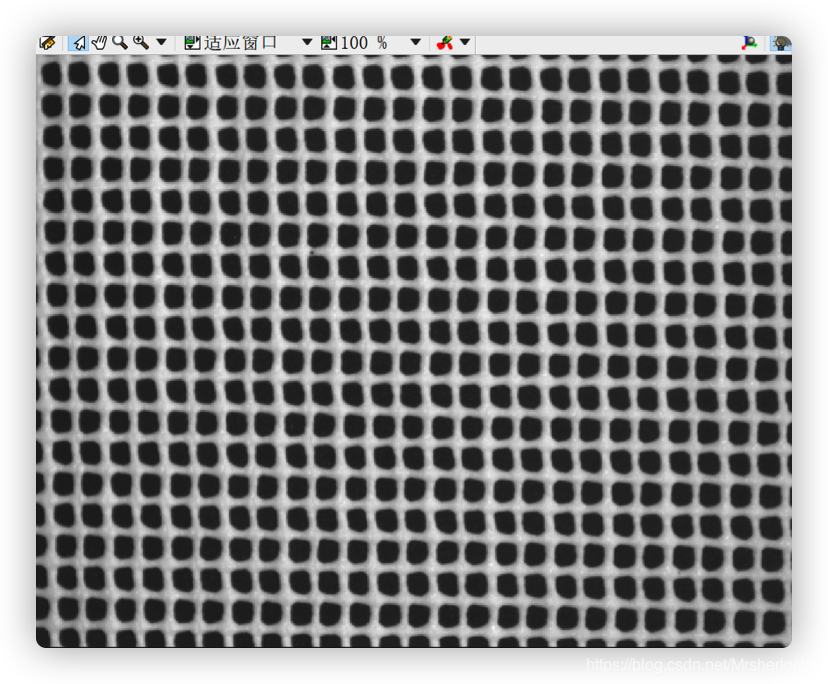
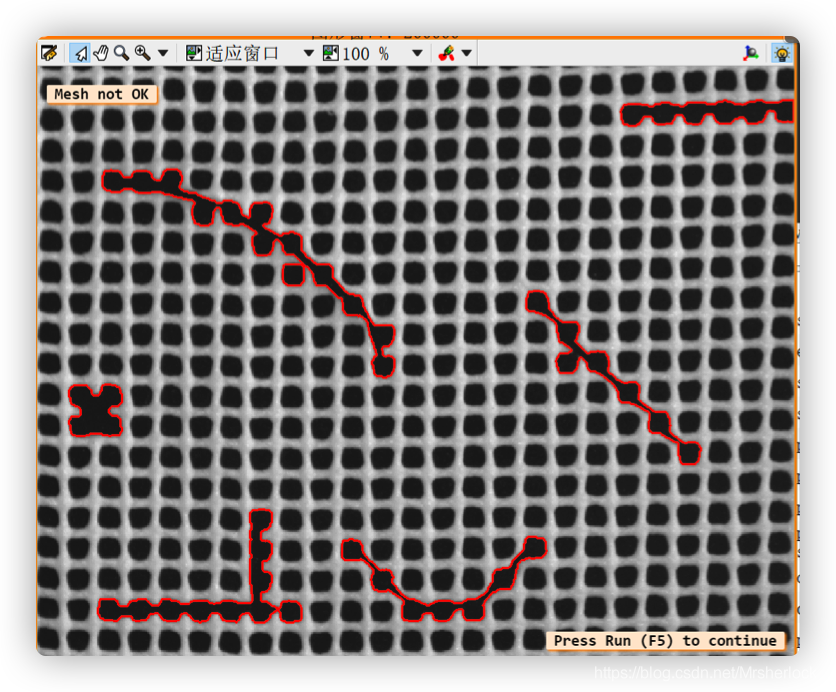
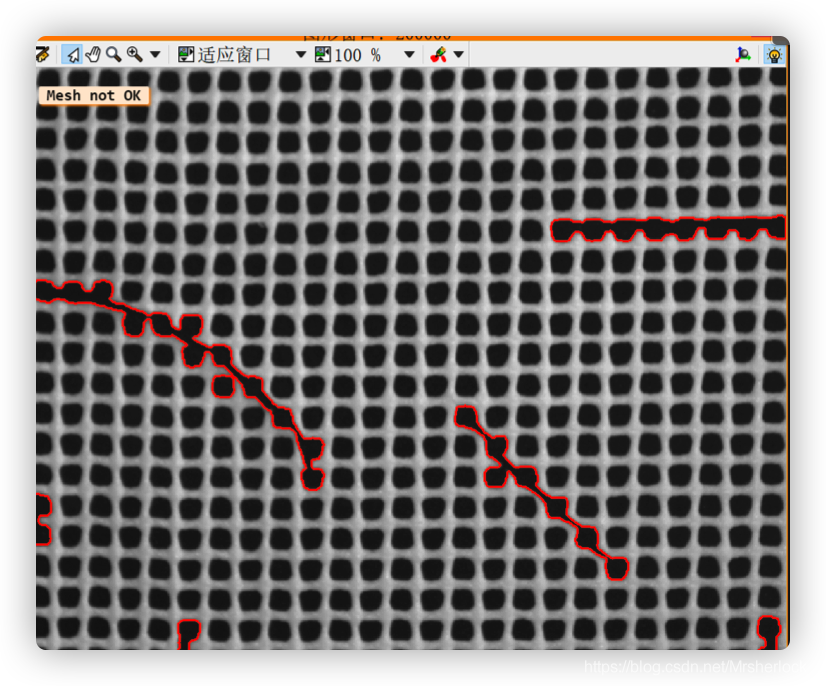
这里的blob利用了局部二值化,提取局部的信息进行二值化操作,局部动态阈值操作
光照稳定,环境简单的应用场合
* The task of this example is to detect defects on a
* web using the operator dyn_threshold. In this way,
* the operator can be used to find textures that
* differ from the rest of the image.
dev_update_window ('off')
read_image (Image, 'plastic_mesh/plastic_mesh_01')
dev_close_window ()
get_image_size (Image, Width, Height)
dev_open_window_fit_image (Image, 0, 0, Width, Height, WindowHandle)
set_display_font (WindowHandle, 18, 'mono', 'true', 'false')
dev_set_draw ('margin')
dev_set_line_width (3)
* Each of the images is read and smoothed. Subsequently
* dyn_threshold is performed and connected regions are
* looked for. The parameter 'area' of the operator select_shape
* makes it possible to find regions that differ in the area
* size. Found errors are finally counted and displayed.
for J := 1 to 14 by 1
    read_image (Image, 'plastic_mesh/plastic_mesh_' + J$'02')
    mean_image (Image, ImageMean, 49, 49)
    dyn_threshold (Image, ImageMean, RegionDynThresh, 5, 'dark')
    connection (RegionDynThresh, ConnectedRegions)
// 根据面积来提取图像的特征
    select_shape (ConnectedRegions, ErrorRegions, 'area', 'and', 500, 99999)
    count_obj (ErrorRegions, NumErrors)
    dev_display (Image)
    dev_set_color ('red')
    dev_display (ErrorRegions)
    * If the number of errors exceeds zero, the message 'Mesh not
    * OK' is displayed. Otherwise the web is undamaged
    * and 'Mesh OK' is displayed.
    if (NumErrors > 0)
        disp_message (WindowHandle, 'Mesh not OK', 'window', 24, 12, 'black', 'true')
    else
        disp_message (WindowHandle, 'Mesh OK', 'window', 24, 12, 'black', 'true')
    endif
    * If the sequence number of the image to be inspected is
    * lower than 14, the request to press 'Run' to continue appears.
    * If the last image is read, pressing 'Run' will clear the SVM.
    if (J < 14)
        disp_continue_message (WindowHandle, 'black', 'true')
        stop ()
    endif
endfor
对于图片:动态二值化,首先需要把图片进行均值滤波,这个动态二值化相当于对两张图片做了一次像素级别的差分运算
对于区域:差分运算使用difference算子
dyn_threshold(OrigImage, ThresholdImage : RegionDynThresh : Offset, LightDark : )
//ThresholdImage是输入的等待二值化的图片,Offset是二值化偏移量,OrigImage是原图片,RegionDynThresh是输出结果
//二值化是把OrigImage和ThresholdImage两个图片中的像素,一个像素一个像素的比较
案例五(blob+特征+差分)
检测PCB板的毛刺和断开点
打光均匀,对比度高,稳定的场合
灰度图像进行腐蚀或者开运算,图像暗的像素会增多
灰度图像进行膨胀或者闭运算,图像亮的像素会增多
开运算=先腐蚀后膨胀

read_image (Image, 'pcb')
dev_close_window ()
get_image_size (Image, Width, Height)
dev_open_window (0, 0, Width, Height, 'black', WindowHandle)
dev_display (Image)
* detect defects ...
gray_opening_shape (Image, ImageOpening, 7, 7, 'octagon')
gray_closing_shape (Image, ImageClosing, 7, 7, 'octagon')
//动态二值化实现差分操作
dyn_threshold (ImageOpening, ImageClosing, RegionDynThresh, 75, 'not_equal')
dev_display (Image)
dev_set_color ('red')
dev_set_draw ('margin')
dev_display (RegionDynThresh)
案例六(检测定位+blob+特征+差分)
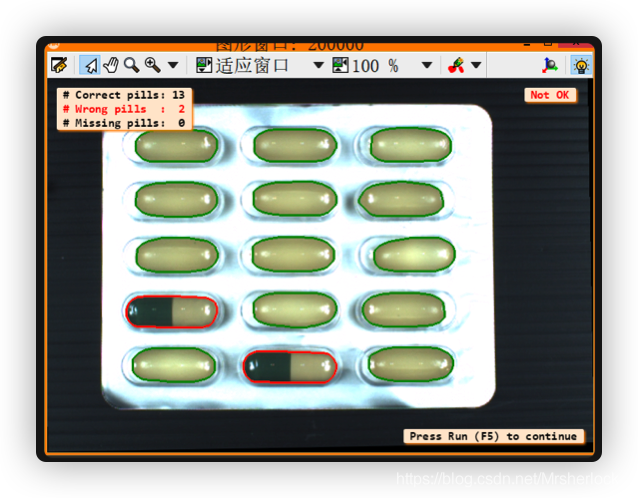
- 定位胶囊
- 把胶囊位置调正,调水平
- 把每个胶囊放到区域数组中,每个胶囊对应到一个标准的胶囊格子中(用来测量面积)
- 将胶囊面积和胶囊格子面积进行对比,若小于低阈值则正常,大于高阈值则异常
* This example demonstrates an application from the pharmaceutical
* industry. The task is to check the content of automatically filled
* blisters. The first image (reference) is used to locate the chambers
* within a blister shape as a reference model, which is then used to
* realign the subsequent images along to this reference shape. Using
* blob analysis the content of each chamber is segmented and finally
* classified by a few shape features.
*
dev_close_window ()
dev_update_off ()
read_image (ImageOrig, 'blister/blister_reference')
dev_open_window_fit_image (ImageOrig, 0, 0, -1, -1, WindowHandle)
set_display_font (WindowHandle, 14, 'mono', 'true', 'false')
dev_set_draw ('margin')
dev_set_line_width (3)
*
* In the first step, we create a pattern to cut out the chambers in the
* subsequent blister images easily.
access_channel (ImageOrig, Image1, 1)
threshold (Image1, Region, 90, 255)
// 拟合成椭圆
shape_trans (Region, Blister, 'convex')
orientation_region (Blister, Phi)
area_center (Blister, Area1, Row, Column)
vector_angle_to_rigid (Row, Column, Phi, Row, Column, 0, HomMat2D)
affine_trans_image (ImageOrig, Image2, HomMat2D, 'constant', 'false')
gen_empty_obj (Chambers)
for I := 0 to 4 by 1
// 人工手动划分胶囊格子
    Row := 88 + I * 70
    for J := 0 to 2 by 1
        Column := 163 + J * 150
        gen_rectangle2 (Rectangle, Row, Column, 0, 64, 30)
        concat_obj (Chambers, Rectangle, Chambers)
    endfor
endfor
affine_trans_region (Blister, Blister, HomMat2D, 'nearest_neighbor')
difference (Blister, Chambers, Pattern)
union1 (Chambers, ChambersUnion)
orientation_region (Blister, PhiRef)
PhiRef := rad(180) + PhiRef
area_center (Blister, Area2, RowRef, ColumnRef)
*
*
* Each image read will be aligned to this pattern and reduced to the area of interest,
* which is the chambers of the blister
Count := 6
for Index := 1 to Count by 1
    read_image (Image, 'blister/blister_' + Index$'02')
    threshold (Image, Region, 90, 255)
    connection (Region, ConnectedRegions)
    select_shape (ConnectedRegions, SelectedRegions, 'area', 'and', 5000, 9999999)
    shape_trans (SelectedRegions, RegionTrans, 'convex')
    *
    * Align pattern along blister of image
    orientation_region (RegionTrans, Phi)
    area_center (RegionTrans, Area3, Row, Column)
    vector_angle_to_rigid (Row, Column, Phi, RowRef, ColumnRef, PhiRef, HomMat2D)
    affine_trans_image (Image, ImageAffineTrans, HomMat2D, 'constant', 'false')
    *
    * Segment pills
    reduce_domain (ImageAffineTrans, ChambersUnion, ImageReduced)
    decompose3 (ImageReduced, ImageR, ImageG, ImageB)
    var_threshold (ImageB, Region, 7, 7, 0.2, 2, 'dark')
    connection (Region, ConnectedRegions0)
    closing_rectangle1 (ConnectedRegions0, ConnectedRegions, 3, 3)
    fill_up (ConnectedRegions, RegionFillUp)
    select_shape (RegionFillUp, SelectedRegions, 'area', 'and', 1000, 99999)
    opening_circle (SelectedRegions, RegionOpening, 4.5)
    connection (RegionOpening, ConnectedRegions)
    select_shape (ConnectedRegions, SelectedRegions, 'area', 'and', 1000, 99999)
    shape_trans (SelectedRegions, Pills, 'convex')
    *
    * Classify segmentation results and display statistics
    count_obj (Chambers, Number)
    gen_empty_obj (WrongPill)
    gen_empty_obj (MissingPill)
    for I := 1 to Number by 1
        select_obj (Chambers, Chamber, I)
        intersection (Chamber, Pills, Pill)
        area_center (Pill, Area, Row1, Column1)
        if (Area > 0)
            min_max_gray (Pill, ImageB, 0, Min, Max, Range)
            if (Area < 3800 or Min < 60)
                concat_obj (WrongPill, Pill, WrongPill)
            endif
        else
            concat_obj (MissingPill, Chamber, MissingPill)
        endif
    endfor
    *
    dev_clear_window ()
    dev_display (ImageAffineTrans)
    dev_set_color ('forest green')
    count_obj (Pills, NumberP)
    count_obj (WrongPill, NumberWP)
    count_obj (MissingPill, NumberMP)
    dev_display (Pills)
    if (NumberMP > 0 or NumberWP > 0)
        disp_message (WindowHandle, 'Not OK', 'window', 12, 12 + 600, 'red', 'true')
    else
        disp_message (WindowHandle, 'OK', 'window', 12, 12 + 600, 'forest green', 'true')
    endif
    *
    Message := '# Correct pills: ' + (NumberP - NumberWP)
    Message[1] := '# Wrong pills  :  ' + NumberWP
    Message[2] := '# Missing pills:  ' + NumberMP
    *
    Colors := gen_tuple_const(3,'black')
    if (NumberWP > 0)
        Colors[1] := 'red'
    endif
    if (NumberMP > 0)
        Colors[2] := 'red'
    endif
    disp_message (WindowHandle, Message, 'window', 12, 12, Colors, 'true')
    dev_set_color ('red')
    dev_display (WrongPill)
    dev_display (MissingPill)
    if (Index < Count)
        disp_continue_message (WindowHandle, 'black', 'true')
    endif
    stop ()
endfor
版权声明:本文为Mrsherlock_原创文章,遵循CC 4.0 BY-SA版权协议,转载请附上原文出处链接和本声明。