一、SpringBoot配置文件
SpringBoot默认有一个全局配置文件,配置文件名是固定的:
application.properties
或者
application.yml
二、YAML(yml)
1. 概述
yml以数据为中心,比json和xml等更适合做配置文件;
使用语法:
server:
	port:8081
xml写法:
<server>
	<port>8081</port>
</server>
2.YAML语法
基本语法
k:(空格)v:表示一对键值对(空格一定要有)
以空格的缩进来控制层级关系
值的写法
k:v:字面量
字符串默认不需要加单引号或者双引号
“”:双引号,不会转义字符串里的特殊字符,特殊字符会以自身想表达的意思进行输出。
name:“你 \n 我”,会输出:我 换行 你
‘’:单引号,会转义字符串里的特殊字符,特殊字符会作为普通字符串输出。
name:“你 \n 我”,会输出:我你(没有换行)
对象(属性和值)、Map(键值对)的写法
k:v:在下一行来写对象的属性和值的关系;
person:
    name:zhangsan
    age:18
行内写法
person: {name:zhangsan,age:18}
数组,List、Set的写法
用-值表示数组中的一个元素**(一定不要忘了值“-(中间有一个空格) 值”)**
persons:
	- zhangsan
	- lisi
	- wangwu
#- zhangsan(中间有空格)
行内写法
persons:[zhangsan,lisi,wangwu]
三、配置文件值注入
1. 实例
配置文件
person:
  name: 张三
  age: 15
  isLeader: false
  birth: 2018/12/12
  map: {k1: v1,k2: v2}
  list:
    - 李四
    - 王五
  pet:
    name: dog
    age: 2
javaBean
/**
 * 将配置文件中的每一个值映射到这个组件中
 * @ConfigurationProperties:告诉SpringBoot将本类中的每一个属性和配置文件中的相关配置进行绑定;
 * prefix = "person":指定配置文件中的哪一个属性下的配置和类属性一一映射
 */
@Component
@ConfigurationProperties(prefix = "person")
public class Person {
    String name;
    Integer age;
    boolean isLeader;
    Date birth;
    Map<String, Object> map;
    List<String> list;

    Pet pet;
使用idea编写yml文件需导入maven依赖才会有提示
<!--导入配置文件处理器,配置文件进行绑定就会有提示-->
<dependency>
    <groupId>org.springframework.boot</groupId>
    <artifactId>spring-boot-configuration-processor</artifactId>
    <optional>true</optional>
</dependency>
2. 相关注解
- @ConfigurationProperties(prefix = “person”):告诉SpringBoot将本类中的每一个属性和配置文件相关配置进行绑定;
- @Component:只有此组件是容器中的组件时才能使用@ConfigurationProperties注解完成属性绑定
3.配置文件注入值数据校验
使用@ConfigurationProperties()方式
javaBean
@Component
//@ConfigurationProperties(prefix = "person")
@Validated
public class Person {

    @Email
    @Value("${person.name}")
String name;

    Integer age;
    boolean isLeader;
    Date birth;
    Map<String, Object> map;
List<String> list;

    Pet pet;
yaml配置文件
person:
  name: 张三
  age: 15
  isLeader: false
  birth: 2018/12/12
  map: {k1: v1,k2: v2}
  list:
    - 李四
    - 王五
  pet:
    name: dog
    age: 2
测试类
@RunWith(SpringRunner.class)
@SpringBootTest
class SpringbootConfigApplicationTests {

    @Autowired
    private Person person;

    @Test
    void contextLoads() {
        System.out.println(person.getName());
    }

}
测试结果
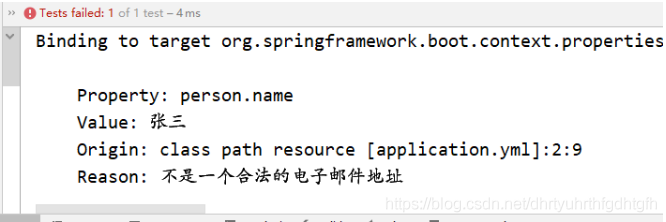
5. 说明使用@ConfigurationProperties()注入的方式支持JSR303数据校验
使用@value()的方式
javaBean
@Component
//@ConfigurationProperties(prefix = "person")
@Validated
public class Person {

    @Email
    String name;

    Integer age;
    boolean isLeader;
    Date birth;
    Map<String, Object> map;
    List<String> list;

    Pet pet;
yaml配置文件
person:
  name: 张三
  age: 15
  isLeader: false
  birth: 2018/12/12
  map: {k1: v1,k2: v2}
  list:
    - 李四
    - 王五
  pet:
    name: dog
    age: 2
测试类
@RunWith(SpringRunner.class)
@SpringBootTest
class SpringbootConfigApplicationTests {

    @Autowired
    private Person person;

    @Test
    void contextLoads() {
        System.out.println(person.getName());
    }

}
测试结果

5. 说明使用@Value的方式注入,不支持JSR303数据校验
4. @Value获取值和@ConfigurationProperties获取值比较
| @ConfigurationProperties | @Value | |
|---|---|---|
| 功能 | 批量注入配置文件中的属性 | 一个个指定 |
| 松散绑定(松散语法) | 支持 | 不支持 |
| SpEL | 不支持 | 支持 |
| JSR303数据校验 | 支持 | 不支持 |
| 复杂类型封装 | 支持 | 不支持 |
配置文件yml还是properties他们都能获取到值;
如果说,我们只是在某个业务逻辑中需要获取一下配置文件中的某项值,使用@Value;
如果说,我们专门编写了一个javaBean来和配置文件进行映射,我们就直接使用@ConfigurationProperties;
5. @PropertySource、@ImportResource、@Bean
@PropertySource加载指定properties配置文件(无法加载yml文件)
javaBean
/**
 * 将配置文件中的每一个值映射到这个组件中
 * @ConfigurationProperties:告诉SpringBoot将本类中的每一个属性和配置文件中的相关配置进行绑定;
 * prefix = "person":指定配置文件中的哪一个属性下的配置和类属性一一映射
 */
@Component
@PropertySource(value = {"classpath:person.properties"})
@ConfigurationProperties(prefix = "person")
//@Validated
public class Person {

//    @Email
    @Value("${person.name}")
    String name;

    Integer age;
    boolean isLeader;
    Date birth;
    Map<String, Object> map;
    List<String> list;

    Pet pet;
配置文件
person.name=张三
person.age=20
person.isLeader=false
测试类
@RunWith(SpringRunner.class)
@SpringBootTest
class SpringbootConfigApplicationTests {

    @Autowired
    private Person person;

    @Test
    void contextLoads() {
        System.out.println(person.getName()+"的年龄是:"+person.getAge());
    }

}
测试结果
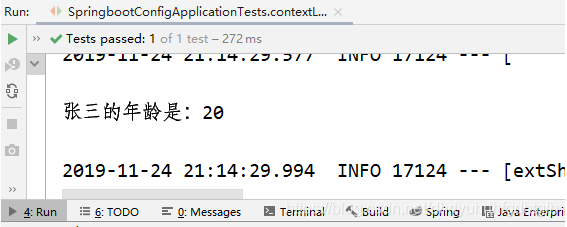
@ImportResource导入指定spring配置文件,让外部spring配置文件生效(但是springboot并不推荐这种做法)
配置文件spring-service.xml
<?xml version="1.0" encoding="UTF-8"?>
<beans xmlns="http://www.springframework.org/schema/beans"
       xmlns:xsi="http://www.w3.org/2001/XMLSchema-instance"
       xsi:schemaLocation="http://www.springframework.org/schema/beans http://www.springframework.org/schema/beans/spring-beans.xsd">


    <bean id="helloService" class="com.feiniu.springboot.service.HelloSercice"></bean>
</beans>
java类
package com.feiniu.springboot.service; public class HelloSercice { public void hello(){ System.out.println("hello"); } }需要在配置类上加上@ImportResource注解,并指明配置文件位置
@ImportResource(locations = {"classpath:spring-service.xml"})
@SpringBootApplication
public class SpringbootConfigApplication {

    public static void main(String[] args) {
        SpringApplication.run(SpringbootConfigApplication.class, args);
    }

}
测试类
@RunWith(SpringRunner.class)
@SpringBootTest
class SpringbootConfigApplicationTests {

    @Autowired
    private Person person;

    @Autowired
    ApplicationContext ioc;

    @Test
    void contextLoads() {
        System.out.println(ioc.containsBean("helloService"));
    }

}
测试结果
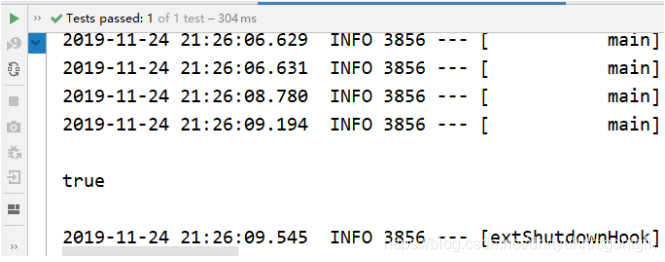
springboot推荐使用全注解的方式,使用@Bean注解给容器中添加组件
HelloService类
package com.feiniu.springboot.service;

public class HelloSercice {
    public void hello(){
        System.out.println("hello");
    }
}
配置类
@Configuration:指明当前类是一个配置类;就是来替代之前的Spring配置文件
使用**@Bean**给容器中添加组件
- 方法的返回值就是就是容器中的组件类型
- 方法名就是容器中组件的名称
/**
 * @Configuration:指明当前类是一个配置类;就是来替代之前的Spring配置文件
 *@Bean给容器中添加组件
 *方法的返回值就是就是容器中的组件类型
 *方法名就是容器中组件的名称
 *
 */
@Configuration
public class AppConfig {
    @Bean
    public HelloSercice helloSercice() {
        System.out.println("@Bean给容器中添加组件了");
        return new HelloSercice();
    }
}
测试类
@RunWith(SpringRunner.class)
@SpringBootTest
class SpringbootConfigApplicationTests {

    @Autowired
    ApplicationContext ioc;

    @Test
    void contextLoads() {
        System.out.println(ioc.containsBean("helloService"));
    }

}
测试结果
[外链图片转存失败,源站可能有防盗链机制,建议将图片保存下来直接上传(img-g4qVXJ0b-1576460377156)(31620294E7B142189E731CD688EF27BE)]
6. 配置文件占位符
1. 随机数
${random.value}、${random.int}、${random.long}
${random.int(10)}、${random.int[1024,65536]}
2. 案例
person.properties文件
person.name=张三${random.uuid}
person.age=${random.int}
person.isLeader=false
#person.pet.name的值:先获取之前配置中person.name的值,然后拼接上person.hello的值,因为
#person.hello没有值,所以取默认值hello,最后再拼接上dog
person.pet.name=${person.name}${person.hello:hello}_dog
Person.java
/**
 * 将配置文件中的每一个值映射到这个组件中
 * @ConfigurationProperties:告诉SpringBoot将本类中的每一个属性和配置文件中的相关配置进行绑定;
 * prefix = "person":指定配置文件中的哪一个属性下的配置和类属性一一映射
 */
@Component
@PropertySource(value = {"classpath:person.properties"})
@ConfigurationProperties(prefix = "person")
public class Person {

    @Value("${person.name}")
    String name;

    Integer age;
    boolean isLeader;
    Date birth;
    Map<String, Object> map;
    List<String> list;

    Pet pet;
测试类
@RunWith(SpringRunner.class)
@SpringBootTest
class SpringbootConfigApplicationTests {

    @Autowired
    private Person person;

    @Autowired
    ApplicationContext ioc;

    @Test
    void contextLoads() {
        System.out.println(person);
    }

}
测试结果

四、Profile
1. 多profile文件
我们在编写主配置文件的时候,文件名可以是application-{profile}.properties/yml
springboot默认使用的是application.properties中的配置
编写三个主配置文件
application.properties
server.port=8080application-dev.properties
server.port=8082application-prod.properties
server.port=8081
- 直接启动主配置类

发现端口号是8080,则说明默认加载的是application.properties文件
- 在application.properties中添加spring.profiles.active=prod配置,然后启动应用
server.port=8080
spring.profiles.active=prod

发现端口号是8081,则说明此事加载的是application-prod.properties文件
- 在application.properties中添加spring.profiles.active=dev配置,然后启动应用
server.port=8080
spring.profiles.active=dev

发现端口号是8082,则说明此事加载的是application-prod.properties文件
2. yml支持多文档块儿的方式
1. 每一个文档块儿之间用—隔开
application.yml
 server:
   port: 8080

 spring:
   profiles:
     active: prod

 ---
 server:
   port: 8081

 spring:
   profiles: dev

 ---
 server:
   port: 8082
 spring:
   profiles: prod
2. 激活指定profile
在配置文件中指定spring.profiles. active=prod
命令行:
java -jar spring-boot-config-0.0.1-SNAPSHOT.jar --spring.profiles.active=prod;
可以直接在测试的时候,配置传入命令行参数
虚拟机参数:
-Dspring.profiles.active=dev
[外链图片转存失败,源站可能有防盗链机制,建议将图片保存下来直接上传(img-JQELhExV-1576460377157)(61816A6C7133418EA47178A5846F02D3)]
五、配置文件加载位置
springboot 启动会扫描以下位置的application.properties或者application.yml文件作为Spring boot的默认配置文件
–file:./config/(-file指当前项目根路径)
–file:./
–classpath:/config/(-classpath指类路径)
–classpath:/
优先级由高到底,高优先级的配置会覆盖低优先级的配置;
SpringBoot会从这四个位置全部加载主配置文件;互补配置(高优先级中有的用高优先级,高优先级没有的用低优先级);
我们还可以通过spring.config.location来改变默认的配置文件位置(只能通过命令行的方式使用)
项目打包好以后,我们可以使用命令行参数的形式,启动项目的时候来指定配置文件的新位置;指定配置文件和默认加载的这些配置文件共同起作用形成互补配置;
java -jar spring-boot-02-config-02-0.0.1-SNAPSHOT.jar --spring.config.location=G:/application.properties
六、外部配置加载顺序
SpringBoot也可以从以下位置加载配置; 优先级从高到低;高优先级的配置覆盖低优先级的配置,所有的配置会形成互补配置
1.命令行参数
所有的配置都可以在命令行上进行指定
java -jar spring-boot-02-config-02-0.0.1-SNAPSHOT.jar --server.port=8087 --server.context-path=/abc
多个配置用空格分开; --配置项=值
2.来自java:comp/env的JNDI属性
3.Java系统属性(System.getProperties())
4.操作系统环境变量
5.RandomValuePropertySource配置的random.*属性值
由jar包外向jar包内进行寻找;
优先加载带profile
6.jar包外部的application-{profile}.properties或application.yml(带spring.profile)配置文件
7.jar包内部的application-{profile}.properties或application.yml(带spring.profile)配置文件
再来加载不带profile
8.jar包外部的application.properties或application.yml(不带spring.profile)配置文件
9.jar包内部的application.properties或application.yml(不带spring.profile)配置文件
10.@Configuration注解类上的@PropertySource
11.通过SpringApplication.setDefaultProperties指定的默认属性
所有支持的配置加载来源;