一)okhttp3简介
okhttp是一个高性能的http库,支持同步、异步请求,并且实现了spdy、http2、websocket协议,api比较简洁易用。
核心类:
OkHttpClient:用于初始化http请求信息
Request:请求参数信息
Call:回调函数信息
RequestBody:请求报文信息
Response:请求响应信息
okhttp github地址:https://github.com/square/okhttp
http请求方式区别:
multipart/form-data:该方式可以用键值对传递参数,并且可以上传文件。
application/x-www-form-urlencoded:该方式只能以键值对传递参数,并且参数最终会拼接成一条,用“&”符合隔开。
application/json:该方式是以对象的方式传递参数,对象中的信息以键值对传递。
二)okhttp3案例
第一步:创建一个maven项目,引入springboot的jar、再引入okhttp3的jar
<project xmlns="http://maven.apache.org/POM/4.0.0" xmlns:xsi="http://www.w3.org/2001/XMLSchema-instance" xsi:schemaLocation="http://maven.apache.org/POM/4.0.0 http://maven.apache.org/xsd/maven-4.0.0.xsd">
    <modelVersion>4.0.0</modelVersion>
    <groupId>com.oysept</groupId>
    <artifactId>springboot_okhttp3</artifactId>
    <version>0.0.1-SNAPSHOT</version>
    <packaging>jar</packaging>

    <parent>
        <groupId>org.springframework.boot</groupId>
        <artifactId>spring-boot-starter-parent</artifactId>
        <version>2.1.4.RELEASE</version>
        <relativePath/>
    </parent>

    <properties>
        <java.version>1.8</java.version>
    </properties>

    <dependencies>
        <dependency>
            <groupId>org.springframework.boot</groupId>
            <artifactId>spring-boot-starter-web</artifactId>
        </dependency>

        <dependency>
            <groupId>com.squareup.okhttp3</groupId>
            <artifactId>okhttp</artifactId>
            <version>4.0.0</version>
        </dependency>
    </dependencies>

    <build>
        <plugins>
            <plugin>
                <groupId>org.springframework.boot</groupId>
                <artifactId>spring-boot-maven-plugin</artifactId>
                <configuration>
                    <mainClass>com.oysept.Okhttp3Application</mainClass>
                </configuration>
            </plugin>
            <plugin>
                <groupId>org.apache.tomcat.maven</groupId>
                <artifactId>tomcat7-maven-plugin</artifactId>
            </plugin>
        </plugins>
    </build>
</project>
创建application.yml配置文件,设置访问端口
server:
    port: 8080
创建springboot启动类:
package com.oysept;

import org.springframework.boot.SpringApplication;
import org.springframework.boot.autoconfigure.SpringBootApplication;

@SpringBootApplication
public class Okhttp3Application {

    public static void main(String[] args) {
        SpringApplication.run(Okhttp3Application.class, args);
    }
}
创建一个JavaBean,用于参数传递
package com.oysept.vo;

public class FileVO {

    private String fileName;
    private String fileContent;
    private Integer fileSize;
    private String fileType;

    public FileVO() {}
    public FileVO(String fileName, String fileContent, Integer fileSize, String fileType) {
        this.fileName = fileName;
        this.fileContent = fileContent;
        this.fileSize = fileSize;
        this.fileType = fileType;
    }

    public String getFileName() {return fileName;}
    public void setFileName(String fileName) {this.fileName = fileName;}

    public String getFileContent() {return fileContent;}
    public void setFileContent(String fileContent) {this.fileContent = fileContent;}

    public Integer getFileSize() {return fileSize;}
    public void setFileSize(Integer fileSize) {this.fileSize = fileSize;}

    public String getFileType() {return fileType;}
    public void setFileType(String fileType) {this.fileType = fileType;}

    public String toString() {
        return "DataVO[fileName: "+this.fileName+", fileSize: "+this.fileSize+", fileType: "+this.fileType+"]";
    }
}
第二步:创建一个GET请求Controller类,提供一些测试接口
package com.oysept.controller;

import org.springframework.web.bind.annotation.RequestMapping;
import org.springframework.web.bind.annotation.RequestMethod;
import org.springframework.web.bind.annotation.RequestParam;
import org.springframework.web.bind.annotation.RestController;

import com.oysept.vo.FileVO;

@RestController
public class GetController {

    /**
     * 访问地址: http://localhost:8080/okhttp3/get/params
    * @return
     */
    @RequestMapping(value="/okhttp3/get/params", method = RequestMethod.GET)
    public String getParams(@RequestParam(value = "param1") String param1, @RequestParam("param2") String param2) {
        System.out.println("==>/okhttp3/get/params, param1: " + param1 + ", param2: " + param2);

        // 处理业务逻辑
        return "/okhttp3/get/params SUCCESS!";
    }

    /**
     * 访问地址: http://localhost:8080/okhttp3/get/form
     * @return
     */
    @RequestMapping(value="/okhttp3/get/form", method = RequestMethod.GET)
    public String getForm(FileVO fileVO) {
        System.out.println("==>/okhttp3/get/form, fileVO: " + fileVO);

        // 处理业务逻辑
        return "/okhttp3/get/form SUCCESS";
    }
}
1、GET带参数请求
main方法测试:
package com.oysept.test;
import java.io.IOException;
import java.util.concurrent.TimeUnit;
import okhttp3.OkHttpClient;
import okhttp3.Request;
import okhttp3.Response;
/**
* GET带参请求
* @author ouyangjun
*/
public class GetParamsTest {
public static void main(String[] args) {
// 请求地址
String url = "http://localhost:8080/okhttp3/get/params?param1=EEE¶m2=PPP";
OkHttpClient client = new OkHttpClient()
.newBuilder()
.connectTimeout(10, TimeUnit.SECONDS) // 设置超时时间
.readTimeout(10, TimeUnit.SECONDS) // 设置读取超时时间
.writeTimeout(10, TimeUnit.SECONDS) // 设置写入超时时间
.build();
Request request = new Request.Builder()
.url(url)
.build();
try (Response response = client.newCall(request).execute()) {
System.out.println("/okhttp3/get 返回结果: " + response.body().string());
} catch (IOException e) {
e.printStackTrace();
}
}
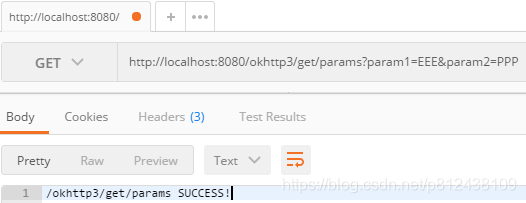
}Postman测试:
2、GET application/x-www-form-urlencoded表单请求
main方法测试:
package com.oysept.test;

import java.io.IOException;
import java.util.concurrent.TimeUnit;

import okhttp3.OkHttpClient;
import okhttp3.Request;
import okhttp3.Response;

/**
 * GET application/x-www-form-urlencoded请求方式
 * @author ouyangjun
 */
public class GetFormTest {

    public static void main(String[] args) {
        // 参数名称需和FileVO中的名称一一对应
        String url = "http://localhost:8080/okhttp3/get/form?fileName=kkkk&fileSize=6699";

        OkHttpClient client = new OkHttpClient()
                .newBuilder()
                .connectTimeout(10, TimeUnit.SECONDS) // 设置超时时间
                .readTimeout(10, TimeUnit.SECONDS) // 设置读取超时时间
                .writeTimeout(10, TimeUnit.SECONDS) // 设置写入超时时间
                .build();

        Request request = new Request.Builder()
                .url(url)
                .build();
        try (Response response = client.newCall(request).execute()) {
            System.out.println("/okhttp3/get/form 返回结果: " + response.body().string());
        } catch (IOException e) {
            e.printStackTrace();
        }
    }
}
第三步:创建一个POST请求Controller类,提供一些测试接口
package com.oysept.controller;

import org.springframework.http.MediaType;
import org.springframework.web.bind.annotation.RequestBody;
import org.springframework.web.bind.annotation.RequestMapping;
import org.springframework.web.bind.annotation.RequestMethod;
import org.springframework.web.bind.annotation.RestController;

import com.oysept.vo.FileVO;

@RestController
public class PostController {

    /**
     * 局限性: 该方式只适合键值对数据格式, 最后会把键值对拼接成一条语句
     * 访问地址: http://localhost:8080/okhttp3/post/xwwwform_urlencoded
     * 请求方式: POST
     * 传参方式(键值对): application/x-www-form-urlencoded
     * @param fileVO
     * @return
     */
    @RequestMapping(value="/okhttp3/post/xwwwform_urlencoded", method = RequestMethod.POST,
            consumes = {
                MediaType.APPLICATION_FORM_URLENCODED_VALUE
            },
            produces = {
                MediaType.APPLICATION_JSON_UTF8_VALUE
            })
    public String xWWWFormUrlencoded(FileVO fileVO) {
        System.out.println("==>/okhttp3/post/xwwwform_urlencoded: " + fileVO);

        // 处理业务逻辑
        return "/okhttp3/post/xwwwform_urlencoded SUCCESS!";
    }

    /**
     * 局限性: 该方式比较适合图片类文件上传, 如把图片转换成Base64格式, 再处理
     * 访问地址: http://localhost:8080/okhttp3/post/formData
     * 请求方式: POST
     * 传参方式(键值对): multipart/form-data
     * @param fileVO
     * @return
     */
    @RequestMapping(value="/okhttp3/post/formData", method = RequestMethod.POST,
            consumes = {
                 MediaType.MULTIPART_FORM_DATA_VALUE
            },
            produces = {
                MediaType.APPLICATION_JSON_UTF8_VALUE
            })
    public String formData(FileVO fileVO) {
        System.out.println("==>/okhttp3/post/formData: " + fileVO);

        // 处理业务逻辑
        return "/okhttp3/post/formData SUCCESS!";
    }

    /**
     * 访问地址: http://localhost:8080/okhttp3/post/json
     * 请求方式: POST
     * 传参方式: application/json
     * @param fileVO
     * @return
     */
    @RequestMapping(value="/okhttp3/post/json", method = RequestMethod.POST,
            consumes = {
                MediaType.APPLICATION_JSON_UTF8_VALUE
            },
            produces = {
                MediaType.APPLICATION_JSON_UTF8_VALUE
            })
    public String json(@RequestBody FileVO fileVO) {
        System.out.println("==>/okhttp3/post/json: " + fileVO);

        // 处理业务逻辑
        return "/okhttp3/post/json SUCCESS!";
    }
}
1、POST multipart/form-data表单请求
main方法测试:
package com.oysept.test;

import java.io.IOException;
import java.util.HashMap;
import java.util.Map;
import java.util.concurrent.TimeUnit;

import okhttp3.MediaType;
import okhttp3.MultipartBody;
import okhttp3.OkHttpClient;
import okhttp3.Request;
import okhttp3.RequestBody;
import okhttp3.Response;

/**
 * multipart/form-data方式测试
 * @author ouyangjun
 */
public class PostFormDataTest {

    public static void main(String[] args) {
        // 请求地址
        String url = "http://localhost:8080/okhttp3/post/formData";

        // 请求参数
        Map<String, String> paramsMap = new HashMap<String, String>();
        paramsMap.put("fileName", "GGGGG");
        paramsMap.put("fileSize", "77777");
        httpMethod(url, paramsMap);
    }

    public static void httpMethod(String url, Map<String, String> paramsMap) {
        // 创建client对象 创建调用的工厂类 具备了访问http的能力
        OkHttpClient client = new OkHttpClient()
                .newBuilder()
                .connectTimeout(10, TimeUnit.SECONDS) // 设置超时时间
                .readTimeout(10, TimeUnit.SECONDS) // 设置读取超时时间
                .writeTimeout(10, TimeUnit.SECONDS) // 设置写入超时时间
                .build();

        // 添加请求类型
        MultipartBody.Builder builder = new MultipartBody.Builder();
        builder.setType(MediaType.parse("multipart/form-data"));

        //  创建请求的请求体
        for (String key : paramsMap.keySet()) {
            // 追加表单信息
            builder.addFormDataPart(key, paramsMap.get(key));
        }
        RequestBody body = builder.build();

        // 创建request, 表单提交
        Request request = new Request.Builder()
            .url(url)
            .post(body)
            .build();

        // 创建一个通信请求
        try (Response response = client.newCall(request).execute()) {
            // 尝试将返回值转换成字符串并返回
            System.out.println("==>返回结果: " + response.body().string());
        } catch (IOException e) {
            e.printStackTrace();
        }
    }
}
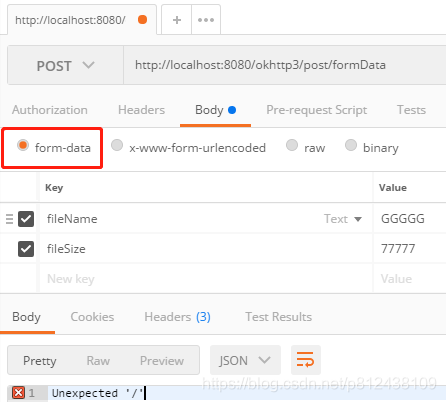
Postman测试:
2、POST application/x-www-form-urlencoded表单请求
main方法测试:
package com.oysept.test;

import java.io.IOException;
import java.util.HashMap;
import java.util.Map;
import java.util.concurrent.TimeUnit;

import okhttp3.FormBody;
import okhttp3.MediaType;
import okhttp3.OkHttpClient;
import okhttp3.Request;
import okhttp3.RequestBody;
import okhttp3.Response;

/**
 * application/x-www-form-urlencoded方式测试
 * @author ouyangjun
 */
public class PostXwwwFormTest {

    public static void main(String[] args) {
        // 请求地址
        String url = "http://localhost:8080/okhttp3/post/xwwwform_urlencoded";

        // 传值方式一: 键值
        Map<String, String> paramsMap = new HashMap<String, String>();
        paramsMap.put("fileName", "testName");
        paramsMap.put("fileSize", "999");
        httpMethodOne(url, paramsMap);

        // 传值方式二: 把键值对参数拼接起来
        String params = "fileName=TTTT&fileSize=666";
        httpMethodTwo(url, params);
    }

    // 方式一
    public static void httpMethodOne(String url, Map<String, String> paramsMap) {
        // 创建client对象 创建调用的工厂类 具备了访问http的能力
        OkHttpClient client = new OkHttpClient()
                .newBuilder()
                .connectTimeout(10, TimeUnit.SECONDS) // 设置超时时间
                .readTimeout(10, TimeUnit.SECONDS) // 设置读取超时时间
                .writeTimeout(10, TimeUnit.SECONDS) // 设置写入超时时间
                .build();

        // 创建请求的请求体
        FormBody.Builder builder = new FormBody.Builder();
        for (String key : paramsMap.keySet()) {
            // 追加表单信息
            builder.add(key, paramsMap.get(key));
        }
        RequestBody body = builder.build();

        // 创建request, 表单提交
        Request request = new Request.Builder()
            .addHeader("Content-Type", "application/x-www-form-urlencoded")
            .url(url)
            .post(body)
            .build();

        // 创建一个通信请求
        try (Response response = client.newCall(request).execute()) {
            // 尝试将返回值转换成字符串并返回
            System.out.println("==>httpMethodOne 方式二请求返回结果: " + response.body().string());
        } catch (IOException e) {
            e.printStackTrace();
        }
    }

    // 方式二: 把键值对参数拼接起来
    public static void httpMethodTwo(String url, String strParams) {
        // 创建client对象 创建调用的工厂类 具备了访问http的能力
        OkHttpClient client = new OkHttpClient()
                .newBuilder()
                .connectTimeout(10, TimeUnit.SECONDS) // 设置超时时间
                .readTimeout(10, TimeUnit.SECONDS) // 设置读取超时时间
                .writeTimeout(10, TimeUnit.SECONDS) // 设置写入超时时间
                .build();

        //  创建请求的请求体, 把参数拼接起来
        RequestBody body = RequestBody.create(strParams, MediaType.parse("application/x-www-form-urlencoded; charset=utf-8"));

        // 创建request, 表单提交
        Request request = new Request.Builder()
            .url(url)
            .post(body)
            .build();

        // 创建一个通信请求
        try (Response response = client.newCall(request).execute()) {
            // 尝试将返回值转换成字符串并返回
            System.out.println("==>httpMethodTwo 方式二请求返回结果: " + response.body().string());
        } catch (IOException e) {
            e.printStackTrace();
        }
    }
}
Postman测试:

3、application/json请求方式
main方法测试:
package com.oysept.test;

import java.io.IOException;
import java.util.concurrent.TimeUnit;

import okhttp3.MediaType;
import okhttp3.OkHttpClient;
import okhttp3.Request;
import okhttp3.RequestBody;
import okhttp3.Response;

/**
 * application/json方式测试
 * @author ouyangjun
 */
public class PostJsonTest {

    public static void main(String[] args) {
        // 请求地址
        String url = "http://localhost:8080/okhttp3/post/json";

        // JSON传值
        String json = "{\"fileName\":\"testName\", \"fileSize\":\"999\"}";
        httpMethod(url, json);
    }

    public static void httpMethod(String url, String json) {
        // 创建client对象 创建调用的工厂类 具备了访问http的能力
        OkHttpClient client = new OkHttpClient()
                .newBuilder()
                .connectTimeout(10, TimeUnit.SECONDS) // 设置超时时间
                .readTimeout(10, TimeUnit.SECONDS) // 设置读取超时时间
                .writeTimeout(10, TimeUnit.SECONDS) // 设置写入超时时间
                .build();

        // 创建请求的请求体
        RequestBody body = RequestBody.create(json, MediaType.get("application/json;charset=UTF-8"));

        // 创建request, 表单提交
        Request request = new Request.Builder()
            .url(url)
            .post(body)
            .build();

        // 创建一个通信请求
        try (Response response = client.newCall(request).execute()) {
            // 尝试将返回值转换成字符串并返回
            System.out.println("==>httpMethod 方式二请求返回结果: " + response.body().string());
        } catch (IOException e) {
            e.printStackTrace();
        }
    }
}
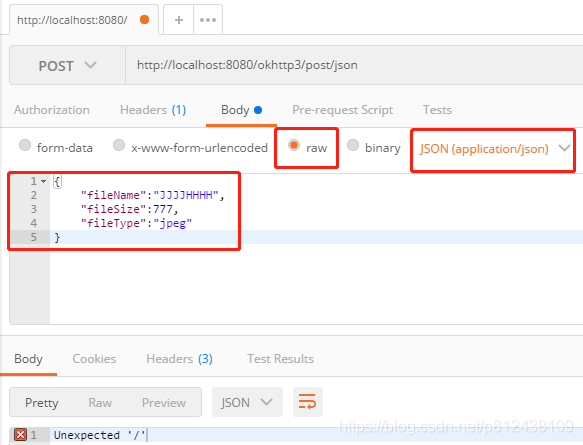
Postman测试:
先启动Okhttp3Application中main方法,然后在执行GET、POST测试类。
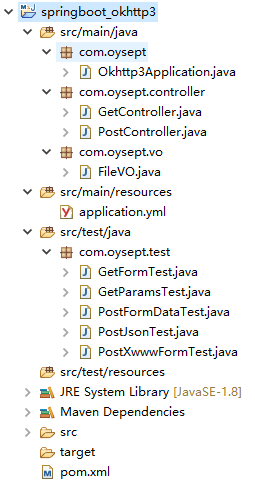
项目结构图:
识别二维码关注个人微信公众号

本章完结,待续,欢迎转载!
本文说明:该文章属于原创,如需转载,请标明文章转载来源!