Flutter Slider大家族之CustomScrollView和SliverAppBar 组件①
没有最好,只有更好。那一瞬间,你终于发现,那曾深爱过的人,早在告别的那天,已消失在这个世界。心中的爱和思念,都只是属于自己曾经拥有过的纪念。我想,有些事情是可以遗忘的,有些事情是可以记念的,有些事情能够心甘情愿,有些事情一直无能为力。我爱你,这是我的劫难。
今日效果图:
效果图(1.1):
CustomScrollView()
加粗是必加参数(只列举常用属性)
| CustomScrollView参数 | 类型 | 说明 |
|---|---|---|
| physics | ScrollPhysics | 滑动类型: BouncingScrollPhysics() 拉到最底部有回弹效 ClampingScrollPhysics() 包裹内容不会回弹 NeverScrollableScrollPhysics() 滑动禁止 |
| primary | bool | 当条目不足时 true可以滚动 |
| cacheExtent | int | 缓存条目(预加载条目) |
| scrollDirection | Axis | 滚动方向: Axis.vertical Axis. horizontal |
| slivers | List<Widget> | 子Widget |
| shrinkWrap | bool | true反向滑动AppBar |
咋们先来看看physics效果:
| BouncingScrollPhysics() | NeverScrollableScrollPhysics() | ClampingScrollPhysics() |
|---|---|---|
| 拉到最底部有回弹效果 | 滑动禁止 | 包裹内容不会回弹(默认) |
效果图(1.2): | 效果图(1.3): | 效果图(1.4): |
CustomScrollView()完整代码:
CustomScrollView(
	//      滑动类型
	//      BouncingScrollPhysics() 拉到最底部有回弹效果
	//    ClampingScrollPhysics() 包裹内容不会回弹
	//    NeverScrollableScrollPhysics() 滑动禁止
        physics: BouncingScrollPhysics(),
        //true反向滑动AppBar
        shrinkWrap: false,

        // 当条目不足时 true可以尝试滚动 false不可以滚动
        primary: true,
          //缓存条目
        cacheExtent: 0,
        //滚动方向
        scrollDirection: Axis.vertical,
        slivers: <Widget>[
      	  ///AppBar
          initSliverAppBar(),

          ///SliverFixedExtentList 下一章介绍
          initSliverFixedExtentList(),

          ///SliverList 下一章介绍
          initSliverList(),

          ///SliverGrid 下一章介绍
          initSliverGrid(),
        ],
      ),
注意:
- CustomScrollView中不能直接使用ListView或GridView,因为CustomScrollView本身是一个可滑动组件,ListView或GridView也是可滑动组件,可滑动组件里面嵌套可滑动组件会冲突.
这里代码也比较简单,直接看看效果图吧:
效果图(1.5):
这些参数不懂的记得评论区留言哦~
SliverAppBar()
(只列举常用属性)
| SliverAppBar参数 | 说明 | 类型 |
|---|---|---|
| title | Widget | 标题 |
| expandedHeight | double | AppBar滑动高度 |
| leading | Widet | 左侧按钮 |
| floating | bool | 滑动时appBar是否显示 当snap = true时 这个参数必须为true!!! |
| pinned | bool | appBar是否固定 |
| snap | bool | AppBar跟随手指滑动而滑动 floating必须为true才可以使用 |
| flexibleSpace | FlexibleSpaceBar | 滑动背景 |
| backgroundColor | color | 背景颜色 |
| brightness | Brightness | 状态栏主题色: Brightness.light灰色 Brightness.dark白色(默认) |
| primary | bool | AppBar是否在状态栏下面 |
| centerTitle | bool | 标题(title)是否居中 |
| actions | List | 右侧Widget |
SliverAppBar()代码:
 Widget initSliverAppBar() {
    return  SliverAppBar(
      title: Text(
        "flutter",
        style: TextStyle(color: Colors.black),
      ),
      //左侧按钮
      leading: CloseButton(),
      //滑动高度
      expandedHeight: 230.0,
      //当snap = true时 这个参数必须为true!!!
      floating: true,

      //AppBar固定
      pinned: true,

      //AppBar跟随手指滑动而滑动  floating必须为true才可以使用
      snap: true,

      //滑动背景
      flexibleSpace: new FlexibleSpaceBar(
        background: Image.asset(
          "assets/images/flutter.jpg",
          fit: BoxFit.fill,
        ),
        title: new Text(
          "android",
          style: TextStyle(color: Colors.black),
        ),
        //标题居中
        centerTitle: true,
        //滑动模式  CollapseMode.parallax,
        //          CollapseMode.none,
        collapseMode: CollapseMode.pin,
      ),

      //背景颜色
      backgroundColor: Colors.blue,

      //状态栏主题 Brightness.light灰色 Brightness.dark白色(默认)
      brightness: Brightness.dark,

      //AppBar是否在状态栏下面
      primary: true,

      //标题(title)是否居中
      centerTitle: false,
      // bottom: PreferredSizeWidget(),
      //右侧Widget操作
      actions: initAppBarRightIcon(),
    );
  }
滑动背景参数:
| FlexibleSpaceBar参数 | 类型 | 说明 |
|---|---|---|
| background | Widget | 背景Widget |
| title | Widget | 标题Widget |
| centerTitle | bool | 标题是否居中 |
| collapseMode | CollapseMode | 滑动模式 CollapseMode.parallax, CollapseMode.none, CollapseMode.pin, |
| titlePadding | EdgeInsetsGeometry | 标题内边距 |
collapseMode事例:
| CollapseMode.parallax | CollapseMode.none | CollapseMode.pin |
|---|---|---|
| 背景小部件将以视差方式滚动 | 没有折叠效果 | 后台小部件固定到位,直到达到最小范围 |
效果图(1.5): | 效果图(1.6):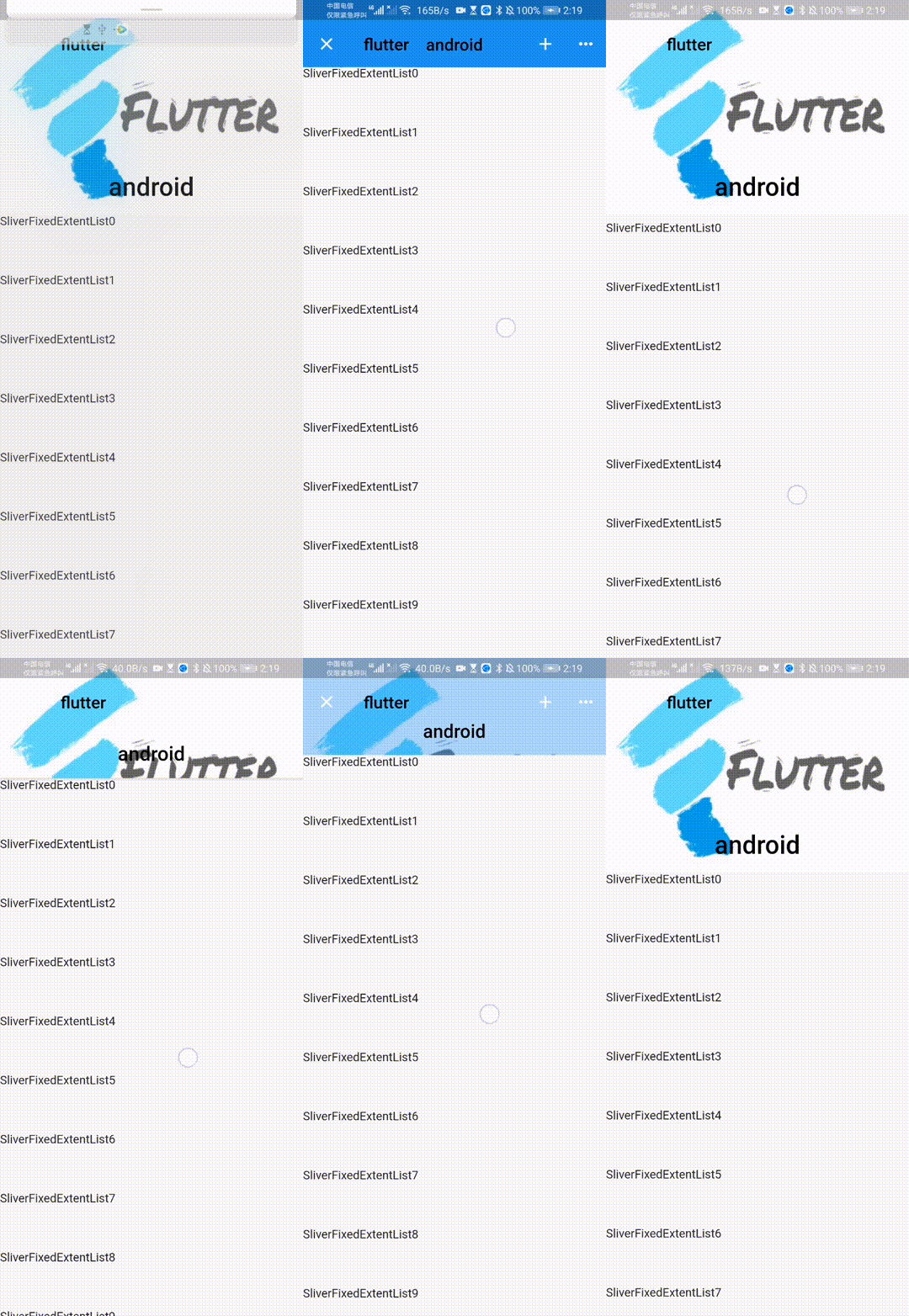 | 效果图(1.7): |
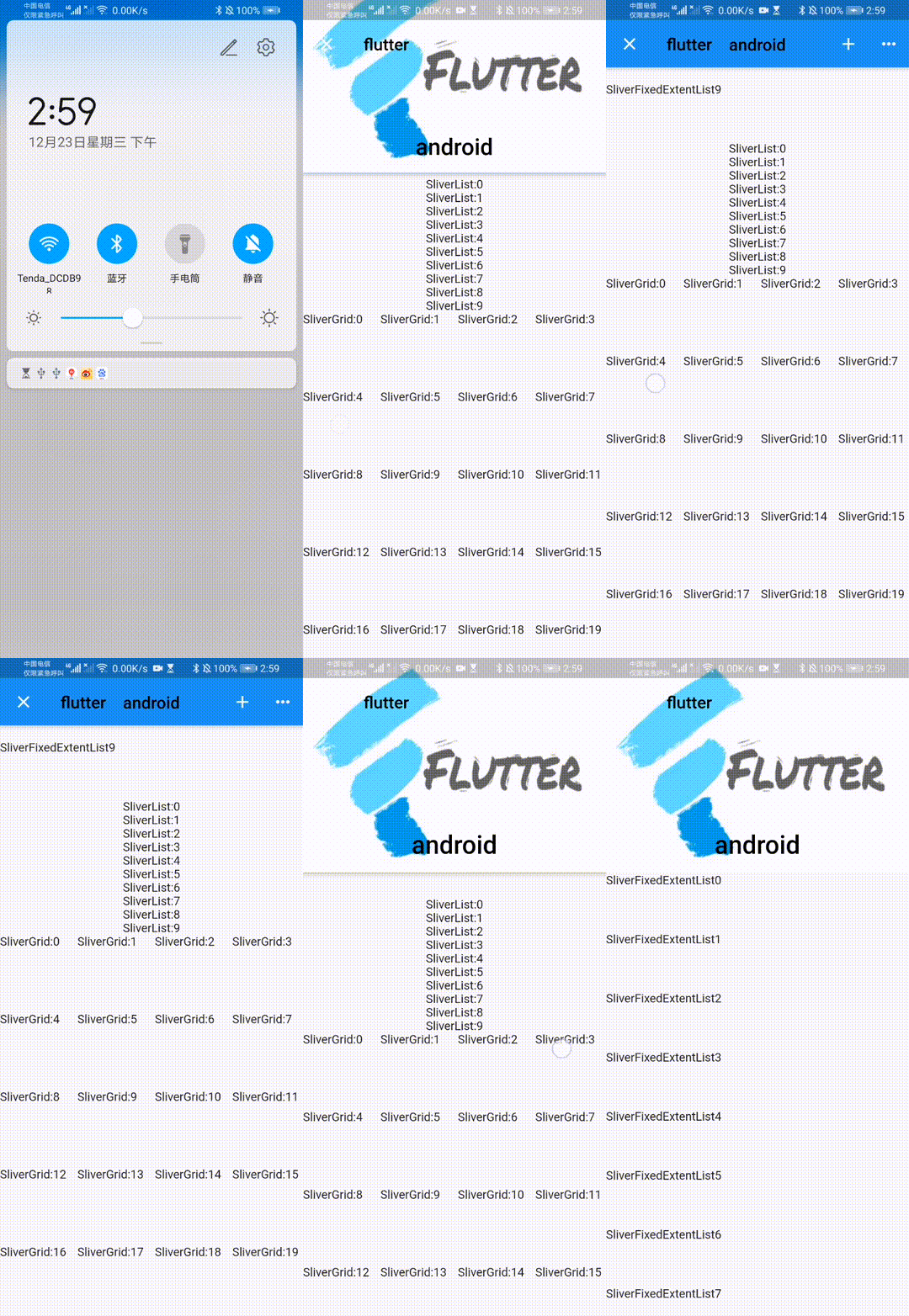
floating,pinned和snap参数事例:
| floating: true pinned: true snap: true | floating: true pinned: false snap: true |
|---|---|
| 只要有向下的手势,AppBar就弹出 | AppBar滚动出他原来的位置 |
 |  |
SliverAppBar最终效果:
效果图(1.8):
猜你喜欢:
Flutter Slider,CupertinoSlider滑动条
Flutter Sliver大家族之SliverList(),SliverFixedExtentList(),SliverGrid()组件②
Flutter Sliver大家族之SliverPersistentHeader()和SliverToBoxAdapter()组件③
原创不易,您的点赞就是对我最大的支持,点个赞支持一下吧~
版权声明:本文为weixin_44819566原创文章,遵循CC 4.0 BY-SA版权协议,转载请附上原文出处链接和本声明。