Shiro
一. Shiro权限
- 什么是权限控制:
- 忽略特别细的概念,比如权限能细分很多种,功能权限,数据权限,管理权限等
- 理解两个概念:用户和资源,让指定的用户,只能操作指定的资源(CRUD)
- 初学javaweb时怎么做
- Filter接口中有一个doFilter方法,自己编写好业务Filter,并配置对哪个web资源进行拦截后
- 如果访问的路径命中对应的Filter,则会执行doFilter()方法,然后判断是否有权限进行访问对应的资源
- /api/user/info?id=1
public void doFilter(ServletRequest req, ServletResponse resp, FilterChain chain) {
	HttpServletRequest httpRequest=(HttpServletRequest)request;
	HttpServletResponse httpResponse=(HttpServletResponse)response;

	HttpSession session=httpRequest.getSession();

	if(session.getAttribute("username")!=null){
		chain.doFilter(request, response);  //如果可以放行
	} else {
		httpResponse.sendRedirect(httpRequest.getContextPath()+"/login.jsp");
	}
}
二. 权限框架ACL和RBAC
2.1 什么是ACL和RBAC
ACL: Access Control List 访问控制列表
- 以前盛行的一种权限设计,它的核心在于用户直接和权限挂钩
- 优点:简单易用,开发便捷
- 缺点:用户和权限直接挂钩,导致在授予时的复杂性,比较分散,不便于管理
- 例子:常见的文件系统权限设计, 直接给用户加权限
RBAC: Role Based Access Control
- 基于角色的访问控制系统。权限与角色相关联,用户通过成为适当角色的成员而得到这些角色的权限
- 优点:简化了用户与权限的管理,通过对用户进行分类,使得角色与权限关联起来
- 缺点:开发对比ACL相对复杂
- 例子:基于RBAC模型的权限验证框架与应用 Apache Shiro、spring Security
BAT企业 ACL,一般是对报表系统,阿里的ODPS
总结:不能过于复杂,规则过多,维护性和性能会下降, 更多分类 ABAC、PBAC等
2.2 主流权限框架介绍和技术选型讲解
什么是 spring Security:官网基础介绍
Spring Security是一个能够为基于Spring的企业应用系统提供声明式的安全访问控制解决方案的安全框架。它提供了一组可以在Spring应用上下文中配置的Bean,充分利用了Spring IoC,DI(控制反转Inversion of Control ,DI:Dependency Injection 依赖注入)和AOP(面向切面编程)功能,为应用系统提供声明式的安全访问控制功能,减少了为企业系统安全控制编写大量重复代码的工作。

一句话:Spring Security 的前身是 Acegi Security ,是 Spring 项目组中用来提供安全认证服务的框架
什么是 Apache Shiro:官网基础介绍
https://github.com/apache/shiro
Apache Shiro是一个强大且易用的Java安全框架,执行身份验证、授权、密码和会话管理。使用Shiro的易于理解的API,您可以快速、轻松地获得任何应用程序,从最小的移动应用程序到最大的网络和企业应用程序。

一句话:Shiro是一个强大易用的Java安全框架,提供了认证、授权、加密和会话管理等功能
两个优缺点,应该怎么选择
Apache Shiro比Spring Security , 前者使用更简单
Shiro 功能强大、 简单、灵活, 不跟任何的框架或者容器绑定,可以独立运行
Spring Security 对Spring 体系支持比较好,脱离Spring体系则很难开发
SpringSecutiry 支持Oauth鉴权 https://spring.io/projects/spring-security-oauth,Shiro需要自己实现
三. Apache Shiro基础概念和架构
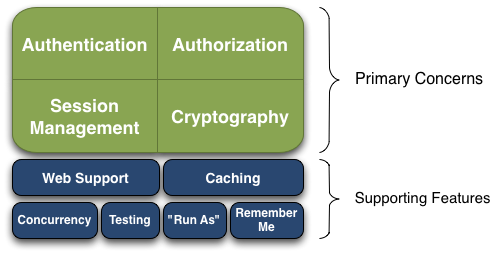
3.1 Shiro核心知识之架构图交互和四大模块
- 直达Apache Shiro官网 http://shiro.apache.org/introduction.html
- 什么是身份认证
- Authentication,身份证认证,一般就是登录
- 什么是授权
- Authorization,给用户分配角色或者访问某些资源的权限
- 什么是会话管理
- Session Management, 用户的会话管理员,多数情况下是web session
- 什么是加密
- Cryptography, 数据加解密,比如密码加解密等
3.2 Shrio权限控制流程和概念
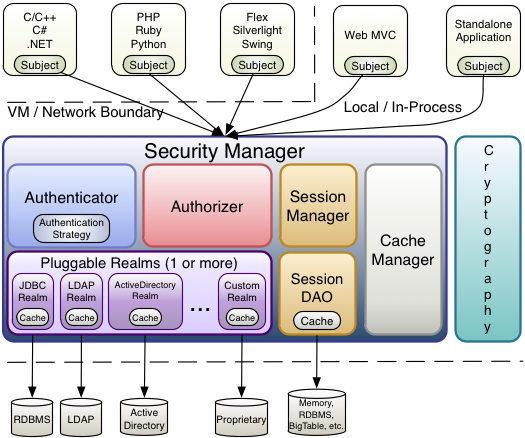
- Subject
- 我们把用户或者程序称为主体(如用户,第三方服务,cron作业),主体去访问系统或者资源
- SecurityManager
- 安全管理器,Subject的认证和授权都要在安全管理器下进行
- Authenticator
- 认证器,主要负责Subject的认证
- Realm
- 数据域,Shiro和安全数据的连接器,好比jdbc连接数据库; 通过realm获取认证授权相关信息
- Authorizer
- 授权器,主要负责Subject的授权, 控制subject拥有的角色或者权限
- Cryptography
- 加解密,Shiro的包含易于使用和理解的数据加解密方法,简化了很多复杂的api
- Cache Manager
- 缓存管理器,比如认证或授权信息,通过缓存进行管理,提高性能
更多资料导航:http://shiro.apache.org/reference.html
四. Spring boot整合Shiro
4.1 依赖
<dependency>
      <groupId>org.springframework.boot</groupId>
      <artifactId>spring-boot-starter-web</artifactId>
</dependency>
<dependency>
      <groupId>mysql</groupId>
      <artifactId>mysql-connector-java</artifactId>
</dependency>
<dependency>
      <groupId>org.projectlombok</groupId>
      <artifactId>lombok</artifactId>
      <scope>provided</scope>
</dependency>
<dependency>
      <groupId>com.alibaba</groupId>
      <artifactId>druid</artifactId>
</dependency>
<dependency>
      <groupId>org.apache.shiro</groupId>
      <artifactId>shiro-spring</artifactId>
      <version>1.4.1</version>
</dependency>
    <!-- mybatis分页支持 -->
<dependency>
      <groupId>com.github.pagehelper</groupId>
      <artifactId>pagehelper-spring-boot-starter</artifactId>
      <version>1.2.12</version>
</dependency>
    <!-- tk.mybatis对mybatis做了二次封装-->
<dependency>
      <groupId>tk.mybatis</groupId>
      <artifactId>mapper</artifactId>
      <version>4.1.5</version>
</dependency>
    <!-- tk.mybatis与spring boot整合 -->
<dependency>
      <groupId>tk.mybatis</groupId>
      <artifactId>mapper-spring-boot-starter</artifactId>
      <version>2.1.5</version>
</dependency>
4.2 数据库表的设计
权限标准五张表:
- sys_user
- sys_role
- sys_user_role
- sys_permission
- sys_role_permission
4.3 自定义realm
public class CustomRealm extends AuthorizingRealm {

    /**
     * 进行权限校验的时候回调用
     */
 	@Override
    protected AuthorizationInfo doGetAuthorizationInfo(PrincipalCollection principals){
        SimpleAuthorizationInfo info = new SimpleAuthorizationInfo();
        return simpleAuthorizationInfo;
    }

    /**
     * 用户登录的时候会调用
     */
    @Override
    protected AuthenticationInfo doGetAuthenticationInfo(AuthenticationToken token) 		throws AuthenticationException {
        return new SimpleAuthenticationInfo(username, user.getPassword(),
        					this.getClass().getName());
    }
}
4.3 shiro配置
@Configuration
public class ShiroConfig {

    @Bean
    public ShiroFilterFactoryBean shiroFilter(SecurityManager securityManager){
        ShiroFilterFactoryBean shiroFilterFactoryBean = new ShiroFilterFactoryBean();

        shiroFilterFactoryBean.setSecurityManager(securityManager);

        shiroFilterFactoryBean.setLoginUrl("/no_login");

        shiroFilterFactoryBean.setUnauthorizedUrl("/no_auth");

        Map<String, String> chainFilter = new LinkedHashMap<>();

        chainFilter.put("/login", "anon");  //允许登录

        chainFilter.put("/**", "authc");

        shiroFilterFactoryBean.setFilterChainDefinitionMap(chainFilter);

        return shiroFilterFactoryBean;
    }

    /**
     *  该类的作用是,实现注解的方式来设置权限
     */
    @Bean
    public DefaultAdvisorAutoProxyCreator advisorAutoProxyCreator(){
        DefaultAdvisorAutoProxyCreator advisor = new DefaultAdvisorAutoProxyCreator();
        advisor.setProxyTargetClass(true);
        return advisor;
    }

 	/**
     * 实现注解的方式来配置权限
     */
    @Bean
    public AuthorizationAttributeSourceAdvisor
    			authorizationAttributeSourceAdvisor(SecurityManager securityManager){
        AuthorizationAttributeSourceAdvisor authorizationAttributeSourceAdvisor = new
        				AuthorizationAttributeSourceAdvisor();
        authorizationAttributeSourceAdvisor.setSecurityManager(securityManager);
        return authorizationAttributeSourceAdvisor;
    }
    /**
    @Bean
    public LifecycleBeanPostProcessor lifecycleBeanPostProcessor() {
        return new LifecycleBeanPostProcessor();
    }
     */

   /**
    *  SecurityManager的配置
    */
    @Bean
    public SecurityManager securityManager(SessionManager manager, Realm realm) 	{
        DefaultWebSecurityManager securityManager = new DefaultWebSecurityManager();
        securityManager.setSessionManager(sessionManager);
        securityManager.setRealm(realm);
        return securityManager;
    }

   /**
    *  SessionManager的配置
    */
    @Bean
    public SessionManager sessionManager(){
        SessionManager sessionManager = new CustomSessionManager();
        return sessionManager;
    }


    /**
     * Realm
     * @param addSaltCredentialsMatch
     * @return
     */
    @Bean
    public Realm realm(AddSaltCredentialsMatch addSaltCredentialsMatch) {
        CustomRealm realm = new CustomRealm();
        realm.setCredentialsMatcher(addSaltCredentialsMatch);  //密码规则
        return realm;
    }

    /**
     * 自定义的密码加盐规则
     * @return
     */
    @Bean
    public AddSaltCredentialsMatch addSaltCredentialsMatch() {
        return new AddSaltCredentialsMatch();
    }
}
4.4 自定义SessionManager
public class CustomSessionManager extends DefaultWebSessionManager {

    /**
     * 重写默认的session
     * @param request
     * @param response
     * @return
     */
    @Override
    protected Serializable getSessionId(ServletRequest request, ServletResponse response) {

        String sessionId = WebUtils.toHttp(request).getHeader("token");
        if(null != sessionId) {
            request.setAttribute(ShiroHttpServletRequest.REFERENCED_SESSION_ID_SOURCE,
                    ShiroHttpServletRequest.COOKIE_SESSION_ID_SOURCE);

            request.setAttribute(ShiroHttpServletRequest.REFERENCED_SESSION_ID, sessionId);
            //automatically mark it valid here.  If it is invalid, the
            //onUnknownSession method below will be invoked and we'll remove the attribute at that time.
            request.setAttribute(ShiroHttpServletRequest.REFERENCED_SESSION_ID_IS_VALID, Boolean.TRUE);

            return sessionId;
        }else {
            return super.getSessionId(request, response);
        }
    }
}
五. 权限数据缓存
redis作为企业使用最为频繁的中间件,用来缓存各种业务数据,在使用shiro的缓存的时候,课程中还是采用redis来作为缓存中间件。下载地址:https://github.com/MicrosoftArchive/redis/releases
5.1 引入依赖
<dependency>
      <groupId>org.crazycake</groupId>
      <artifactId>shiro-redis</artifactId>
      <version>3.2.3</version>
</dependency>
5.2 配置RedisManager
@Bean
public RedisManager redisManager() {
	RedisManager redisManager = new RedisManager();
	redisManager.setHost("localhost:6379");
	return redisManager;
}
5.3 配置CacheManager
@Bean
public CacheManager cacheManager(RedisManager redisManager) {
	RedisCacheManager cacheManager = new RedisCacheManager();
	cacheManager.setRedisManager(redisManager);
	return cacheManager;
}
5.4 在SecurityManager中加入缓存管理
securityManager.setCacheManager(cacheManager);
六. Session数据的缓存
6.1 配置RedisSessionDao
@Bean
public RedisSessionDAO redisSessionDAO(RedisManager redisManager) {
	RedisSessionDAO redisSessionDAO = new RedisSessionDAO();
	redisSessionDAO.setRedisManager(redisManager);
	return redisSessionDAO;
}
6.2 SessionManager的设置
@Bean
public SessionManager sessionManager(RedisSessionDAO redisSessionDAO){
	CustomSessionManager sessionManager = new CustomSessionManager();
	sessionManager.setSessionDAO(redisSessionDAO);
	return sessionManager;
}
附录:
/**
   shiro内部提供了做两次md5处理。但是得到数据与其他工具类,得到两次md5数据不一致。
 */
@Bean
public CredentialsMatcher credentialsMatcher() {
	HashedCredentialsMatcher hashedCredentialsMatcher = new HashedCredentialsMatcher();
	hashedCredentialsMatcher.setHashAlgorithmName("MD5"); //设置加密方式
	hashedCredentialsMatcher.setHashIterations(2);  //作两次md5加密

	return hashedCredentialsMatcher;
}
处理方式:在用户注册的时候,存入密码的时候就按照shiro的规则来储存密码。
new SimpleHash("md5", "123", null, 2).toString() // 将这种处理方式得到的密码存入数据库。
版权声明:本文为qq_45566762原创文章,遵循CC 4.0 BY-SA版权协议,转载请附上原文出处链接和本声明。