爬虫
网址链接:历史天气查询|历史天气预报查询|历史气温查询|过去天气查询_历史天气查询网
import requests
from lxml import etree
import pandas as pd

headers = {
    'User-Agent': 'Mozilla/5.0 (Windows NT 10.0; Win64; x64) AppleWebKit/537.36 (KHTML, like Gecko) Chrome/89.0.4389.114 Safari/537.36 Edg/89.0.774.68'
}

# 获取所有2021年12个月的url链接
def get_url_list(s_page, e_page):
    url_list = []
    for i in range(s_page, e_page):
        if i < 10:
            url_list.append('https://lishi.tianqi.com/rizhao/2021{}.html'.format('0' + str(i)))
        else:
            url_list.append('https://lishi.tianqi.com/rizhao/2021{}.html'.format(str(i)))
    return url_list


# 解析获取url数据,并解析
def parse_datas(url):
    response = requests.get(url, headers=headers)
    html = etree.HTML(response.text)
    t_list = html.xpath('/html/body/div[7]/div[1]/div[4]/ul/li')
    datas = []
    for li in t_list:
        data = li.xpath('./div/text()')
        datas.append(data)
    return datas


# 合并每一页url获取的数据
def temp_datas(s_page, e_page):
    url_list = get_url_list(s_page, e_page)
    c_datas = []
    for url in url_list:
        c_datas.extend(parse_datas(url))
    return c_datas


if __name__ == '__main__':
    datas = pd.DataFrame(temp_datas(s_page=1, e_page=13),
                         columns=['date', 'h_temp', 'l_temp', 'weather', 'w_d'])
    print(datas)

datas.to_csv(r'rizhao_weather.csv', index=None)
可视化
import pandas as pd
import numpy as np
from pyecharts import options as opts
from pyecharts.charts import Bar, Line, Timeline, Page, Pie, Grid

datas = pd.read_csv('rizhao_weather.csv')

#数据处理
datas.date = datas.date.str.split(' ', expand=True)[0]
datas.h_temp = datas.h_temp.str.split('℃', expand=True)[0].astype(np.float)
datas.l_temp = datas.l_temp.str.split('℃', expand=True)[0].astype(np.float)
datas['w_d0'] = datas['w_d'].str.split(' ', expand=True)[0]
datas['w_d1'] = datas['w_d'].str.split(' ', expand=True)[1]
datas['month'] = datas.date.apply(lambda x: x.split('-')[1])
datas['deltaT'] = datas.h_temp - datas.l_temp
datas['averageT'] = (datas.h_temp + datas.l_temp) / 2


def t_line(datas, city):
    '''绘制折线轮播图'''
    t2 = Timeline()
    for i in datas.month.unique():
        data = datas[datas.month == i]

        line = Line()
        line.add_xaxis(data['date'].tolist())
        #最高气温折线
        line.add_yaxis('最高气温', data['h_temp'].tolist(),
                       markpoint_opts=opts.MarkPointOpts(
                           data=[
                               opts.MarkPointItem(type_='max', name='最大值'),
                           ]
                       ),
                       markline_opts=opts.MarkLineOpts(
                           data=[opts.MarkLineItem(type_='average', name='平均值')]
                       )
                       )
        #最低气温折线
        line.add_yaxis('最低气温', data['l_temp'].tolist(),
                       markpoint_opts=opts.MarkPointOpts(
                           data=[
                               opts.MarkPointItem(type_='min', name='最小值'),
                           ]
                       ),
                       markline_opts=opts.MarkLineOpts(
                           data=[opts.MarkLineItem(type_='average', name='平均值')]
                       )
                       )
        #最高温与最低温的差值
        line.add_yaxis('最高温-最低温', data['deltaT'].tolist(),
                       markpoint_opts=opts.MarkPointOpts(
                           data=[
                               opts.MarkPointItem(type_='max', name='最大值'),
                               opts.MarkPointItem(type_='min', name='最小值'),
                           ]
                       ),
                       markline_opts=opts.MarkLineOpts(
                           data=[opts.MarkLineItem(type_='average', name='平均值')]
                       )
                       )

        line.set_global_opts(
            title_opts=opts.TitleOpts(title="{}月份的气温变化(℃)".format(i), subtitle=city),
            toolbox_opts=opts.ToolboxOpts(is_show=True),
            xaxis_opts=opts.AxisOpts(type_='category')

        )
        t2.add(line, '{}月'.format(i))

    return t2

def t_pie(datas, city):
    """绘制饼型轮播图"""
    tp = Timeline()
    for i in datas.month.unique():
        data = datas[datas['month'] == i]

        weather_datas = data.groupby('weather').size().reset_index()
        weather_datas = [list(z) for z in zip(weather_datas['weather'], weather_datas[0])]

        wind_datas = data.groupby('w_d0').size().reset_index()
        wind_datas = [list(z) for z in zip(wind_datas['w_d0'], wind_datas[0])]

        #风向情况
        pie1 = (
        Pie()
        .add(
            "",
            wind_datas,
            radius=["30%", "60%"],
            center=["75%", "50%"],
            rosetype="area",
        )
        .set_global_opts(legend_opts=opts.LegendOpts(is_show=False))
        )

        #天气情况
        pie2 = (
            Pie()
                .add(
                "",
                weather_datas,
                radius=["30%", "60%"],
                center=["25%", "50%"],
                rosetype="area")
                .set_global_opts(title_opts=opts.TitleOpts(title="{}月份天气/风向情况".format(i), subtitle=city),
                                legend_opts=opts.LegendOpts(is_show=False))
        )
        grid = (
            Grid()
            .add(pie1, grid_opts=opts.GridOpts(pos_left="55%"))
            .add(pie2, grid_opts=opts.GridOpts(pos_right="55%"))
        )
        tp.add(grid, '{}月'.format(i))

    return tp

def bar_plot(datas, city):
    """2021年12个月各月的平均气温"""
    x_list = [i+'月' for i in datas.groupby('month')['averageT'].mean().index]
    y_list = [round(i, 1) for i in datas.groupby('month')['averageT'].mean().values]

    bar = Bar()
    bar.add_xaxis(x_list)
    bar.add_yaxis('', y_list)
    bar.set_global_opts(title_opts=opts.TitleOpts(title='各月平均气温(℃)', subtitle=city))

    return bar

def title(city):
    """利用Pie模块绘制页面标头"""
    c = (
        Pie()
        .set_global_opts(
            title_opts=opts.TitleOpts(title='2021年{}天气情况分析'.format(city),
                                      title_textstyle_opts=opts.TextStyleOpts(font_size=36, color='#000000'),
                                      pos_left='center',
                                      pos_top='middle'))
    )
    return c


city='日照'
page = (
    Page(layout=Page.DraggablePageLayout)
        .add(
            title(city),
            bar_plot(datas, city),
            t_line(datas, city),
            t_pie(datas, city))
    )
page.render('test.html')
使用浏览器打开渲染后的 test.html 文件,如果是
page.render()则默认为 render.html
拖拉/调整图表位置和大小,当调整到一个适合的布局时,点击左上方的 Save Config 按钮
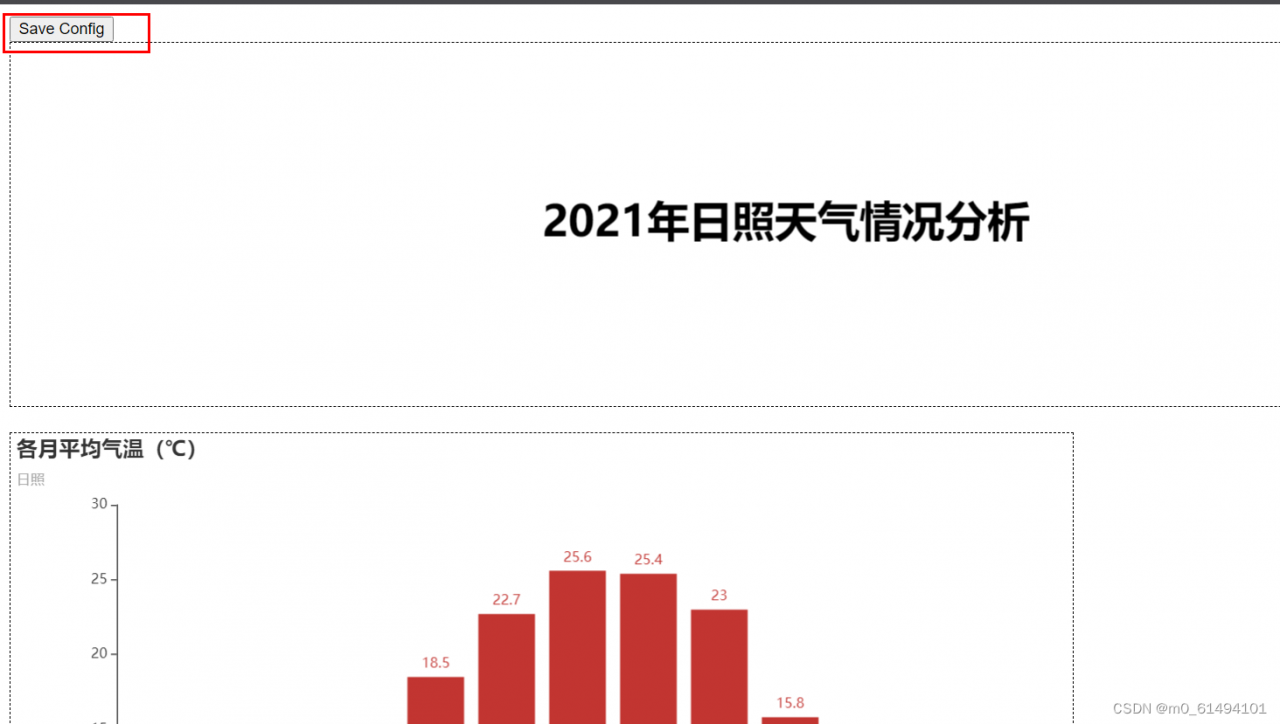
下载 chart_config.json 配置文件,记住json文件的位置
注意: 请注释掉上面的的所有渲染代码,就是下面这些代码。因为 html 已经生成,并不需要再重新渲染一遍。
# page = (
#     Page(layout=Page.DraggablePageLayout)
#         .add(
#             title(city),
#             bar_plot(datas, city),
#             t_line(datas, city),
#             t_pie(datas, city))
#     )
# page.render('test.html')
再次渲染图表并指定其布局配置
test.html:第一步生成的原 html 文件
C:/Users/LENOVO/Desktop/chart_config.json:第二步下载的配置文件
new_render.html:新 html 文件路径
def resave_page():
    #调整页面布局后重新存储生成新页面
    page = Page()
    page.save_resize_html(source='test.html', cfg_file=r'C:/Users/LENOVO/Desktop/chart_config.json',
                          dest='new_render.html')

if __name__ == '__main__':
resave_page()版权声明:本文为m0_61494101原创文章,遵循CC 4.0 BY-SA版权协议,转载请附上原文出处链接和本声明。